Mushtaq Bilal, PhD Profile picture
Aug 7 10 tweets 4 min read Read on X
Google NotebookLM is a powerful tool for academic writers.

It can help you summarize papers, extract relevant data, and find common across multiple papers. And it's free to use.

But many academics don't know about it.

Here's how to use NotebookLM for academic writing:
1. Go to notebooklm(dot)google and click on "Try NotebookLM" in the top-right corner.

This will open NotebookLM for you.
2. To get started, click on "New Notebook."

NotebookLM will ask you to upload sources. You can upload from your Google Drive or from your computer.

As soon as you upload a paper, NotebookLM will summarize it for you.
3. NotebookLM will suggest a few questions relevant to the source. You can use these suggestions or ask your own questions.

NotebookLM will answer your question with references to the selected paper. It will not consult any other source to answer your question.

Click on a citation and NotebookLM will take you to the relevant passage in the paper.
4. If you find an answer helpful, you can convert it into a note.

Click on the pin in the top-right corner of a answer and NotebookLM will convert it into a note.

You can also add notes of your own.

Click on "Add note" and write your own note.
5. You can find common themes across multiple papers.

Open a new notebook and upload multiple papers relevant to your project.

Then simply ask NotebookLM to find common themes across them.

Here you can see NotebookLM has found common themes across 12 papers.

This will save you a lot of time.
Want an AI-powered personal research assistant.

Try Research Kick Chat

Integrate ChatGPT-4, Claude 3.5, and Gemini with databases like Semantic Scholar and PubMed.

And build custom AI Assistants for all your research needs.

Tutorial 👇
6. The great thing about NotebookLM is it will not go beyond the sources you upload.

For example, I asked it to tell me a joke.

NotebookLM said the sources did not contain any jokes.
7. If a paper is open source, you can simply paste its URL and NotebookLM will retrieve and summarize it for you.
Found this thread on NotebookLM helpful?

1. Scroll to the top and repost the first post to share it with your friends.

2. Follow me for more threads on how to use AI apps for academic purposes.

• • •

Missing some Tweet in this thread? You can try to force a refresh

 

Keep Current with Mushtaq Bilal, PhD

Mushtaq Bilal, PhD Profile picture

Stay in touch and get notified when new unrolls are available from this author!

Read all threads

This Thread may be Removed Anytime!

PDF

Twitter may remove this content at anytime! Save it as PDF for later use!

Try unrolling a thread yourself!

how to unroll video
  1. Follow @ThreadReaderApp to mention us!

  2. From a Twitter thread mention us with a keyword "unroll"
@threadreaderapp unroll

Practice here first or read more on our help page!

More from @MushtaqBilalPhD

Aug 2
Analyzing qualitative data (like notes, reports, interviews) takes a lot of time and labor.

MyRA is an AI-powered app that can help you with it.

It's GDPR compliant and doesn't store or sell your data.

Here's how to use it:
Go to myra(dot)org(dot)uk and sign up for an account.

Once you have logged in, MyRA will ask you to prepare your transcripts.
MyRA will ask you ensure that your transcripts are anonymous.

It will ask you to rename documents for better organization and to ensure that your documents are not bigger than 7,000 words each.
Read 9 tweets
Jul 17
Introducing Research Kick Elite

Integrate latest LLMs (ChatGPT-4, Claude 3.5, and Gemini Advanced) with academic databases like Semantic Scholar and PubMed.

Build AI-powered assitants customized for all your research tasks.

Here's how to use it Research Kick (RK) Elite:
1. Sign Up

Go to this link: ​​

And click on "Start Now."

It will open the main user interface of RK Elite. Click on the mindblown emoji in the top-left corner and sign up for an account.

We have deliberately kept the interface a little playful.

Once you've signed in, you will see the main user interface. Scroll down a little in the main panel and you will see several conversation starters. Click on any one of them.

RK Elite will tell you that you are not a premium subscriber.

Click on the blank bar that says "Upgrade." You will be taken to the pricing page. There is only one pricing plan $30/month. Click on "Subscribe" to purchase the plan.chat.researchkick.com/welcome
2. Main User Interface

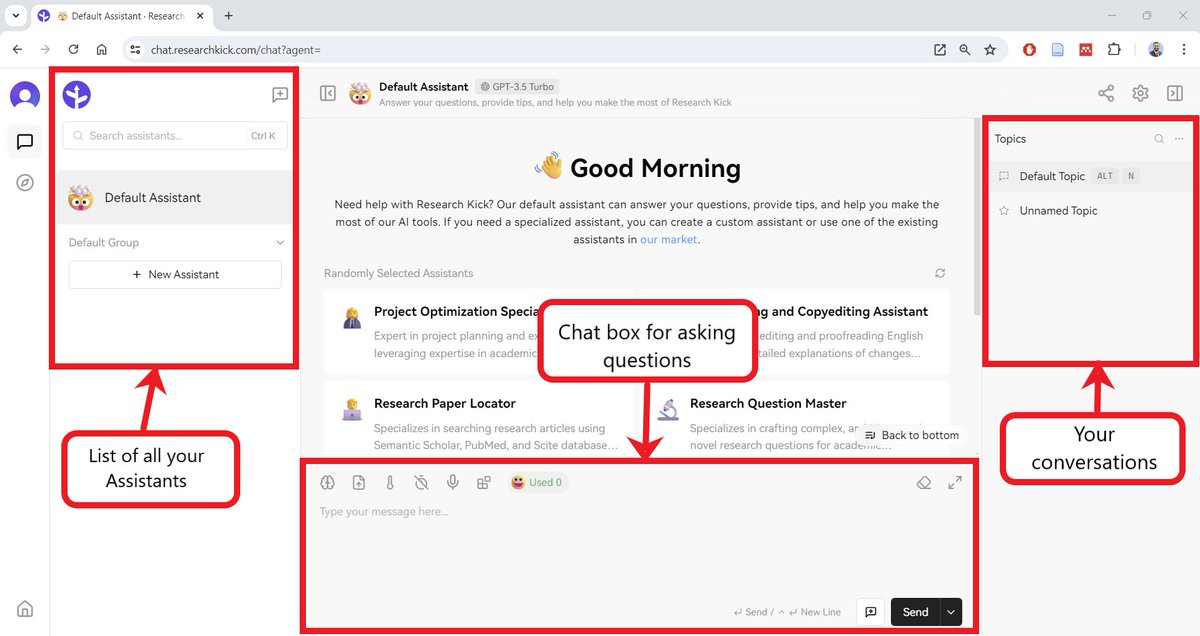
RK Elite has three panels. The middle panel is meant for chatting and asking question. This is quite similar to how ChatGPT works.

The left panel will show all the custom Assistants you build. In the start, you will only have the "Default Assistant."

The right panel will show you a list of your conversations with each Assistant.A screenshot of the main user interface of Research Kick Elite.
Read 11 tweets
Jul 13
I lived in the US 🇺🇸 for several years and now I live in Denmark 🇩🇰

Here's a comparison of the two countries (based on my experiences):

1. Entering the country

🇺🇸 If you are a brown man like me, chances are you will be selected for "random screening.”
It may be followed by an "interview." And if you are not careful, you might even get an unwanted colonoscopy 😂

🇩🇰No random screening when entering the country.

The last time I entered Denmark, here’s how the conversation went at passport control:

Immigration officer: Hi
Me: Hi (presents passport and residence card)
Immigration officer: (stamps passport) Here you go.
Me: Thanks.

That's it. Took less than a minute.
2. Banking

🇺🇸 If you want to open a bank account, you’ll need your social security number, address, (and passport).

You can get your account up and running the same day.

🇩🇰It took my Danish bank two whole months to process my application for opening a bank account. Two months!

If you are moving to Denmark for study or work, please keep this in mind.
Read 28 tweets
Jul 12
Flashcards: a great tool for reviewing key concepts and definitions.

But making flashcards takes a lot of time and effort.

DoryAI is a AI-powered that can flashcards for you in minutes.

Here's how to use it:
Go to www.getdoryai(dot)com and click on "Get Started" to sign up for a free account.
Click on "Flashcards."

You can make flashcards of PDFs, Word files, or PowerPoint presentations.

Upload the material and click on "Generate."

Dory will take a few moments to create a set of flashcards for you.
Read 5 tweets
Jul 4
How to make $100,000 online as an academic

A step-by-step tutorial:
Step 1: Developing the Right Mindset
If you want to make money online, the first and the most important thing is to develop the right mindset.

If you don’t have the right mindset, nothing will work, and you will feel frustrated.
Read 45 tweets
Jul 3
Google Scholar and PubMed show you research papers. But they don't show how papers are connected.

Here's how to supercharge your literature review with "visual search," which shows connections between papers:

(And how to export papers to Zotero, Mendeley, and EndNote.)
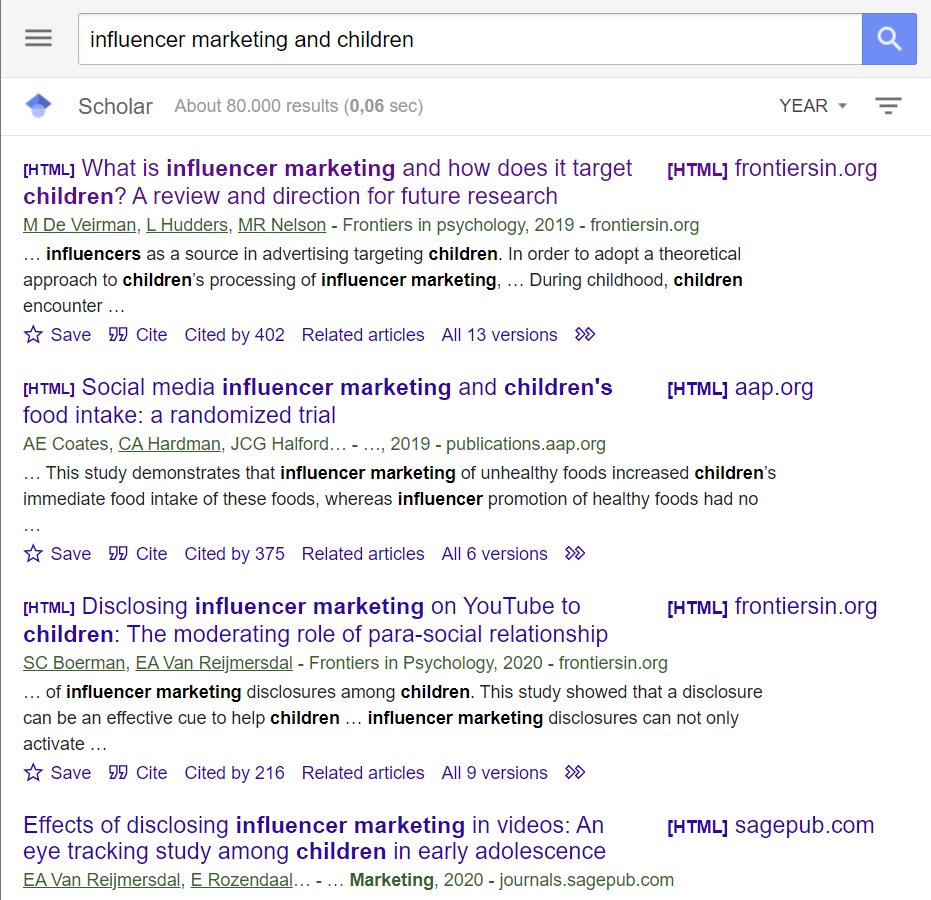
A screenshot of search results in Google Scholar.
A graph of related papers created by Research Rabbit.
1. Go to Google Scholar or PubMed and look up papers relevant to your project.

Read through the results and pick a paper that you find interesting.

Open the paper and copy its title or DOI.
2. Go to researchrabbit(dot)ai and sign up for a free account.

Once you've logged in, click on the "New Collection" button in the top-left corner and create a collection.

Research Rabbit will show you a big green button that says "Add Papers."
Read 15 tweets

Did Thread Reader help you today?

Support us! We are indie developers!


This site is made by just two indie developers on a laptop doing marketing, support and development! Read more about the story.

Become a Premium Member ($3/month or $30/year) and get exclusive features!

Become Premium

Don't want to be a Premium member but still want to support us?

Make a small donation by buying us coffee ($5) or help with server cost ($10)

Donate via Paypal

Or Donate anonymously using crypto!

Ethereum

0xfe58350B80634f60Fa6Dc149a72b4DFbc17D341E copy

Bitcoin

3ATGMxNzCUFzxpMCHL5sWSt4DVtS8UqXpi copy

Thank you for your support!

Follow Us!

:(