The ugly truth: Most websites still look like they were designed in 2012.
I’ve been designing websites for SEO for 10+ years.
Your website's layout WILL make or break your SEO.
Luckily, web design tools make it easy today.
Here's 5 design hacks to implement immediately:
I’ve been designing websites for SEO for 10+ years.
Your website's layout WILL make or break your SEO.
Luckily, web design tools make it easy today.
Here's 5 design hacks to implement immediately:
1/ Eyebrow Style H1’s
+ Add a little extra content above headings.
+ Style your H1 as “Eyebrow Text” to directly match the page.
+ Use your H2 more boldly to introduce the page.
It follows the natural flow of a website, so it’s a modern experience
+ Add a little extra content above headings.
+ Style your H1 as “Eyebrow Text” to directly match the page.
+ Use your H2 more boldly to introduce the page.
It follows the natural flow of a website, so it’s a modern experience

2/ Affixed Scroll Areas
+ It’s position is fixed as you scroll.
+ Have a bold title/image on the left side.
+ And more detailed text on the right side.
Improves content on a page without being overwhelming:
+ It’s position is fixed as you scroll.
+ Have a bold title/image on the left side.
+ And more detailed text on the right side.
Improves content on a page without being overwhelming:

3/ Anchor Glossaries
+ It is a glossary list on a long page.
+ These help you double up key terms on the page.
+ Improved UX giving visitors shortcuts to sections.
+ Makes it easier to navigate.
See the left hand side on this example:
+ It is a glossary list on a long page.
+ These help you double up key terms on the page.
+ Improved UX giving visitors shortcuts to sections.
+ Makes it easier to navigate.
See the left hand side on this example:

4/ Accordions
+ An expandable and collapsible widget, used for FAQs mostly.
+ Build FAQ titles as H3s and wrap answers as P tags.
+ Addresses common questions without compromising design.
See how aesthetically pleasing this looks:
+ An expandable and collapsible widget, used for FAQs mostly.
+ Build FAQ titles as H3s and wrap answers as P tags.
+ Addresses common questions without compromising design.
See how aesthetically pleasing this looks:

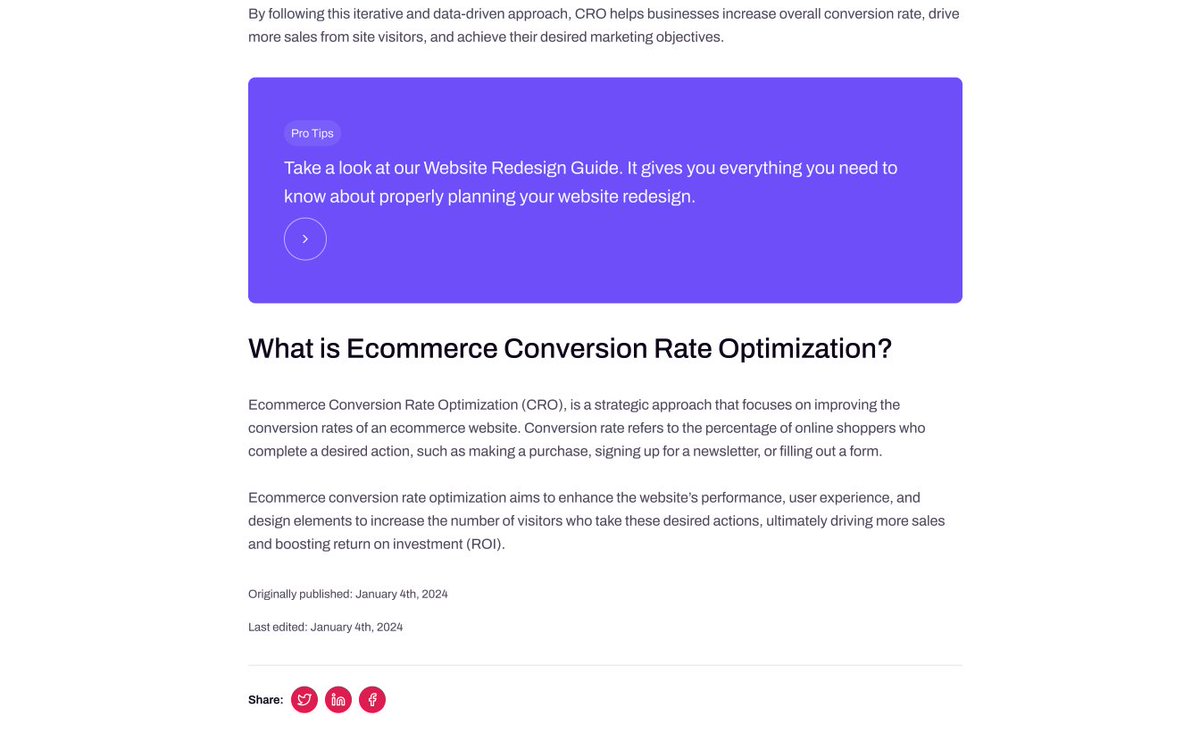
5/ Post Date & Update Placement
+ Helps search engines identify the “freshness” of information.
+ Include original publish date & last edit date.
+ Include it at the bottom of the post body above the footer.
See an example here:
+ Helps search engines identify the “freshness” of information.
+ Include original publish date & last edit date.
+ Include it at the bottom of the post body above the footer.
See an example here:
I teamed up with @JeffGapinski on this post.
Jeff's a web design genius. I'm pretty good at SEO.
To help you make your website sell more.
SEO isn't just content and backlinks.
It comes down to design, UX, and CRO as well.
Jeff's a web design genius. I'm pretty good at SEO.
To help you make your website sell more.
SEO isn't just content and backlinks.
It comes down to design, UX, and CRO as well.
@JeffGapinski Advice: Implement these tips today or give it to your team.
Opinion: Your SEO is only as good as your CRO. Drive the RIGHT traffic and convert them into leads and customers.
Bonus: I collab’d with @JeffGapinski on this post. Go follow him for daily web design & CRO tips!
Opinion: Your SEO is only as good as your CRO. Drive the RIGHT traffic and convert them into leads and customers.
Bonus: I collab’d with @JeffGapinski on this post. Go follow him for daily web design & CRO tips!
@JeffGapinski What would you add?
♻️ REPOST and help businesses everywhere improve their SEO design.
P.S. Want in-depth SEO and marketing advice every Sunday? Join 6,500+ on my newsletter: connorgillivan.com/newsletter
♻️ REPOST and help businesses everywhere improve their SEO design.
P.S. Want in-depth SEO and marketing advice every Sunday? Join 6,500+ on my newsletter: connorgillivan.com/newsletter
• • •
Missing some Tweet in this thread? You can try to
force a refresh