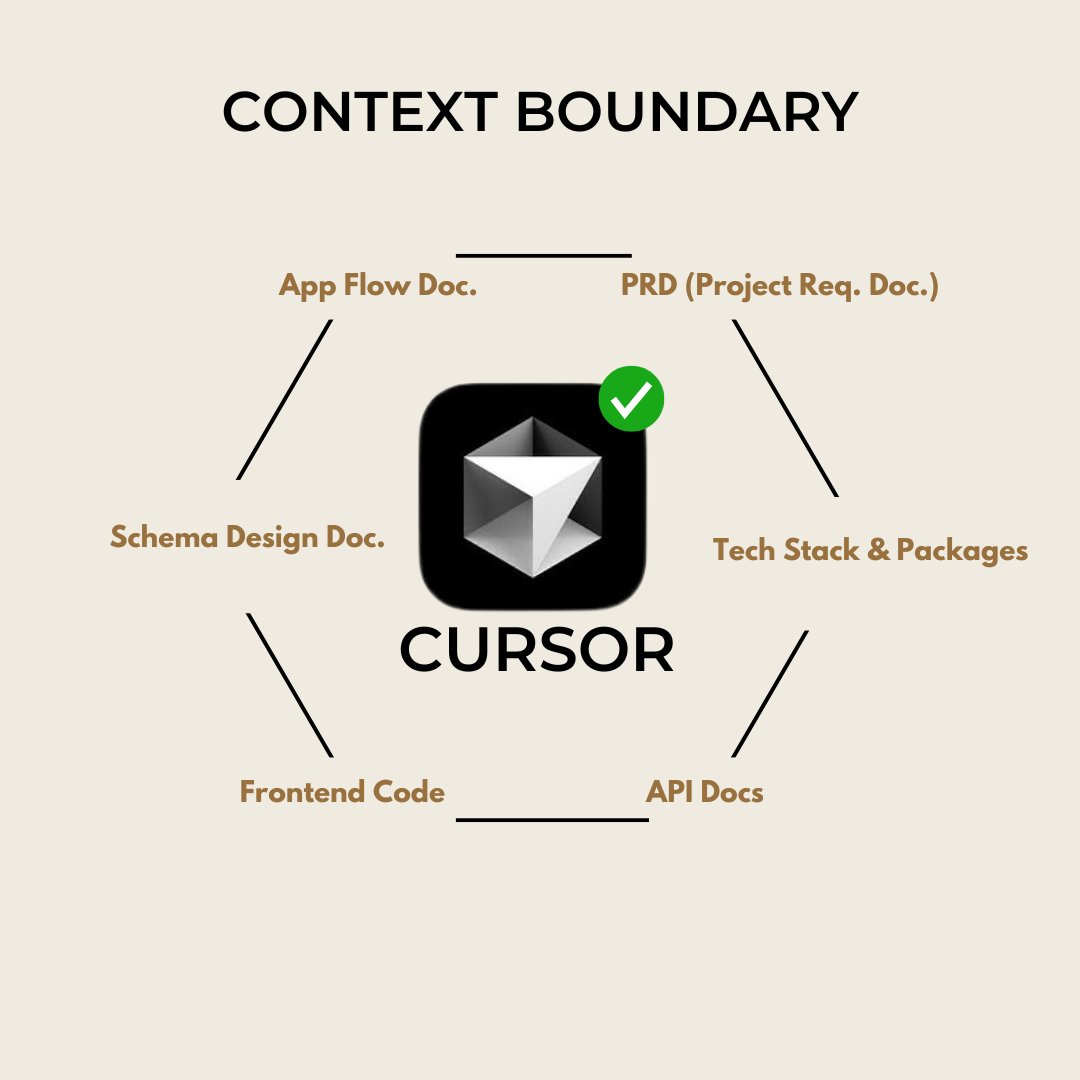
AI coding = Proper Documentation + Detailed Instructions
It's like a smart kid who can code but doesn't know the best practices of code.
You need to tell AI what exactly you want:
- web app?
- features?
- structure?
etc
Here's how you can make AI your full stack developer:
🧵
It's like a smart kid who can code but doesn't know the best practices of code.
You need to tell AI what exactly you want:
- web app?
- features?
- structure?
etc
Here's how you can make AI your full stack developer:
🧵

Context is King!
You need to build a strong wall of Context around AI.
Goal: Don't let AI assume anything. Provide all the information yourself.
This way AI works with you, not against you.
Let's talk about what docs we need to attach, to provide max. context.
You need to build a strong wall of Context around AI.
Goal: Don't let AI assume anything. Provide all the information yourself.
This way AI works with you, not against you.
Let's talk about what docs we need to attach, to provide max. context.

1. Project Requirement Document
It provides the overview of what the project is all about:
- Introduction
- Problem
- Solution
- Target Audience
- Tech Stack
- Core Features
- Scope of Work
This document is a brief introduction of your project.
Let's now add more specific docs to guide AI on each step.
It provides the overview of what the project is all about:
- Introduction
- Problem
- Solution
- Target Audience
- Tech Stack
- Core Features
- Scope of Work
This document is a brief introduction of your project.
Let's now add more specific docs to guide AI on each step.
2. App Flow & Functionality Doc
Think of it like you're explaining you app to a friend.
"when user will sign up, it lands on dashboard. On dashboard it has 4 sections. Metrics section, Analytics section etc"
This doc provides a complete end-to-end rundown of your app.
TIP: Ask AI to DO NOT use bullet points in this doc.
This Document is very important as it creates a graph/blueprint for AI to plan its execution for each page.
Think of it like you're explaining you app to a friend.
"when user will sign up, it lands on dashboard. On dashboard it has 4 sections. Metrics section, Analytics section etc"
This doc provides a complete end-to-end rundown of your app.
TIP: Ask AI to DO NOT use bullet points in this doc.
This Document is very important as it creates a graph/blueprint for AI to plan its execution for each page.
3. Tech Stack and Packages Doc
Now let's provide technical context to AI.
Is your project using python? or Nextjs? or what are you using for backend: Supabase? or Firebase?
This doc will explain every single detail about the tech stack AI need to use to build your app.
Make sure you use popular tech stacks only because LLMs like Claude and GPT4 are trained on mostly used frameworks.
I use Nextjs 14, TaliwindCSS, shadcnUI, radixUI for frontend and supabase for backend.
This stack is favored by all platforms:
- v0
- bolt
- Claude
- Cursor
- Replit
Python is also good for heavy funtioning apps that doesn't require modern UI.
Now let's provide technical context to AI.
Is your project using python? or Nextjs? or what are you using for backend: Supabase? or Firebase?
This doc will explain every single detail about the tech stack AI need to use to build your app.
Make sure you use popular tech stacks only because LLMs like Claude and GPT4 are trained on mostly used frameworks.
I use Nextjs 14, TaliwindCSS, shadcnUI, radixUI for frontend and supabase for backend.
This stack is favored by all platforms:
- v0
- bolt
- Claude
- Cursor
- Replit
Python is also good for heavy funtioning apps that doesn't require modern UI.
4. File structure Doc.
This Doc is important if you don't want to enter the vicious error cycle later on.
AI can create duplicate files, save files in wrong place, or even delete finished code.
To solve this pain. Provide the file structure yourself.
Tip: Make sure you ask AI to create the File structure in ASCII format.
Screenshot it and attach that too with doc.
This Doc is important if you don't want to enter the vicious error cycle later on.
AI can create duplicate files, save files in wrong place, or even delete finished code.
To solve this pain. Provide the file structure yourself.
Tip: Make sure you ask AI to create the File structure in ASCII format.
Screenshot it and attach that too with doc.
5. API Docs
AI doesn't know by default how API is configured for any platform.
We need to attach the API docs of all APIs we will be using in our app.
Like OpenAI API, Claude API Docs, Supabase Docs etc.
Copy the instructions from their site and paste it in your doc and attach that doc to AI.
AI doesn't know by default how API is configured for any platform.
We need to attach the API docs of all APIs we will be using in our app.
Like OpenAI API, Claude API Docs, Supabase Docs etc.
Copy the instructions from their site and paste it in your doc and attach that doc to AI.
6. Backend Schema Design Doc.
Schema is Basically a blueprint of your Backend.
It contains all database tables that you need to create, storage buckets and user information tables (auth)
I use Supabase beacause AI can create SQL queries that you can run in Supabase in seconds.
And this way I can create my database in an hour and attach it to my frontend.
Best part: Claude is great at designing backend schema's and if you create a proper doc.
AI follows the guidelines easily.
Schema is Basically a blueprint of your Backend.
It contains all database tables that you need to create, storage buckets and user information tables (auth)
I use Supabase beacause AI can create SQL queries that you can run in Supabase in seconds.
And this way I can create my database in an hour and attach it to my frontend.
Best part: Claude is great at designing backend schema's and if you create a proper doc.
AI follows the guidelines easily.
7. .cursorrules file
Many of you are not using this. Think of it like custom instructions in ChatGPT.
cursorrules file need to be project specific and not general like "rules for AI' prompt in cursor.
Based on the tech stack and project requirements, Ask AI to create a .cursorrules file.
This doc will tell AI which doc is located where. (Google map for Cursor)
Help AI navigate better with this file.
Many of you are not using this. Think of it like custom instructions in ChatGPT.
cursorrules file need to be project specific and not general like "rules for AI' prompt in cursor.
Based on the tech stack and project requirements, Ask AI to create a .cursorrules file.
This doc will tell AI which doc is located where. (Google map for Cursor)
Help AI navigate better with this file.
8. UI Layout Doc
This doc will make your frontend pretty and if you use it with v0 than you can build frontend components with consistent vibe.
Most people underestimate the power of clean user interface (UI).
"fisrt impression is the last impression"
This Doc will have information like what UI package you'll be using, fonts, color palletes, icons, effects etc.
This doc will make your frontend pretty and if you use it with v0 than you can build frontend components with consistent vibe.
Most people underestimate the power of clean user interface (UI).
"fisrt impression is the last impression"
This Doc will have information like what UI package you'll be using, fonts, color palletes, icons, effects etc.
9. System Prompts
You can ask AI to create project specific system prompts for v0, bolt or any other tool you might use.
This helps communicating with tools, and you don't need to provide longer context everytime.
You know why Claude on their platform works better than via API? because of their super good system prompt.
You do the same for your projects and you'll be friand with AI.
You can ask AI to create project specific system prompts for v0, bolt or any other tool you might use.
This helps communicating with tools, and you don't need to provide longer context everytime.
You know why Claude on their platform works better than via API? because of their super good system prompt.
You do the same for your projects and you'll be friand with AI.
That's it.
This might sound alot of work, at it is. But it is very important if you want to build production ready apps.
I spend 80% of my dev. time in creating docs and I achieve great results in rest 20% time.
I asked you yesterday, if you want me to automate the documentation creation process for you?
and the response was AMAZING.
and we got 400 reposts!!
This might sound alot of work, at it is. But it is very important if you want to build production ready apps.
I spend 80% of my dev. time in creating docs and I achieve great results in rest 20% time.
I asked you yesterday, if you want me to automate the documentation creation process for you?
and the response was AMAZING.
and we got 400 reposts!!


So I got to work.
Introducing: codeguide. dev
An app that will help you brainstorm and write all important docs that you need to attach to AI.
✅System prompts
✅PRDs
✅Schema Design
✅App Flow Doc
✅UI Layout Doc
etc
(check next tweet)
Introducing: codeguide. dev
An app that will help you brainstorm and write all important docs that you need to attach to AI.
✅System prompts
✅PRDs
✅Schema Design
✅App Flow Doc
✅UI Layout Doc
etc
(check next tweet)

Here's the link:
Join the waitlist to get early access.
I'm building Code Guide with AI to Guide AI to Code. lolcodeguide.dev
Join the waitlist to get early access.
I'm building Code Guide with AI to Guide AI to Code. lolcodeguide.dev
• • •
Missing some Tweet in this thread? You can try to
force a refresh