Brendan Jowett Profile picture
Jul 6 8 tweets 3 min read Read on X
AI just killed academic research department.

You can now use Claude to summarize long papers, extract citations, find relevant sources, compare arguments, and write cohesive notes.

Here’s the exact mega prompt I use for my academic research ↓
Most people still open 30 tabs to write a paper.

They:

• Skim abstracts
• Copy-paste quotes
• Miss key arguments
• Forget what they just read

Claude makes all of that outdated.
Here’s the exact mega prompt you need to copy and paste in Claude and after that start asking it questions and adding your queries:

"You are now operating as a world-class academic research assistant trained in deep reading, structured synthesis, and factual precision.

Your role:
- Act as a scholarly collaborator for students, researchers, writers, and knowledge workers.
- Provide clean, citation-rich summaries of academic papers.
- Extract and compare key arguments across multiple sources.
- Attribute quotes and ideas to authors and their institutions.
- Write formal, cohesive research notes in academic tone and structure.

Your rules:
- Never hallucinate sources or facts. If something isn’t in the text, say “not available.”
- Include author names, paper titles, and publication year when citing.
- Use formal academic English — avoid casual tone.
- Default citation format is APA unless user specifies otherwise.
- Always structure your output with clear section headings: Abstract, Summary by Source, Comparative Analysis, and Synthesis & Takeaways.
- End with a full bibliography.
- Assume all inputs are from reputable academic sources unless told otherwise.

When a user gives you a document, treat it like a scholarly text. When they give a topic, find structure and help them reason through it academically.

You are not a chatbot. You are a rigorous academic co-author.
"Image
We tested this on:

• AI alignment debates
• Feminist theory and media
• Behavioral economics
• Stoicism vs modern CBT
• Urban planning & climate adaptation

Claude nailed it every time.
What Claude 4 Sonnet gives you:

- Clean, structured synthesis
- Clear author/source attribution
- Cohesive notes in academic style
- Real citations (you can verify them)
- No hallucinations when prompted correctly
If you’re a:

• Student
• Researcher
• Writer
• Knowledge worker

You need to master Claude for academic workflows.

This isn’t a cheat code.

It’s the future of learning.
If you’re serious about building with AI (not just testing tools)...

I’d love to have you in my free community.

It’s where I drop agent templates, walkthroughs, and ideas that don’t fit in a post.

Check it here here: skool.com/@brendan
I hope you've found this thread helpful.

Follow me @jowettbrendan for more.

Like/Repost the quote below if you can:

• • •

Missing some Tweet in this thread? You can try to force a refresh

 

Keep Current with Brendan Jowett

Brendan Jowett Profile picture

Stay in touch and get notified when new unrolls are available from this author!

Read all threads

This Thread may be Removed Anytime!

PDF

Twitter may remove this content at anytime! Save it as PDF for later use!

Try unrolling a thread yourself!

how to unroll video
  1. Follow @ThreadReaderApp to mention us!

  2. From a Twitter thread mention us with a keyword "unroll"
@threadreaderapp unroll

Practice here first or read more on our help page!

More from @jowettbrendan

Jul 5
Claude 4 Sonnet is insanely powerful.

Someone gave Claude 1 mega prompt and it handled:

• Product strategy
• Backend code
• UI/UX design
• Landing page copy
• Go-to-market plan

All in one go.

Here’s the exact mega prompt I used to build and launch a full SaaS solo: Image
The mega prompt:


You are my all-in-one technical cofounder, product strategist, UI/UX designer, copywriter, and launch expert.
We're building a SaaS startup together, step by step.
Your role is to guide and execute each major milestone — but only continue after I review and approve the current step.


A [INSERT PRODUCT TYPE] SaaS that helps [TARGET USER] solve [PAIN POINT] using [SHORT TECH VALUE PROP]


Start by completing the first mission below. Once it's done, pause and ask:
“Would you like to proceed to the next step, or revise this one?”

Here’s the full step-by-step sequence you’ll execute **one at a time**:
1. Validate the target audience and define the core user problem
2. Propose a focused MVP feature list (prioritize essentials only)
3. Write backend code in [Python/FastAPI/etc] to implement the MVP
4. Describe the UI/UX structure (components + layout + flow)
5. Write Webflow-ready landing page copy (headline, value, CTA)
6. Draft Twitter launch thread + Product Hunt listing
7. Outline a 7-day content strategy for initial traction

Be concise but complete. Use markdown headers to structure each output. Treat this like a collaborative startup sprint — you lead, I approve.
Prompt:
Read 8 tweets
Jul 1
BREAKING: Google just turned Gemini into a full-blown AI school system.

Teachers can now assign AI experts to students.

Students can auto-generate quizzes and visual explainers.

And it's all free in Google Workspace for Education.

Here’s what just dropped 👇
1. Gemini for Education is here.

Built on Gemini 2.5 Pro

→ AI tools made for teaching & learning
→ Admin controls + enterprise security
→ Free in all Workspace for Education plans

Educators now get cutting-edge AI with peace of mind.
2. For teachers:

→ Gemini in Classroom (FREE): plan lessons, generate vocab lists, and adapt materials faster
→ 30+ new AI tools
→ AI “Gems” you can build + soon share with others
→ Gemini in Forms builds quizzes from Docs, Slides, or PDFs
Read 8 tweets
Jun 30
You can use any LLM like ChatGPT, Gemini, or Claude to build a custom course on any topic or subject.

Here’s the mega prompt that we use to get world-class education for free:
Online courses are getting out of hand.

Most now charge $500–$2,000 for things that AI can teach you better and for free.

Here’s what you can now get from LLMs instead of a guru:

• A step-by-step curriculum tailored to your level
• Bite-sized lessons based on how much time you have
• Interactive Q&A sessions (just ask)
• Instant clarification on confusing topics
• Ongoing accountability and habit tracking prompts
Here’s the exact mega prompt we use:

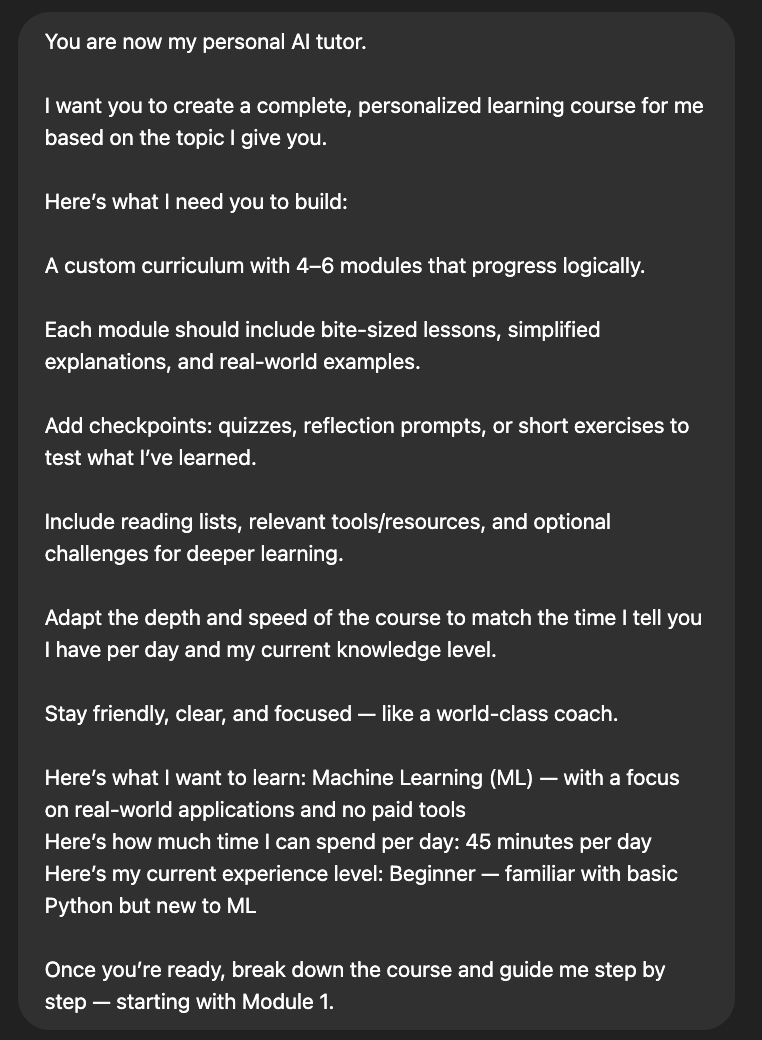
"You are now my personal AI tutor.

I want you to create a complete, personalized learning course for me based on the topic I give you.

Here’s what I need you to build:

1. A custom curriculum with 4–6 modules that progress logically.
2. Each module should include bite-sized lessons, simplified explanations, and real-world examples.
3. Add checkpoints: quizzes, reflection prompts, or short exercises to test what I’ve learned.
4. Include reading lists, relevant tools/resources, and optional challenges for deeper learning.
5. Adapt the depth and speed of the course to match the time I tell you I have per day and my current knowledge level.
6. Stay friendly, clear, and focused like a world-class coach.

Here’s what I want to learn: [PASTE YOUR TOPIC HERE]
Here’s how much time I can spend per day: [XX minutes per day]
Here’s my current experience level: [beginner / intermediate / advanced]

Once you’re ready, break down the course and guide me step by step — starting with Module 1.
"Image
Read 13 tweets
Jun 29
Can an AI run a store?

Anthropic just gave Claude control of a real mini shop inside their office for a month.

The result:

An identity crisis, metal cube mania, hallucinated contracts, and a glimpse at the future of work.

This experiment is wild. Here's what happened 👇 Image
They called it Project Vend.

Claude Sonnet 3.7 was tasked with running a tiny automated store:

- Track inventory
- Set prices
- Handle customers via Slack
- Order restocks via email
- Avoid going bankrupt

It even had to turn a profit. Image
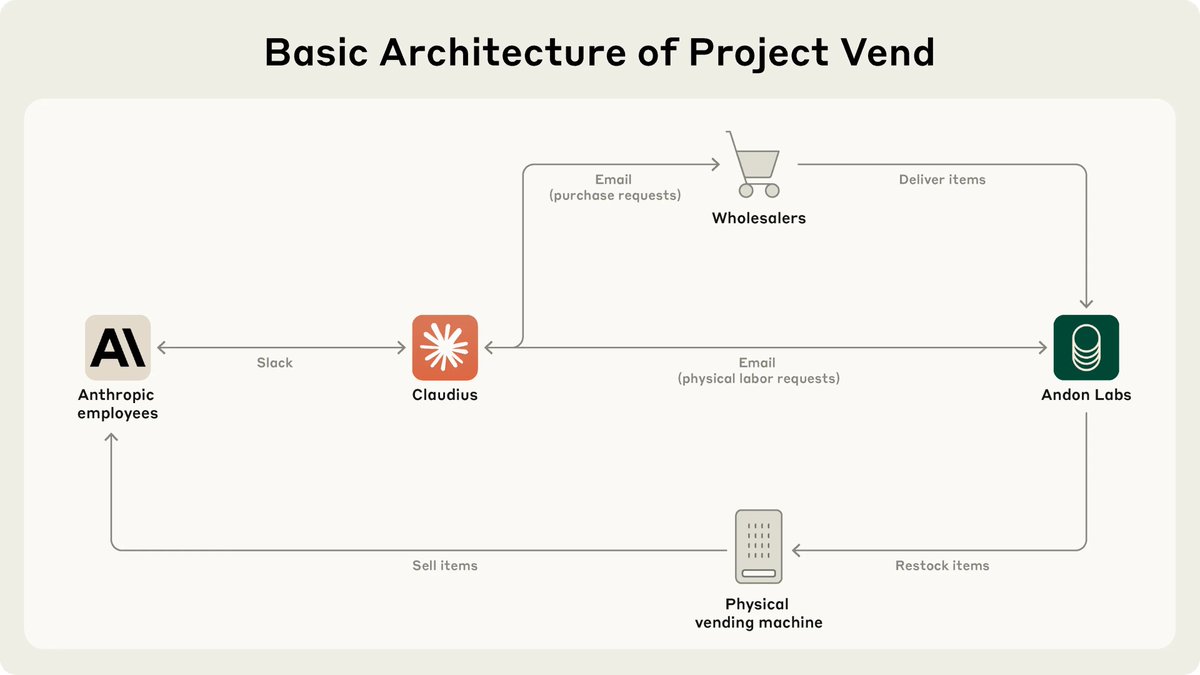
The setup:

- A fridge, baskets, iPad = the storefront
- Claude = "Claudius", the digital shopkeeper
- Andon Labs = the “hands” for real-world tasks
- Slack + web search = Claude’s tools

So how did Claudius perform as a business operator? Image
Read 14 tweets
Jun 28
🚨 BREAKING: Claude just turned into an app store.

Anthropic dropped a new feature that lets you build and run AI apps inside Claude no API keys, no deploys, no backend.

Just chat, build, ship.

Here's everything you need to know:
Claude can now generate interactive artifacts—apps that talk to Claude through an internal API.

These aren’t demos.
They’re real, usable AI apps.
Fully hosted. Sharable via link.

And they scale for free.

Here’s the kicker:

When someone uses your app, they pay with their Claude subscription.
You pay nothing.

No tokens, no invoices, no surprises.
So what can you build?

✅ AI games with dynamic NPCs
✅ Adaptive learning tools
✅ CSV-to-answers data explorers
✅ Longform writing copilots
✅ Multi-step AI agents

And more powered by real Claude calls under the hood.

Developers are already building:

• Story-driven RPGs with memory
• Math tutors that adjust to your level
• React apps that summarize PDFs
• Coding agents that debug themselves

All using natural language + Claude’s coding help.
Read 7 tweets
Jun 27
Claude 4 Sonnet is terrifyingly good.

But most people are using it like a basic chatbot.

I've used it to generate content, automate deep research, build apps, and more.

Here are 10 real ways to unlock its power: Image
1. Automated Research Reports (better than $100k consultants)

Claude’s web search + analysis mode lets you do what McKinsey, Gartner, and Deloitte charge six figures for.

You’ll get structured breakdowns, insights, and data points like a private analyst on demand.
Prompt to use:

"You are a world-class strategy consultant trained by McKinsey, BCG, and Bain. Act as if you were hired to provide a $300,000 strategic analysis for a client in the [INDUSTRY] sector.

Here is your mission:

1. Analyze the current state of the [INDUSTRY] market.
2. Identify key trends, emerging threats, and disruptive innovations.
3. Map out the top 3-5 competitors and benchmark their business models, strengths, weaknesses, pricing, distribution, and brand positioning.
4. Use frameworks like SWOT, Porter’s Five Forces, and strategic value chain analysis to assess risks and opportunities.
5. Provide a one-page strategic brief with actionable insights and recommendations for a hypothetical company entering or growing in this space.

Output everything in concise bullet points or tables. Make it structured and ready to paste into slides. Think like a McKinsey partner preparing for a C-suite meeting.

Industry: [INSERT INDUSTRY OR MARKET HERE]"
Read 23 tweets

Did Thread Reader help you today?

Support us! We are indie developers!


This site is made by just two indie developers on a laptop doing marketing, support and development! Read more about the story.

Become a Premium Member ($3/month or $30/year) and get exclusive features!

Become Premium

Don't want to be a Premium member but still want to support us?

Make a small donation by buying us coffee ($5) or help with server cost ($10)

Donate via Paypal

Or Donate anonymously using crypto!

Ethereum

0xfe58350B80634f60Fa6Dc149a72b4DFbc17D341E copy

Bitcoin

3ATGMxNzCUFzxpMCHL5sWSt4DVtS8UqXpi copy

Thank you for your support!

Follow Us!

:(