How LLMs work, clearly explained (with visuals):
Before diving into LLMs, we must understand conditional probability.
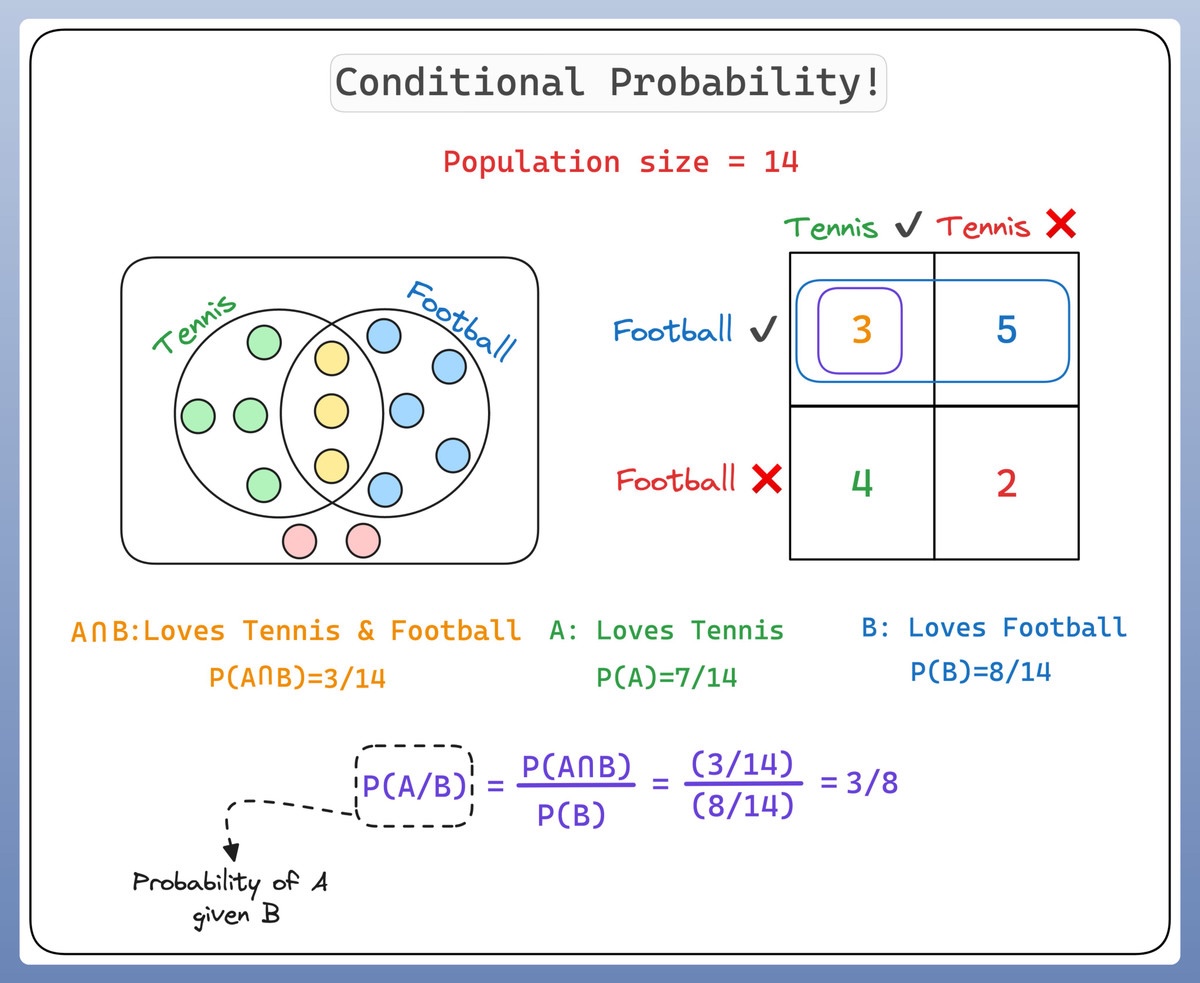
Let's consider a population of 14 individuals:
- Some of them like Tennis 🎾
- Some like Football ⚽️
- A few like both 🎾 ⚽️
- And few like none
Here's how it looks 👇
Let's consider a population of 14 individuals:
- Some of them like Tennis 🎾
- Some like Football ⚽️
- A few like both 🎾 ⚽️
- And few like none
Here's how it looks 👇

So what is Conditional probability?
It's a measure of the probability of an event given that another event has occurred.
If the events are A and B, we denote this as P(A|B).
This reads as "probability of A given B"
Check this illustration👇
It's a measure of the probability of an event given that another event has occurred.
If the events are A and B, we denote this as P(A|B).
This reads as "probability of A given B"
Check this illustration👇
For instance, if we're predicting whether it will rain today (event A), knowing that it's cloudy (event B) might impact our prediction.
As it's more likely to rain when it's cloudy, we'd say the conditional probability P(A|B) is high.
That's conditional probability!
As it's more likely to rain when it's cloudy, we'd say the conditional probability P(A|B) is high.
That's conditional probability!
Now, how does this apply to LLMs like GPT-4?
These models are tasked with predicting/guessing the next word in a sequence.
This is a question of conditional probability: given the words that have come before, what is the most likely next word?
These models are tasked with predicting/guessing the next word in a sequence.
This is a question of conditional probability: given the words that have come before, what is the most likely next word?

To predict the next word, the model calculates the conditional probability for each possible next word, given the previous words (context).
The word with the highest conditional probability is chosen as the prediction.
The word with the highest conditional probability is chosen as the prediction.
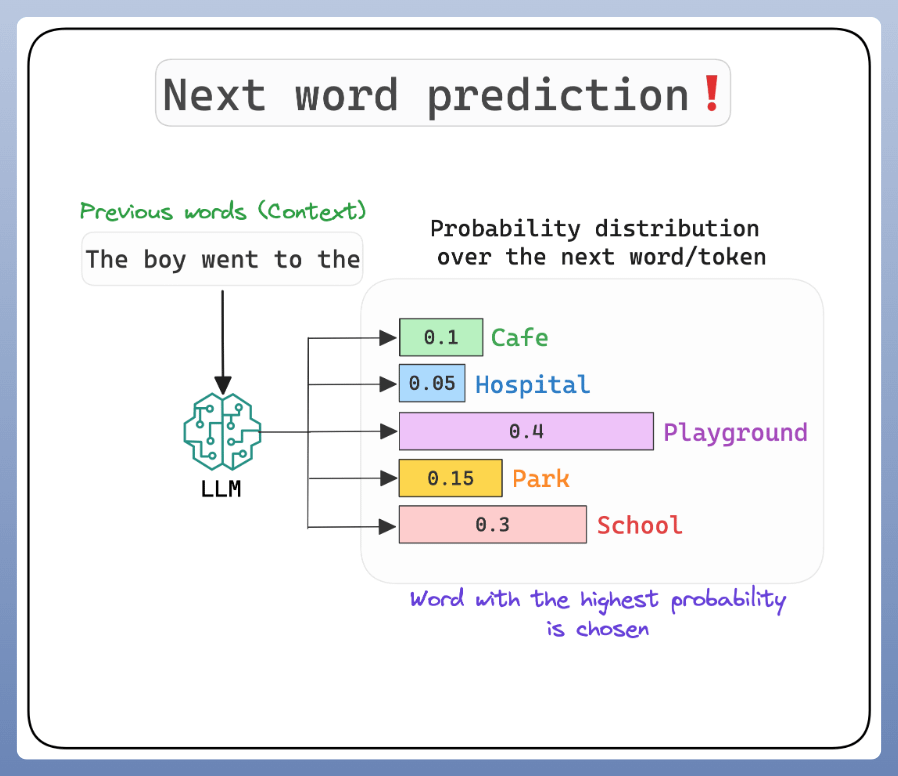
The LLM learns a high-dimensional probability distribution over sequences of words.
And the parameters of this distribution are the trained weights!
The training (or rather pre-training) is supervised.
I'll talk about the different training steps next time!
Check this 👇
And the parameters of this distribution are the trained weights!
The training (or rather pre-training) is supervised.
I'll talk about the different training steps next time!
Check this 👇

But there is a problem!
If we always pick the word with the highest probability, we end up with repetitive outputs, making LLMs almost useless and stifling their creativity.
This is where temperature comes into the picture.
Check this before we understand more about it...👇
If we always pick the word with the highest probability, we end up with repetitive outputs, making LLMs almost useless and stifling their creativity.
This is where temperature comes into the picture.
Check this before we understand more about it...👇

However, a high temperature value produces a gibberish output.
Let's understand what's going on...👇
Let's understand what's going on...👇

So, the LLMs instead of selecting the best token (for simplicity let's think of tokens as words), they "sample" the prediction.
So even if “Token 1” has the highest score, it may not be chosen since we are sampling.
So even if “Token 1” has the highest score, it may not be chosen since we are sampling.
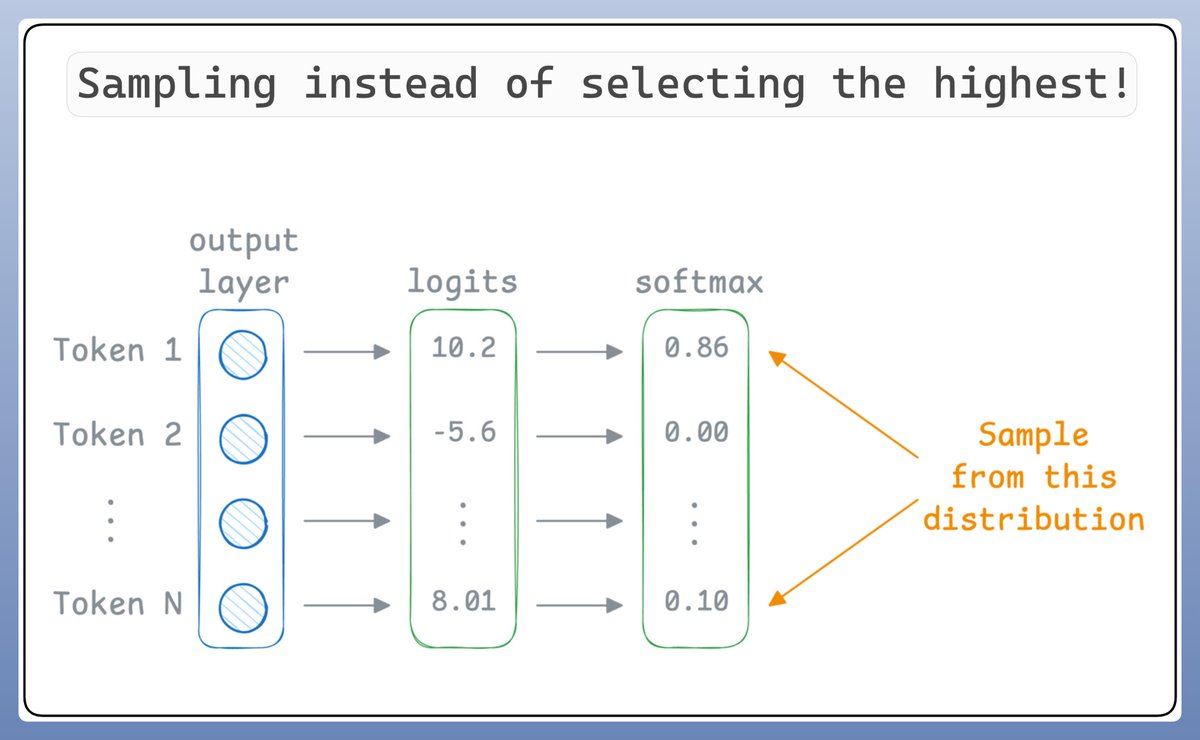
Now, temperature introduces the following tweak in the softmax function, which, in turn, influences the sampling process:

Let's take a code example!
At low temperature, probabilities concentrate around the most likely token, resulting in nearly greedy generation.
At high temperature, probabilities become more uniform, producing highly random and stochastic outputs.
Check this out👇
At low temperature, probabilities concentrate around the most likely token, resulting in nearly greedy generation.
At high temperature, probabilities become more uniform, producing highly random and stochastic outputs.
Check this out👇

That's a wrap!
If you found it insightful, reshare it with your network.
Find me → @_avichawla
Every day, I share tutorials and insights on DS, ML, LLMs, and RAGs.
If you found it insightful, reshare it with your network.
Find me → @_avichawla
Every day, I share tutorials and insights on DS, ML, LLMs, and RAGs.
https://twitter.com/1175166450832687104/status/1942472125484523605
• • •
Missing some Tweet in this thread? You can try to
force a refresh