Grok is a GENIUS marketer.
But only few know how to unlock its full potential.
Here are 15 ways to use Grok for marketing automation (prompts + demos):
But only few know how to unlock its full potential.
Here are 15 ways to use Grok for marketing automation (prompts + demos):
1. Content Ideation
Prompt:
"You’re a marketing strategist. Given {brand_name} and {target_audience}, generate 5 innovative content themes for {topic_niche}. Provide each as a headline plus a 1-sentence angle. Replace placeholders with your own brand & niche before running."
Prompt:
"You’re a marketing strategist. Given {brand_name} and {target_audience}, generate 5 innovative content themes for {topic_niche}. Provide each as a headline plus a 1-sentence angle. Replace placeholders with your own brand & niche before running."
2. Audience Research
Prompt:
"Act as a market analyst. Using {customer_data_summary}, identify 3 key audience segments, their top 2 pain points each, and suggest 2 messaging angles per segment. Output as JSON with “segment”, “pain_points” and “angles” fields."
Prompt:
"Act as a market analyst. Using {customer_data_summary}, identify 3 key audience segments, their top 2 pain points each, and suggest 2 messaging angles per segment. Output as JSON with “segment”, “pain_points” and “angles” fields."
3. Content Creation
Prompt:
"You are an expert copywriter. Transform {raw_outline_or_bullet_points} into a 250-word blog post intro with a hook, 2 key benefits, and a call-to-action for {product_or_service}. Keep tone friendly and persuasive."
Prompt:
"You are an expert copywriter. Transform {raw_outline_or_bullet_points} into a 250-word blog post intro with a hook, 2 key benefits, and a call-to-action for {product_or_service}. Keep tone friendly and persuasive."
4. Blog Copywriting
Prompt:
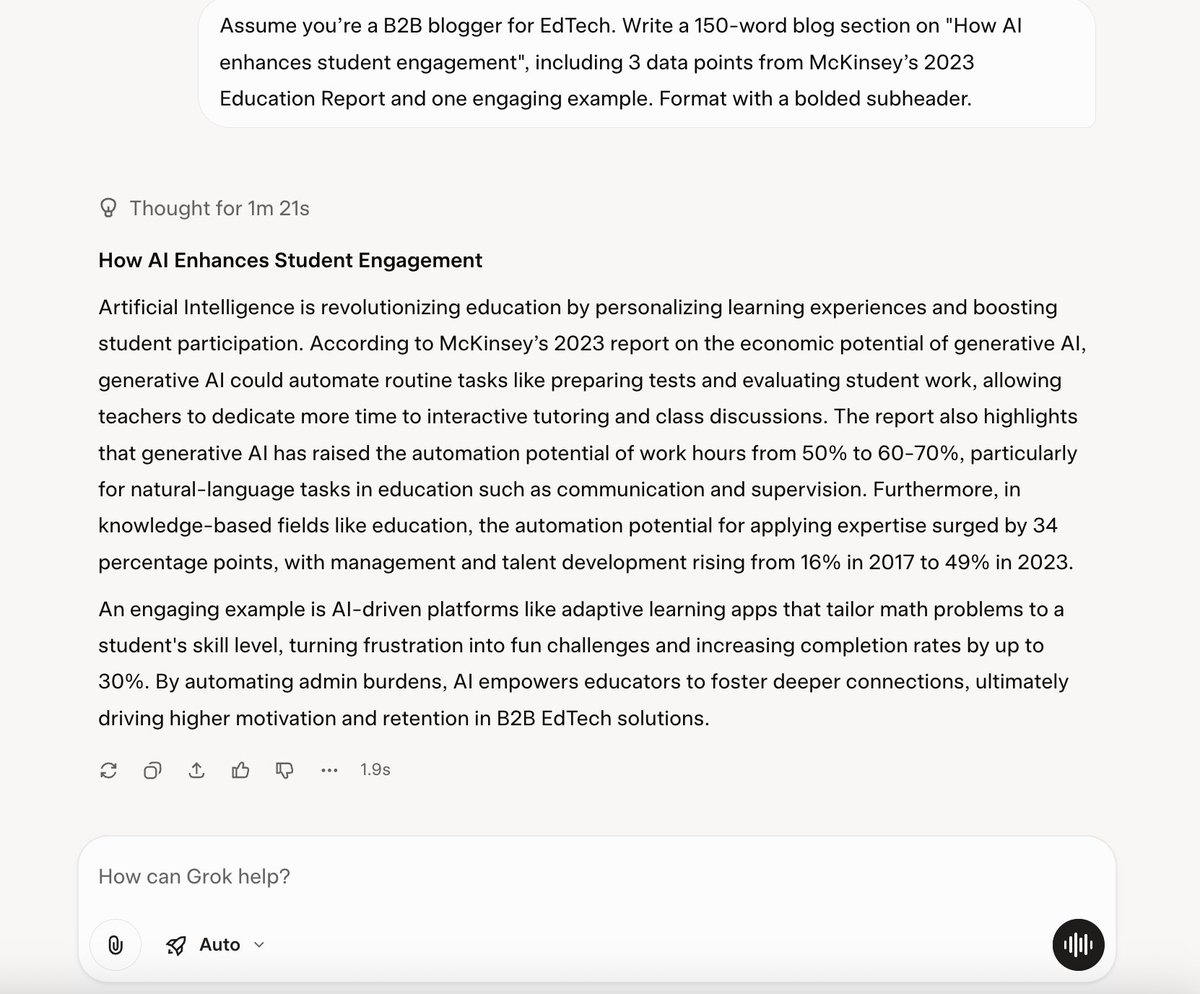
"Assume you’re a B2B blogger for {industry}. Write a 150-word blog section on {subtopic}, including 3 data points from {research_source} and one engaging example. Format with a bolded subheader."
Prompt:
"Assume you’re a B2B blogger for {industry}. Write a 150-word blog section on {subtopic}, including 3 data points from {research_source} and one engaging example. Format with a bolded subheader."
5. Ad Copywriting
Prompt:
"You’re a Facebook ads specialist. Craft 3 ad variations for {product_name} targeting {audience_segment}. Each should include a 20-char headline, 90-char description, and one emoji. Focus on benefit, urgency, and social proof."
Prompt:
"You’re a Facebook ads specialist. Craft 3 ad variations for {product_name} targeting {audience_segment}. Each should include a 20-char headline, 90-char description, and one emoji. Focus on benefit, urgency, and social proof."
6. Product Descriptions
Prompt:
"As a product marketer, write a 120-word description for {product_name}. Highlight 2 unique features, 1 customer benefit, and end with “Ideal for {use_case}.” Use persuasive, clear language."
Prompt:
"As a product marketer, write a 120-word description for {product_name}. Highlight 2 unique features, 1 customer benefit, and end with “Ideal for {use_case}.” Use persuasive, clear language."
7. Content Repurposing
Prompt:
"You’re a repurposing guru. Turn this 500-word blog excerpt ({paste_excerpt}) into: a) a 3-bullet LinkedIn post, b) a 2-sentence Twitter thread tweet, c) a 5-slide carousel outline. Label each output section clearly."
Prompt:
"You’re a repurposing guru. Turn this 500-word blog excerpt ({paste_excerpt}) into: a) a 3-bullet LinkedIn post, b) a 2-sentence Twitter thread tweet, c) a 5-slide carousel outline. Label each output section clearly."
8. SEO Optimization
Prompt:
"Act as an SEO expert. For blog title “{headline}”, suggest 5 keyword-rich title variants (max 60 chars), 3 meta descriptions (max 155 chars), and an H2 outline with 4 headings optimized for {primary_keyword}."
Prompt:
"Act as an SEO expert. For blog title “{headline}”, suggest 5 keyword-rich title variants (max 60 chars), 3 meta descriptions (max 155 chars), and an H2 outline with 4 headings optimized for {primary_keyword}."
9. Chatbot Lead Gen & Support
Prompt:
"You’re a conversational AI. Draft a 5-step chatbot script to qualify leads for {product_service}, asking 3 questions then recommending one relevant resource. Include quick replies and fallback responses."
Prompt:
"You’re a conversational AI. Draft a 5-step chatbot script to qualify leads for {product_service}, asking 3 questions then recommending one relevant resource. Include quick replies and fallback responses."
10. Customer Surveys
Prompt:
"You’re a UX researcher. Create a 7-question customer satisfaction survey for {service_name}, including 2 multiple-choice, 3 Likert-scale and 2 open-ended questions. Ensure clarity and neutrality."
Prompt:
"You’re a UX researcher. Create a 7-question customer satisfaction survey for {service_name}, including 2 multiple-choice, 3 Likert-scale and 2 open-ended questions. Ensure clarity and neutrality."
11. Data Analysis & Reporting
Prompt:
"As a data analyst, summarize key insights from this campaign report ({paste_key_metrics}). Provide 3 top successes, 2 areas to improve, and 2 actionable recommendations. Format as bullet points."
Prompt:
"As a data analyst, summarize key insights from this campaign report ({paste_key_metrics}). Provide 3 top successes, 2 areas to improve, and 2 actionable recommendations. Format as bullet points."
12. Performance Reporting
Prompt:
"You’re a marketing manager. Using {campaign_metrics}, draft a concise performance report: include overall ROI, top-performing channel, and 3 suggested next steps. Keep under 150 words."
Prompt:
"You’re a marketing manager. Using {campaign_metrics}, draft a concise performance report: include overall ROI, top-performing channel, and 3 suggested next steps. Keep under 150 words."
13. Predictive Analytics Support
Prompt:
"You’re a forecasting specialist. Given historical data summary ({paste_summary}), predict next quarter’s performance for {metric}. Provide a brief rationale and confidence level (low/medium/high)."
Prompt:
"You’re a forecasting specialist. Given historical data summary ({paste_summary}), predict next quarter’s performance for {metric}. Provide a brief rationale and confidence level (low/medium/high)."
14. Crisis Response Drafting
Prompt:
"You’re a PR consultant. Draft a 3-paragraph public statement addressing {crisis_scenario}, acknowledging issue, outlining steps taken, and reassuring stakeholders. Keep tone empathetic and factual."
Prompt:
"You’re a PR consultant. Draft a 3-paragraph public statement addressing {crisis_scenario}, acknowledging issue, outlining steps taken, and reassuring stakeholders. Keep tone empathetic and factual."
15. Press Release Creation
Prompt:
"Act as a corporate writer. Write a 300-word press release for {company} announcing {news_event}: include a catchy headline, 2 quotes, 3 key details, and a call-to-action for media inquiries."
Prompt:
"Act as a corporate writer. Write a 300-word press release for {company} announcing {news_event}: include a catchy headline, 2 quotes, 3 key details, and a call-to-action for media inquiries."
The AI prompt library your competitors don't want you to find
→ Unlimited prompts: $15/month
→ Starter pack: $3.99/month
→ Pro bundle: $9.99/month
Grab it before it's gone ↓
godofprompt.ai/pricing
→ Unlimited prompts: $15/month
→ Starter pack: $3.99/month
→ Pro bundle: $9.99/month
Grab it before it's gone ↓
godofprompt.ai/pricing
That's a wrap:
I hope you've found this thread helpful.
Follow me @godofprompt for more.
Like/Repost the quote below if you can:
I hope you've found this thread helpful.
Follow me @godofprompt for more.
Like/Repost the quote below if you can:
https://twitter.com/1643695629665722379/status/1956643380844437712
• • •
Missing some Tweet in this thread? You can try to
force a refresh