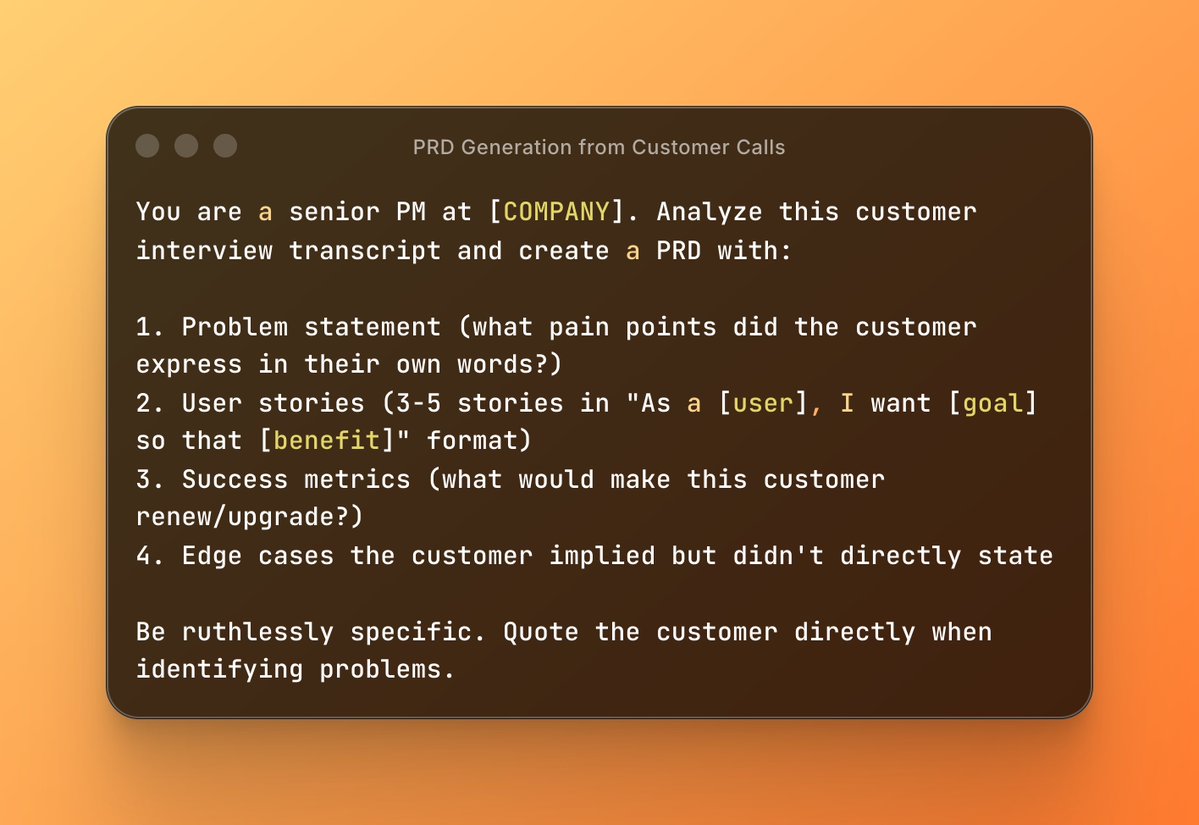
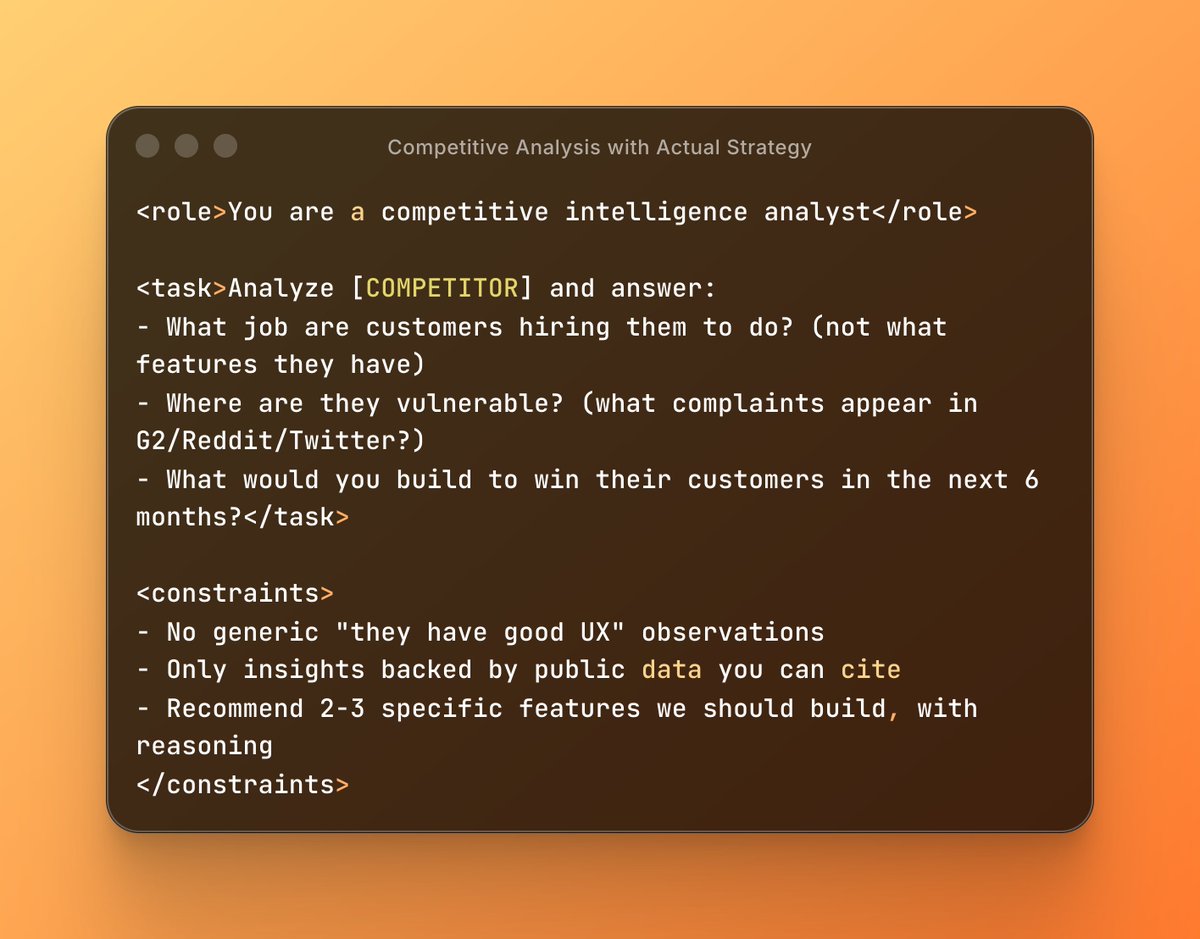
everyone's arguing about whether ChatGPT or Claude is "smarter."
nobody noticed Anthropic just dropped something that makes the model debate irrelevant.
it's called Skills. and it's the first AI feature that actually solves the problem everyone complains about:
"why do I have to explain the same thing to AI every single time?"
here's what's different:
- you know how you've explained your brand guidelines to ChatGPT 47 times?
- or how you keep telling it "structure reports like this" over and over?
- or how every new chat means re-uploading context and re-explaining your process?
Skills ends that cycle.
you teach Claude your workflow once.
it applies it automatically. everywhere. forever.
but the real story isn't memory. it's how this changes what's possible with AI at work.
nobody noticed Anthropic just dropped something that makes the model debate irrelevant.
it's called Skills. and it's the first AI feature that actually solves the problem everyone complains about:
"why do I have to explain the same thing to AI every single time?"
here's what's different:
- you know how you've explained your brand guidelines to ChatGPT 47 times?
- or how you keep telling it "structure reports like this" over and over?
- or how every new chat means re-uploading context and re-explaining your process?
Skills ends that cycle.
you teach Claude your workflow once.
it applies it automatically. everywhere. forever.
but the real story isn't memory. it's how this changes what's possible with AI at work.

here's the technical unlock that makes this actually work:
Skills use "progressive disclosure" instead of dumping everything into context.
normal AI workflow:
→ shove everything into the prompt
→ hope the model finds what it needs
→ burn tokens
→ get inconsistent results
Skills workflow:
→ Claude sees skill names (30-50 tokens each)
→ you ask for something specific
→ it loads ONLY relevant skills
→ coordinates multiple skills automatically
→ executes
example: you ask for a quarterly investor deck
Claude detects it needs:
- brand guidelines skill
- financial reporting skill
- presentation formatting skill
loads all three. coordinates them. outputs a deck that's on-brand, accurate, and properly formatted.
you didn't specify which skills to use.
you didn't explain how they work together.
Claude figured it out.
this is why it scales where prompting doesn't.
Skills use "progressive disclosure" instead of dumping everything into context.
normal AI workflow:
→ shove everything into the prompt
→ hope the model finds what it needs
→ burn tokens
→ get inconsistent results
Skills workflow:
→ Claude sees skill names (30-50 tokens each)
→ you ask for something specific
→ it loads ONLY relevant skills
→ coordinates multiple skills automatically
→ executes
example: you ask for a quarterly investor deck
Claude detects it needs:
- brand guidelines skill
- financial reporting skill
- presentation formatting skill
loads all three. coordinates them. outputs a deck that's on-brand, accurate, and properly formatted.
you didn't specify which skills to use.
you didn't explain how they work together.
Claude figured it out.
this is why it scales where prompting doesn't.
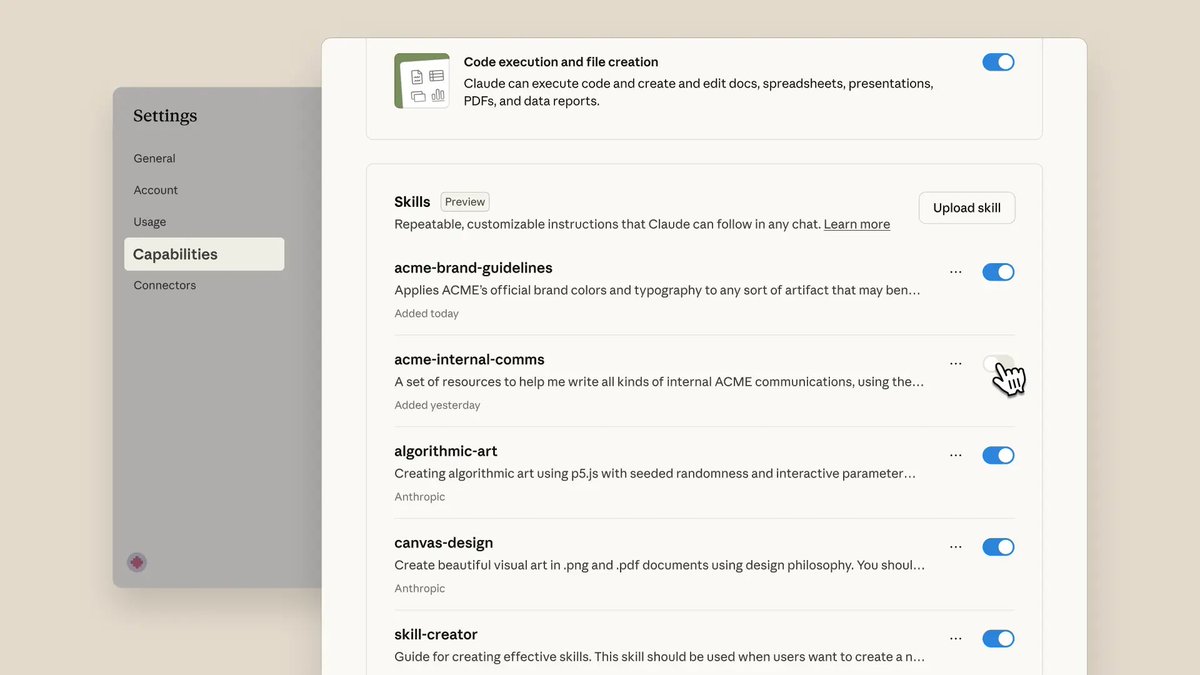
let me show you what this looks like in real workflows.
Scenario 1: Brand-Consistent Content (Marketing Team)
❌ old way:
- designer makes deck
- brand team reviews: "wrong fonts, logo placement off, colors don't match"
- designer fixes
- brand team reviews again: "footer format is wrong"
- 3 rounds, 4 hours wasted
✅ Skills way:
create "Brand_Guidelines" skill with:
• color codes (#FF6B35 coral, #004E89 navy)
• font rules (Montserrat headers, Open Sans body)
• logo placement rules (0.5" minimum spacing)
• template files
prompt: "create 10-slide deck for Q4 product launch"
- Claude auto-applies brand skill
- output matches guidelines first try
- 30 seconds instead of 4 hours
Rakuten (Japanese e-commerce giant) is already doing this.
finance workflows that took a full day? now 1 hour.
Scenario 1: Brand-Consistent Content (Marketing Team)
❌ old way:
- designer makes deck
- brand team reviews: "wrong fonts, logo placement off, colors don't match"
- designer fixes
- brand team reviews again: "footer format is wrong"
- 3 rounds, 4 hours wasted
✅ Skills way:
create "Brand_Guidelines" skill with:
• color codes (#FF6B35 coral, #004E89 navy)
• font rules (Montserrat headers, Open Sans body)
• logo placement rules (0.5" minimum spacing)
• template files
prompt: "create 10-slide deck for Q4 product launch"
- Claude auto-applies brand skill
- output matches guidelines first try
- 30 seconds instead of 4 hours
Rakuten (Japanese e-commerce giant) is already doing this.
finance workflows that took a full day? now 1 hour.
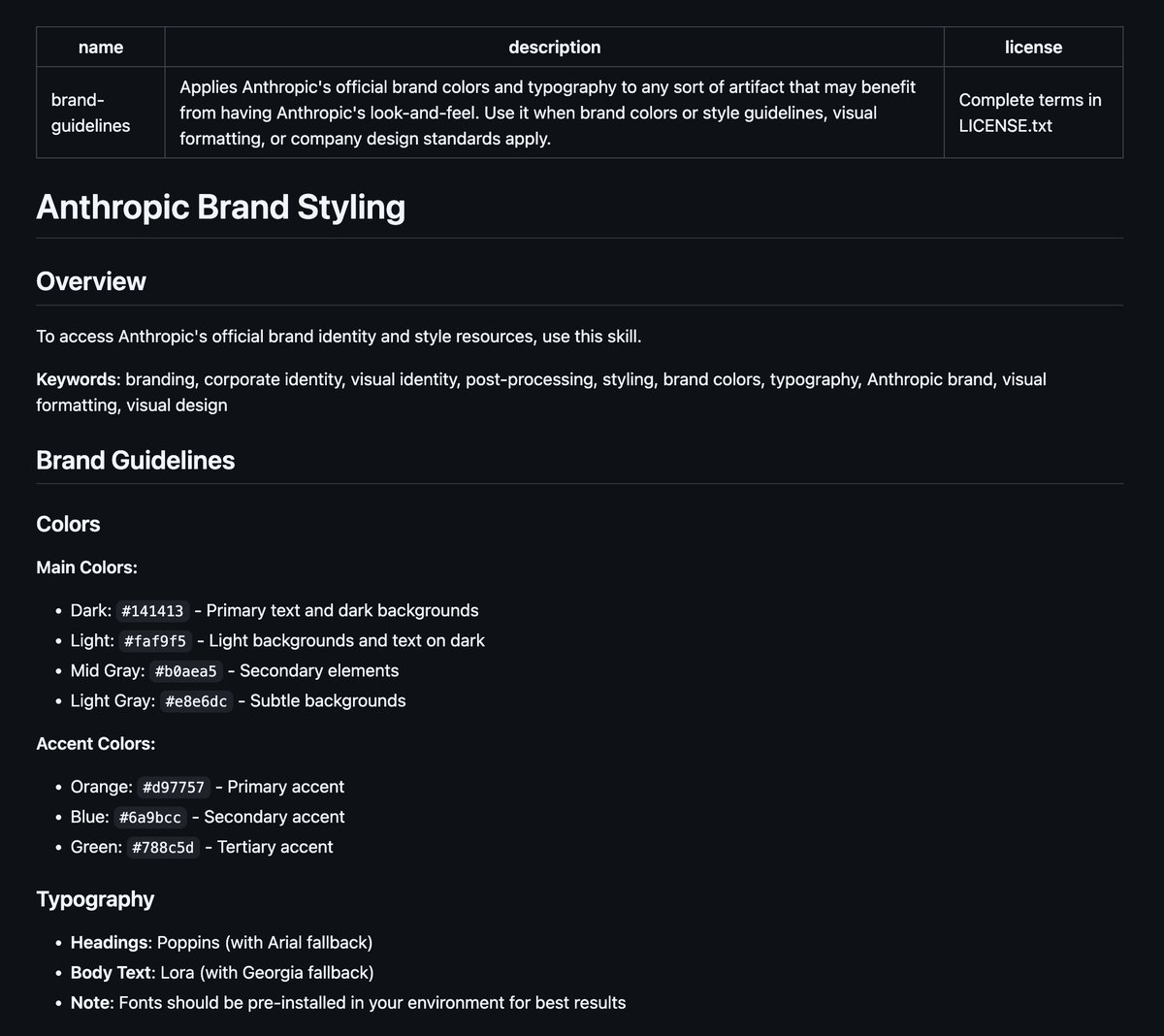
Scenario 2: Sales Workflow Automation (Revenue Team)
the repetitive nightmare:
- new lead comes in
- manually create CRM contact
- fill in 12 fields following "the naming convention"
- update opportunity stage
- log activity notes in specific format
- set follow-up reminder
- 8 minutes per lead × 30 leads/week = 4 hours gone
Skills implementation:
create "CRM_Automation" skill that knows:
- your naming conventions (FirstName_LastName_Company format)
- required fields and validation rules
- opportunity stages and when to use them
- note formatting structure
- follow-up timing rules
now: paste lead info → Claude structures everything correctly → done
time per lead: 30 seconds
weekly savings: 3.75 hours
monthly savings: 15 hours (almost 2 full workdays)
at $50/hour, that's $750/month saved per sales rep.
team of 10 reps? $90k/year in recovered time.
youtu.be/kS1MJFZWMq4
the repetitive nightmare:
- new lead comes in
- manually create CRM contact
- fill in 12 fields following "the naming convention"
- update opportunity stage
- log activity notes in specific format
- set follow-up reminder
- 8 minutes per lead × 30 leads/week = 4 hours gone
Skills implementation:
create "CRM_Automation" skill that knows:
- your naming conventions (FirstName_LastName_Company format)
- required fields and validation rules
- opportunity stages and when to use them
- note formatting structure
- follow-up timing rules
now: paste lead info → Claude structures everything correctly → done
time per lead: 30 seconds
weekly savings: 3.75 hours
monthly savings: 15 hours (almost 2 full workdays)
at $50/hour, that's $750/month saved per sales rep.
team of 10 reps? $90k/year in recovered time.
youtu.be/kS1MJFZWMq4
Scenario 3: Legal Contract Review (In-House Counsel)
the manual process:
- receive vendor contract
- review against standard terms checklist (24 items)
- identify deviations and risks
- draft redline suggestions
- write internal memo
- 45-60 minutes per contract
Skills setup:
create "Contract_Review" skill containing:
- your standard terms library
- risk classification framework
- approved clause variations
- redline language templates
- memo format structure
execution:
upload contract PDF
prompt: "review this against our standard terms"
Claude outputs:
• flagged risky clauses with severity ratings
• suggested protective language
• formatted redline document
• internal memo for stakeholders
time: 8 minutes instead of 60 minutes
for teams reviewing 50+ contracts/month:
→ saves 43 hours monthly
→ $8,600/month at $200/hour legal rates
→ $103k annually
that's a junior attorney's salary in recovered partner time.
the manual process:
- receive vendor contract
- review against standard terms checklist (24 items)
- identify deviations and risks
- draft redline suggestions
- write internal memo
- 45-60 minutes per contract
Skills setup:
create "Contract_Review" skill containing:
- your standard terms library
- risk classification framework
- approved clause variations
- redline language templates
- memo format structure
execution:
upload contract PDF
prompt: "review this against our standard terms"
Claude outputs:
• flagged risky clauses with severity ratings
• suggested protective language
• formatted redline document
• internal memo for stakeholders
time: 8 minutes instead of 60 minutes
for teams reviewing 50+ contracts/month:
→ saves 43 hours monthly
→ $8,600/month at $200/hour legal rates
→ $103k annually
that's a junior attorney's salary in recovered partner time.
ok but how do you actually BUILD one?
for one, you can simply prompt claude: "create a [name of skill] skill, ask me all the necessary questions for context."
you can also create it manually. here's the exact structure of a SKILL.md file:
1/ YAML Frontmatter (metadata):
---
name: Brand Guidelines
description: Apply Acme Corp brand guidelines to presentations and documents
version: 1.0.0
---
this is what Claude reads first to decide IF it should load your skill.
keep description specific (200 char max) or Claude won't know when to use it.
2/ Markdown Body (the actual instructions)
---
## Overview
This Skill provides Acme Corp's official brand guidelines.
Apply these standards to ensure all outputs match our visual identity.
## Brand Colors
- Primary: #FF6B35 (Coral)
- Secondary: #004E89 (Navy Blue)
- Accent: #F7B801 (Gold)
## Typography
Headers: Montserrat Bold
Body text: Open Sans Regular
Size guidelines:
- H1: 32pt
- H2: 24pt
- Body: 11pt
## Logo Usage
Always use full-color logo on light backgrounds.
White logo on dark backgrounds.
Minimum spacing: 0.5 inches around logo.
## When to Apply
Apply these guidelines when creating:
- PowerPoint presentations
- Word documents for external sharing
- Marketing materials
## Resources
See resources/ folder for logo files and fonts.
---
the markdown body is where Claude gets the DETAILS.
it only reads this after deciding the skill is relevant.
this two-level system (metadata → full content) is why Skills scale without burning tokens.
for one, you can simply prompt claude: "create a [name of skill] skill, ask me all the necessary questions for context."
you can also create it manually. here's the exact structure of a SKILL.md file:
1/ YAML Frontmatter (metadata):
---
name: Brand Guidelines
description: Apply Acme Corp brand guidelines to presentations and documents
version: 1.0.0
---
this is what Claude reads first to decide IF it should load your skill.
keep description specific (200 char max) or Claude won't know when to use it.
2/ Markdown Body (the actual instructions)
---
## Overview
This Skill provides Acme Corp's official brand guidelines.
Apply these standards to ensure all outputs match our visual identity.
## Brand Colors
- Primary: #FF6B35 (Coral)
- Secondary: #004E89 (Navy Blue)
- Accent: #F7B801 (Gold)
## Typography
Headers: Montserrat Bold
Body text: Open Sans Regular
Size guidelines:
- H1: 32pt
- H2: 24pt
- Body: 11pt
## Logo Usage
Always use full-color logo on light backgrounds.
White logo on dark backgrounds.
Minimum spacing: 0.5 inches around logo.
## When to Apply
Apply these guidelines when creating:
- PowerPoint presentations
- Word documents for external sharing
- Marketing materials
## Resources
See resources/ folder for logo files and fonts.
---
the markdown body is where Claude gets the DETAILS.
it only reads this after deciding the skill is relevant.
this two-level system (metadata → full content) is why Skills scale without burning tokens.

now package it correctly (this trips everyone up):
Step 1: Create folder structure
---
Brand_Guidelines/
├── SKILL.md (contains the YAML + markdown body above)
└── resources/
├── logo.png
└── fonts/
---
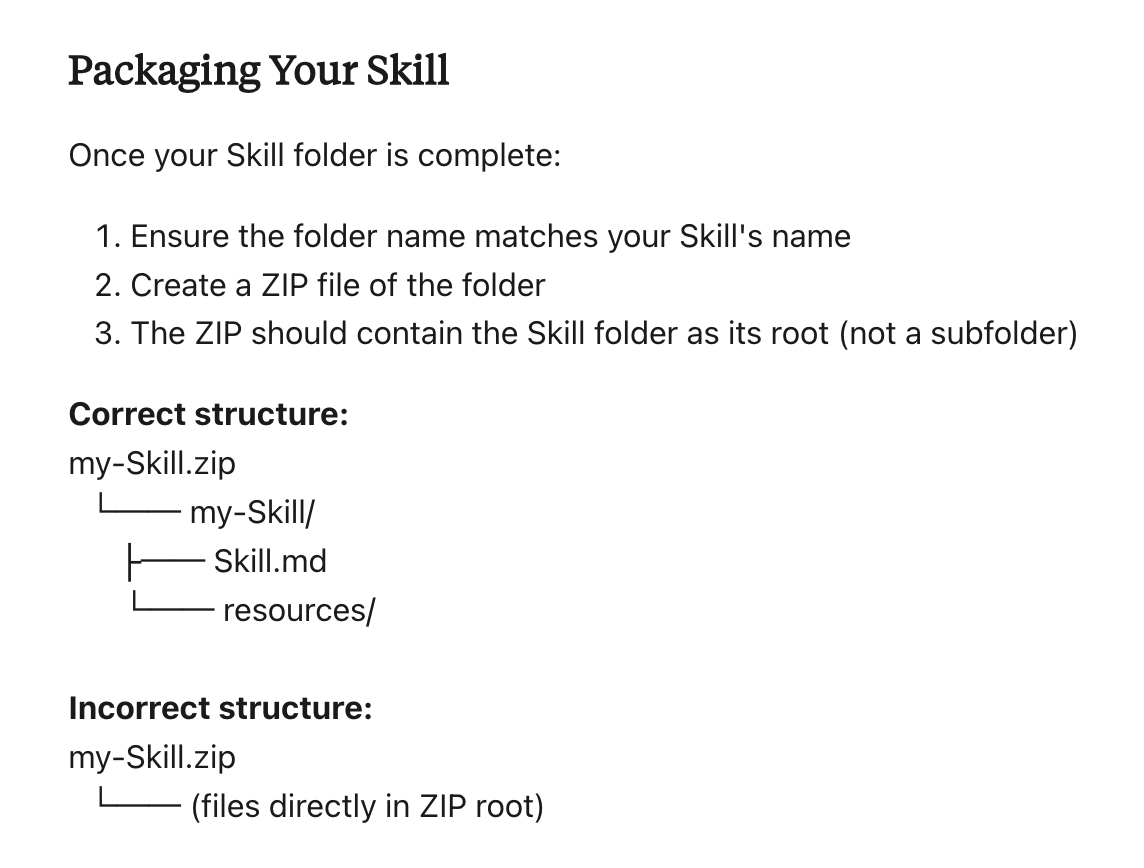
Step 2: ZIP it properly
✅ CORRECT structure:
---
Brand_Guidelines.zip
└── Brand_Guidelines/
├── SKILL.md
└── resources/
---
❌ WRONG structure:
---
Brand_Guidelines.zip
├── SKILL.md (loose in root)
└── resources/
---
the FOLDER must be inside the zip, not files directly.
Mac: right-click folder → "Compress" Windows: right-click folder → "Send to" → "Compressed folder"
Step 3: Upload to Claude
Settings → Capabilities → enable "Code execution"
upload your .zip under Skills
test with: "create a presentation following brand guidelines"
pro tip: use the "skill-creator" skill just say "help me create a brand guidelines skill" and Claude interviews you, generates the folder structure, and formats everything automatically.
the companies dominating with AI aren't using better prompts.
they're building systems that codify how they work.
explore real examples you can clone: github.com/anthropics/ski…
Step 1: Create folder structure
---
Brand_Guidelines/
├── SKILL.md (contains the YAML + markdown body above)
└── resources/
├── logo.png
└── fonts/
---
Step 2: ZIP it properly
✅ CORRECT structure:
---
Brand_Guidelines.zip
└── Brand_Guidelines/
├── SKILL.md
└── resources/
---
❌ WRONG structure:
---
Brand_Guidelines.zip
├── SKILL.md (loose in root)
└── resources/
---
the FOLDER must be inside the zip, not files directly.
Mac: right-click folder → "Compress" Windows: right-click folder → "Send to" → "Compressed folder"
Step 3: Upload to Claude
Settings → Capabilities → enable "Code execution"
upload your .zip under Skills
test with: "create a presentation following brand guidelines"
pro tip: use the "skill-creator" skill just say "help me create a brand guidelines skill" and Claude interviews you, generates the folder structure, and formats everything automatically.
the companies dominating with AI aren't using better prompts.
they're building systems that codify how they work.
explore real examples you can clone: github.com/anthropics/ski…
Claude made simple: grab my free guide
→ Learn fast with mini-course
→ 10+ prompts included
→ Practical use cases
Start here ↓
godofprompt.ai/claude-mastery…
→ Learn fast with mini-course
→ 10+ prompts included
→ Practical use cases
Start here ↓
godofprompt.ai/claude-mastery…
• • •
Missing some Tweet in this thread? You can try to
force a refresh