Alex Prompter Profile picture
Feb 10 7 tweets 2 min read Read on X
Your vibe coded app is a ticking time bomb.

UC San Diego studied how pros actually use AI coding tools.

They don't vibe. They control.

Meanwhile: mass produced code nobody can debug, maintain, or explain.

@verdent_ai built the fix. Here's what the research shows:
The data is brutal:

→ Developers using AI are 19% SLOWER (while thinking they're faster)
→ Stack Overflow 2025: AI trust crashed from 43% to 33%
→ Pros NEVER let AI handle more than 5-6 steps before validating

The ones getting results aren't prompting and praying.

They're planning first.
Here's the trap everyone falls into:

"build me a login system"

AI: sure! *generates 400 lines*

You: looks right!

6 weeks later: API keys exposed, auth bypassed, database chaos.

The AI wasn't wrong.

YOU were wrong for never defining what "login" actually meant. Image
The shift happening right now:

Old way: prompt → code → pray

New way: clarify → align on plan → THEN build

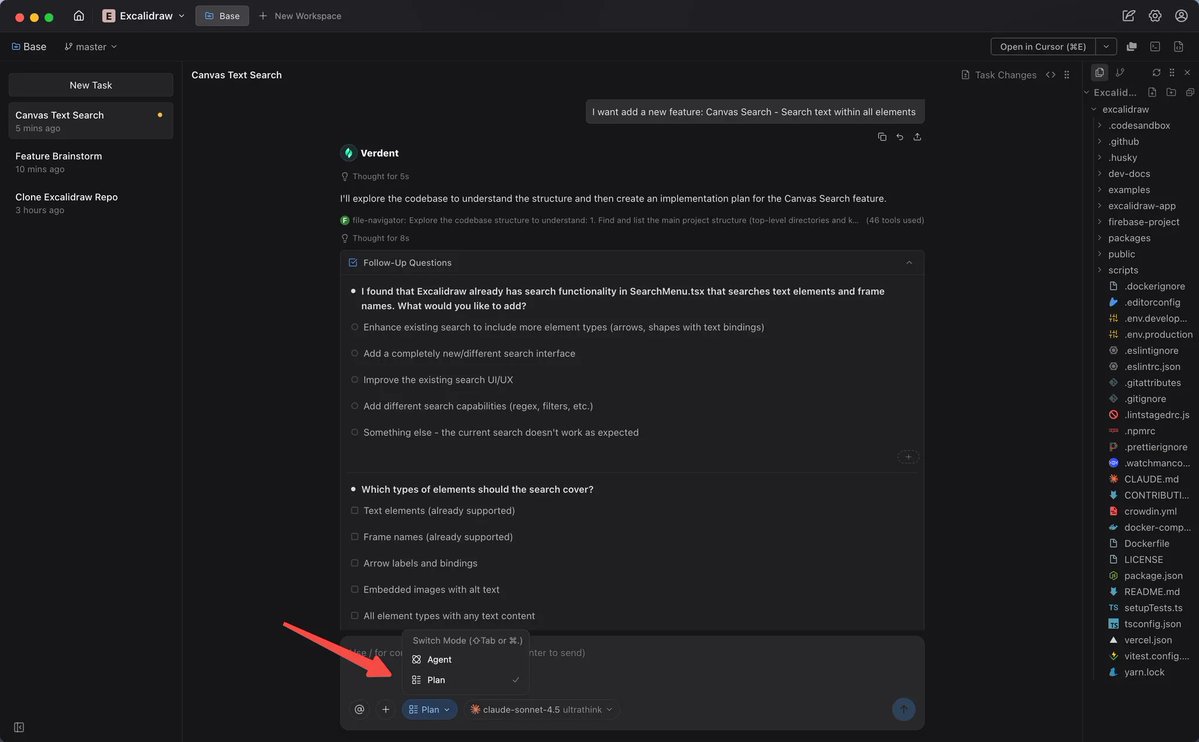
Verdent's Plan Mode does something different.

Instead of generating code, it asks the questions you forgot to ask yourself.

Turns fuzzy ideas into specs before one line gets written.
You say "i want user login"

Verdent asks:

→ Which methods? email, OAuth, phone?
→ Forgot password flow needed?
→ Two-factor auth?
→ Compliance requirements?

Then orchestrates MULTIPLE AI models to brainstorm in parallel.

Like senior engineers debating approaches before you pick a path.
The feature that made me stop and rethink everything:

Same prompt → different plans by role

→ Frontend dev? Component structure, state management
→ QA engineer? Test cases, edge conditions
→ PM? User stories, dependencies

Then auto generates flowcharts and architecture diagrams.

You SEE the system before building it.
This is what AI coding should have been from day one:

Not a code generator.

A thinking partner that aligns BEFORE it builds.

But the real win? Zero hours wasted building the wrong thing.

Stop vibing. Start planning 👇

verdent.ai/?id=700374

• • •

Missing some Tweet in this thread? You can try to force a refresh

 

Keep Current with Alex Prompter

Alex Prompter Profile picture

Stay in touch and get notified when new unrolls are available from this author!

Read all threads

This Thread may be Removed Anytime!

PDF

Twitter may remove this content at anytime! Save it as PDF for later use!

Try unrolling a thread yourself!

how to unroll video
  1. Follow @ThreadReaderApp to mention us!

  2. From a Twitter thread mention us with a keyword "unroll"
@threadreaderapp unroll

Practice here first or read more on our help page!

More from @alex_prompter

Feb 9
R.I.P McKinsey.

You don’t need a $1,200/hr consultant anymore.

You can now run full competitive market analysis using Claude.

Here are the 10 prompts I use instead of hiring consultants: Image
1/ LITERATURE REVIEW SYNTHESIZER

Prompt:

"Analyze these 20 research papers on [topic]. Create a gap analysis table showing: what's been studied, what's missing, contradictions between studies, and 3 unexplored opportunities."

I fed Claude 47 papers on AI regulation.

It found gaps 3 human researchers missed.
2/ COMPETITIVE INTELLIGENCE SCANNER

Prompt:

"Visit [competitor websites]. Extract: pricing tiers, feature comparisons, positioning strategy, target audience, and gaps in their offering we could exploit."

Saved me 12 hours of manual competitive analysis.

Claude even caught pricing they buried in FAQ pages.
Read 15 tweets
Feb 9
Claude Sonnet 4.5 is the closest thing to an economic cheat code we’ve ever touched but only if you ask it the prompts that make it uncomfortable.

Here are 10 Powerful Claude prompts that will help you build a million dollar business (steal them now): Image
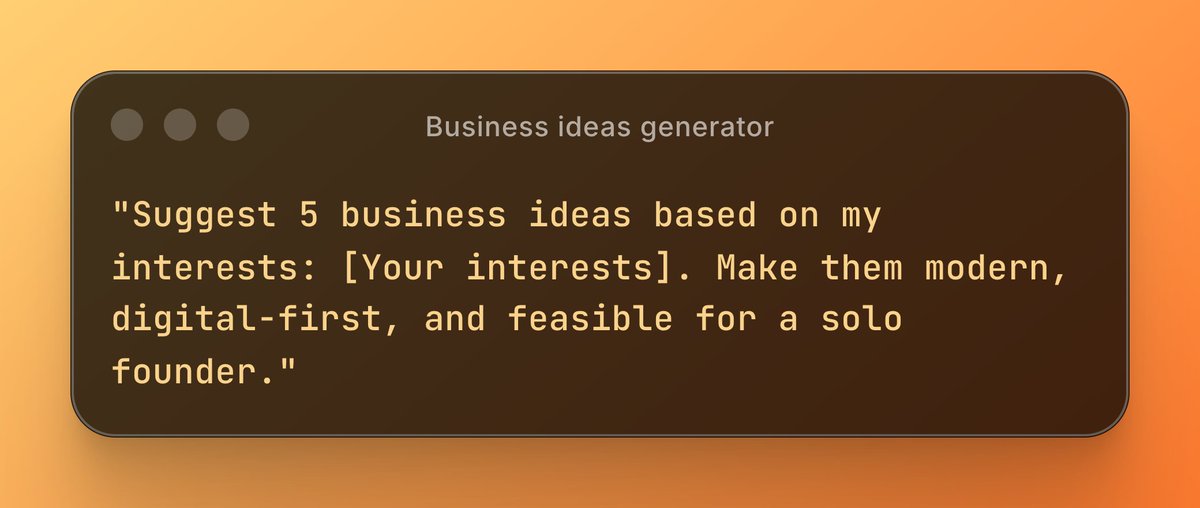
1. Business Idea Generator

"Suggest 5 business ideas based on my interests: [Your interests]. Make them modern, digital-first, and feasible for a solo founder."

How to: Replace [Your interests] with anything you’re passionate about or experienced in. Image
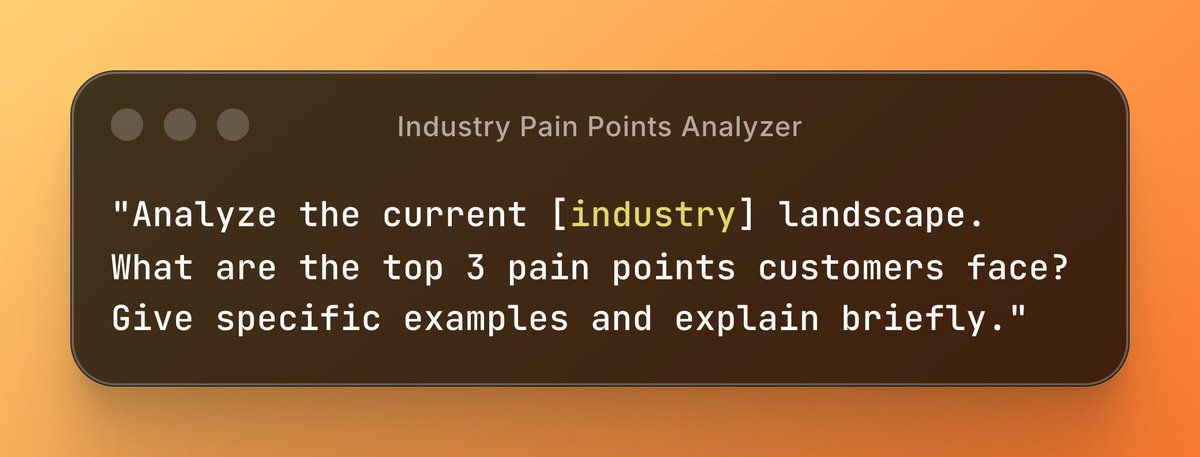
2. Industry Pain Points Analyzer

"Analyze the current [industry] landscape. What are the top 3 pain points customers face? Give specific examples and explain briefly."

How to: Fill in [industry] with a sector you want to research. Image
Read 13 tweets
Feb 6
After 3 years of using Claude, I can say that it is the technology that has revolutionized my life the most, along with the Internet.

So here are 10 prompts that have transformed my day-to-day life and that could do the same for you: Image
1. Research

Mega prompt:

You are an expert research analyst. I need comprehensive research on [TOPIC].

Please provide:
1. Key findings from the last 12 months
2. Data and statistics with sources
3. Expert opinions and quotes
4. Emerging trends and predictions
5. Controversial viewpoints or debates
6. Practical implications for [INDUSTRY/AUDIENCE]

Format as an executive brief with clear sections. Include source links for all claims.

Additional context: [YOUR SPECIFIC NEEDS]
2. Writing white papers

Mega prompt:

You are a technical writer specializing in authoritative white papers.

Write a white paper on [TOPIC] for [TARGET AUDIENCE].

Structure:
- Executive Summary (150 words)
- Problem Statement with market data
- Current Solutions and their limitations
- Our Approach/Solution with technical details
- Case Studies or proof points
- Implementation framework
- ROI Analysis
- Conclusion and Call to Action

Tone: [Authoritative/Conversational/Technical]
Length: [2000-5000 words]

Include:
- Relevant statistics and citations
- Visual placeholders for charts/diagrams
- Quotes from industry experts (mark as [NEEDS VERIFICATION])

Background context: [YOUR COMPANY/PRODUCT INFO]
Read 12 tweets
Feb 5
How to write prompts for ChatGPT, Claude, and Gemini to get extraordinary output (without losing your mind):
Every good prompt has 3 parts:

1. CONTEXT (who you are, what you need)
2. TASK (what you want done)
3. FORMAT (how you want it delivered)

That's it. No 47-step frameworks. No PhD required.

Example:

CONTEXT: "I'm a startup founder pitching investors"
TASK: "Write a 1-minute elevator pitch for [product]"
FORMAT: "Hook + problem + solution + traction. Under 100 words."
PART 1: Context (the most skipped part)

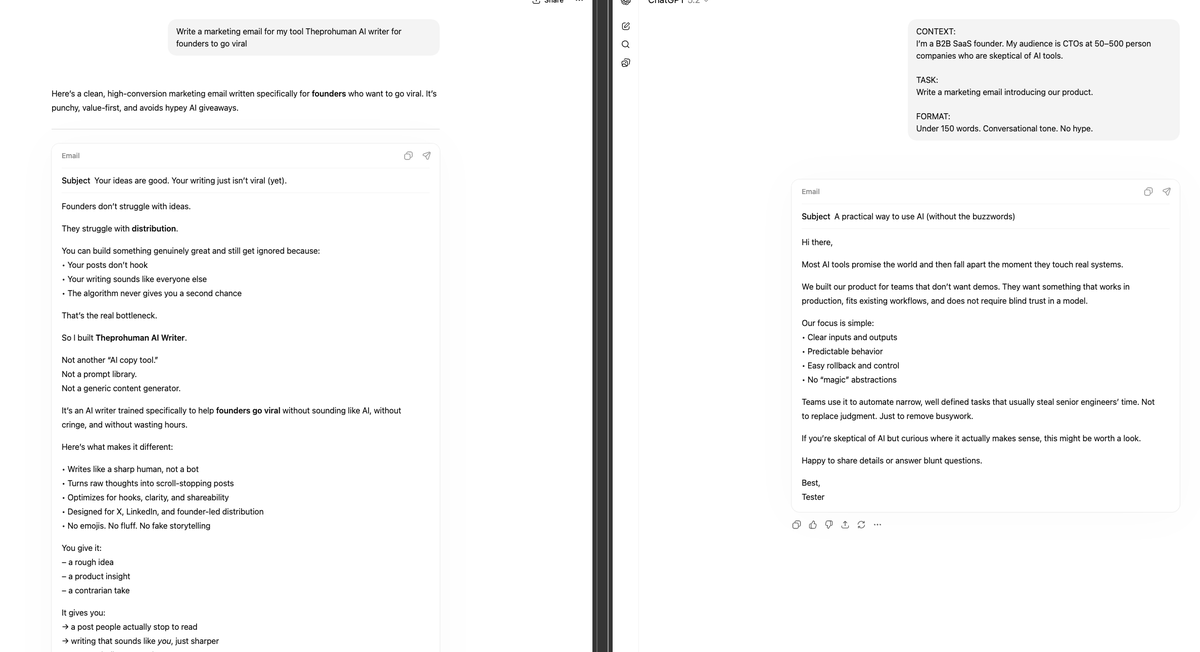
Bad: "Write a marketing email"
Good: "I'm a B2B SaaS founder. My audience is CTOs at 50-500 person companies. They're skeptical of AI tools."

Why it works:

Context = AI understands your situation
No context = AI guesses and gets it wrong

Add 1 sentence of context. Output quality doubles.Image
Read 12 tweets
Feb 5
You don't need a copywriter.
You don't need a data analyst.
You don't need an SEO specialist.

Claude Skills replaced all 5 freelancers I was paying $4,000-$10,000/month for.

Total cost now? $20/month.

Here's exactly how to set it up (takes 10 minutes): 👇
First, what are Claude Skills and why are they different from regular prompts?

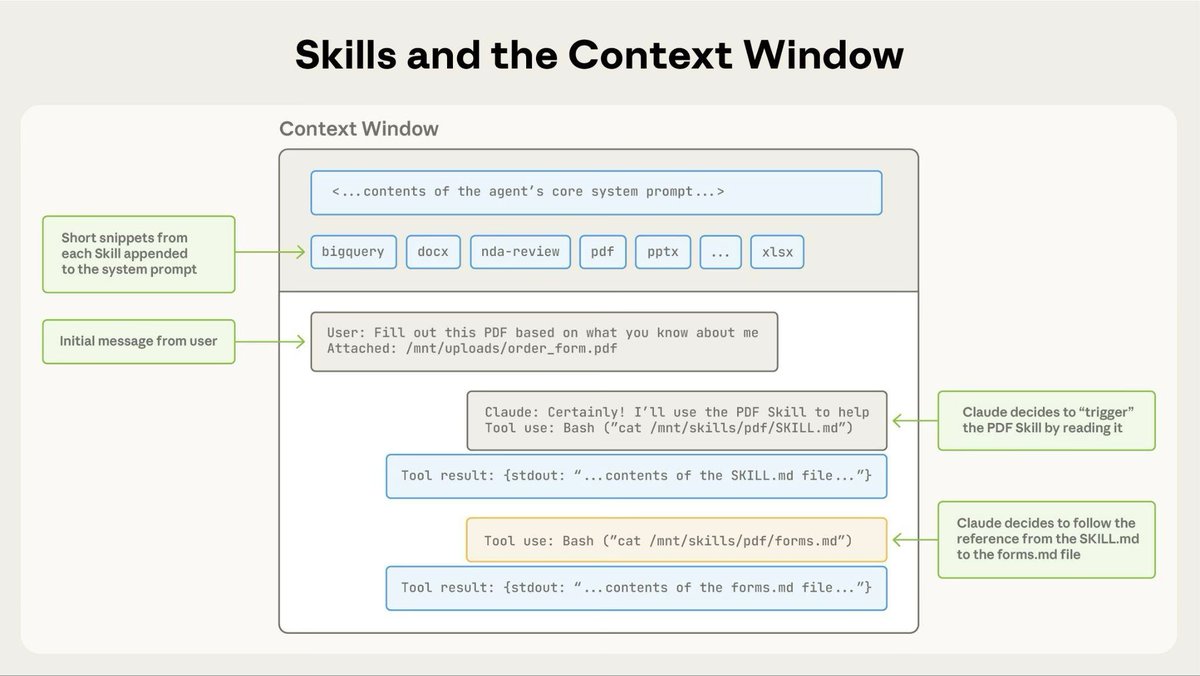
A prompt is a one-time instruction. You explain your brand voice, your format, your preferences. Every. Single. Time.

A Skill is a reusable instruction set you build ONCE. Claude loads it automatically whenever you need that type of work done.

Think of it like hiring a specialist who never forgets your brand guidelines and never sends you an invoice.Image
Here are the 5 freelancer roles Skills can handle:

→ Copywriter ($500-2,000/month): Blog posts, emails, social copy in YOUR voice
→ Data Analyst ($1,000-3,000/month): CSV analysis, reports, trend spotting
→ Graphic Designer ($500-1,500/month): Decks, formatted PDFs, HTML templates
→ Virtual Assistant ($800-2,000/month): Email drafts, SOPs, research summaries
→ SEO Specialist ($1,000-2,500/month): Briefs, keyword research, on-page optimization

That's 48-72 hours saved per month.
Read 10 tweets
Feb 5
I've been collecting JSON prompts that actually work in production for months.

Not the theoretical stuff you see in tutorials.

Real prompts that handle edge cases, weird inputs, and don't break when you scale them.

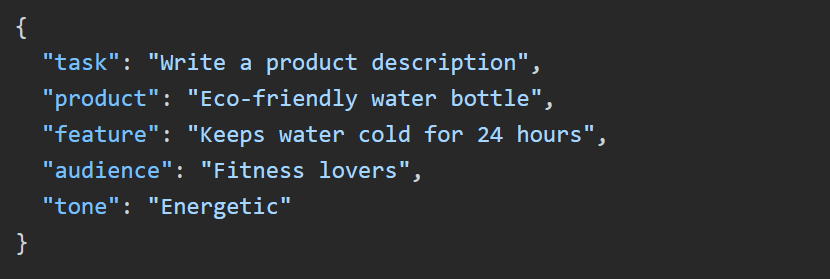
Here are the 12 that changed how I build with LLMs: Image
1. SCHEMA-FIRST ENFORCEMENT

Instead of: "Return JSON with name and email"

Use this:

"Return ONLY valid JSON matching this exact schema. No markdown, no explanation, no extra fields:
{
"name": "string (required)",
"email": "string (required, valid email format)"
}

Invalid response = failure. Strict mode."

Why it works: LLMs treat schema as hard constraint, not suggestion. 94% fewer malformed responses in my tests.
2. ESCAPE HATCH HANDLING

"If you cannot extract [field], return null for that field. Never skip fields, never add 'N/A' or 'unknown' strings.

Missing data = null value.

Example:
{"name": "John", "phone": null}

NOT: {"name": "John", "phone": "not provided"}"

Saved me from 1000+ string parsing bugs. Your downstream code will thank you.
Read 16 tweets

Did Thread Reader help you today?

Support us! We are indie developers!


This site is made by just two indie developers on a laptop doing marketing, support and development! Read more about the story.

Become a Premium Member ($3/month or $30/year) and get exclusive features!

Become Premium

Don't want to be a Premium member but still want to support us?

Make a small donation by buying us coffee ($5) or help with server cost ($10)

Donate via Paypal

Or Donate anonymously using crypto!

Ethereum

0xfe58350B80634f60Fa6Dc149a72b4DFbc17D341E copy

Bitcoin

3ATGMxNzCUFzxpMCHL5sWSt4DVtS8UqXpi copy

Thank you for your support!

Follow Us!

:(