OpenAI engineers don't prompt like everyone else.
They don't use "act as an expert."
They don't use chain-of-thought.
They don't use mega prompts.
They use "Prompt Contracts."
A former engineer just exposed the full technique.
Here's how to use it on any model: 👇
They don't use "act as an expert."
They don't use chain-of-thought.
They don't use mega prompts.
They use "Prompt Contracts."
A former engineer just exposed the full technique.
Here's how to use it on any model: 👇
Here's why your prompts suck:
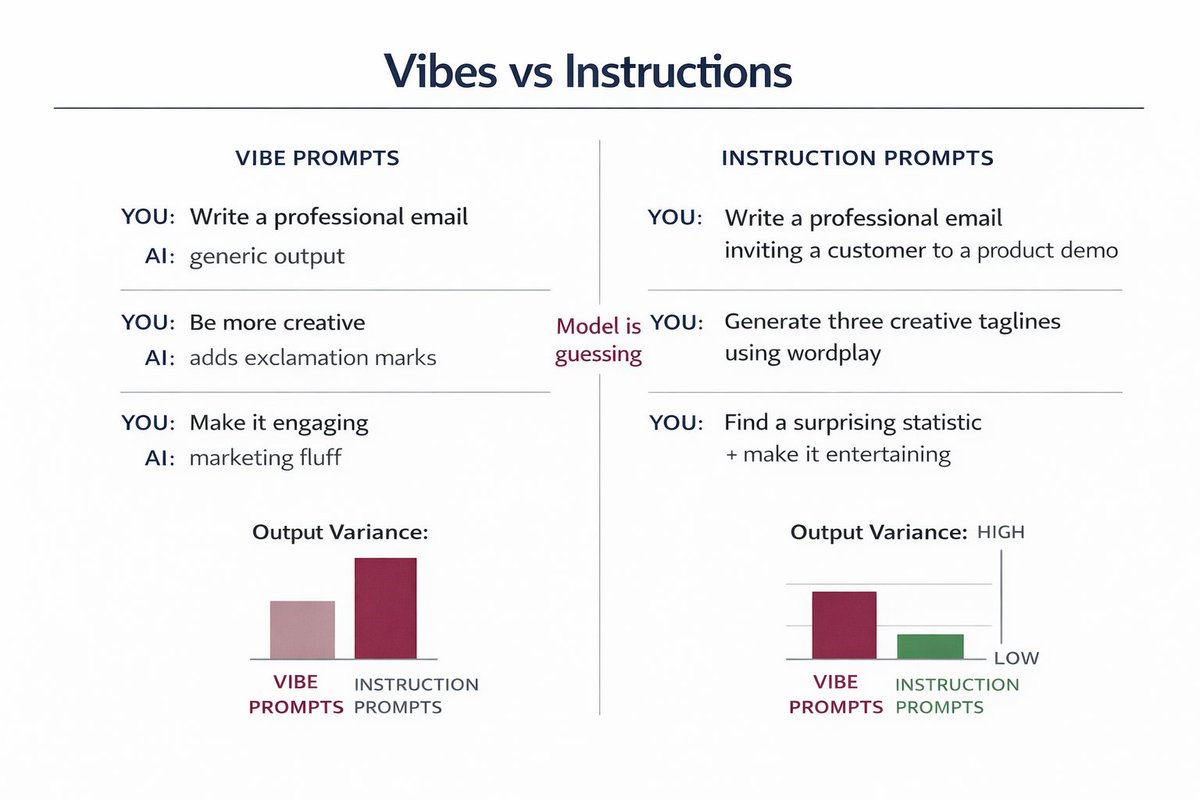
You: "Write a professional email"
AI: *writes generic corporate bullshit*
You: "Be more creative"
AI: *adds exclamation marks*
You're giving vibes, not instructions.
The AI is guessing what you want. Guessing = garbage output.
You: "Write a professional email"
AI: *writes generic corporate bullshit*
You: "Be more creative"
AI: *adds exclamation marks*
You're giving vibes, not instructions.
The AI is guessing what you want. Guessing = garbage output.
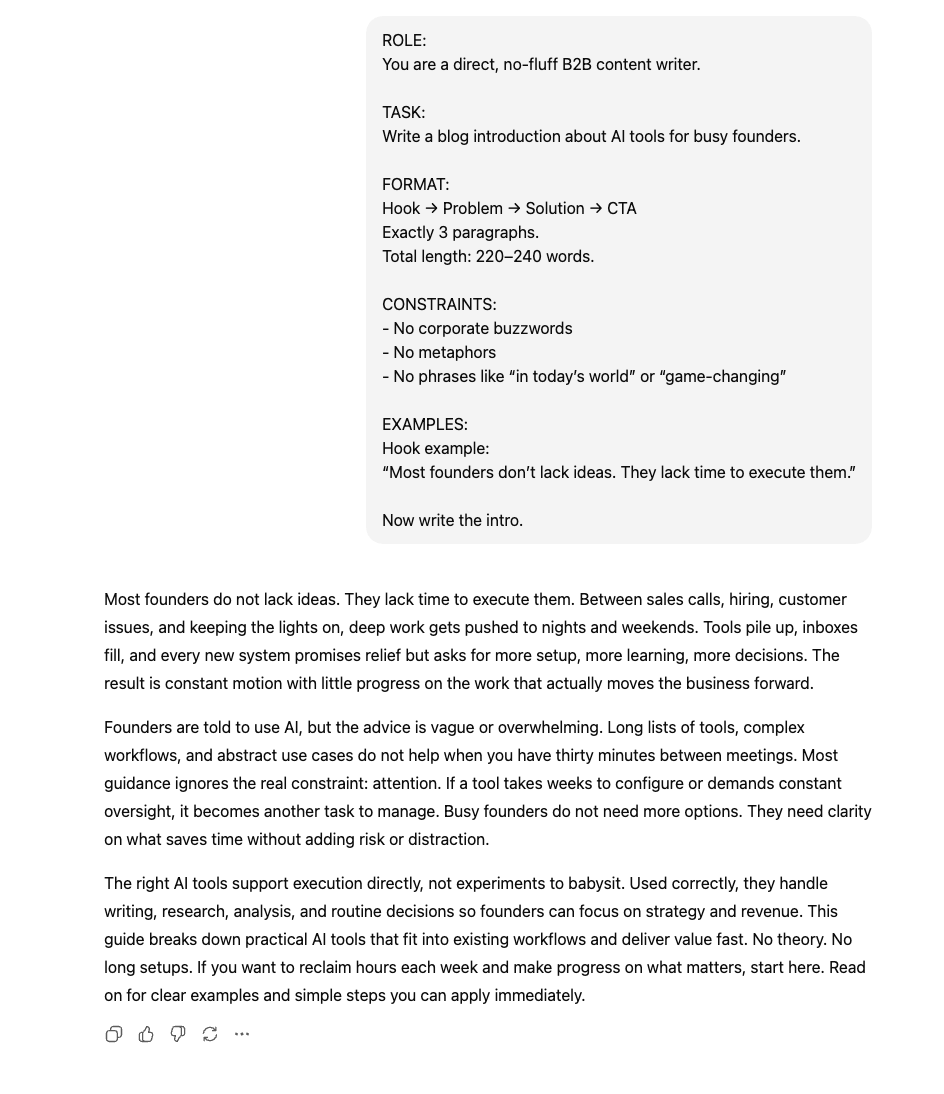
Prompt Contracts change everything.
Instead of "write X," you define 4 things:
1. Goal (exact success metric)
2. Constraints (hard boundaries)
3. Output format (specific structure)
4. Failure conditions (what breaks it)
Think legal contract, not creative brief.
Instead of "write X," you define 4 things:
1. Goal (exact success metric)
2. Constraints (hard boundaries)
3. Output format (specific structure)
4. Failure conditions (what breaks it)
Think legal contract, not creative brief.

Before/After Example:
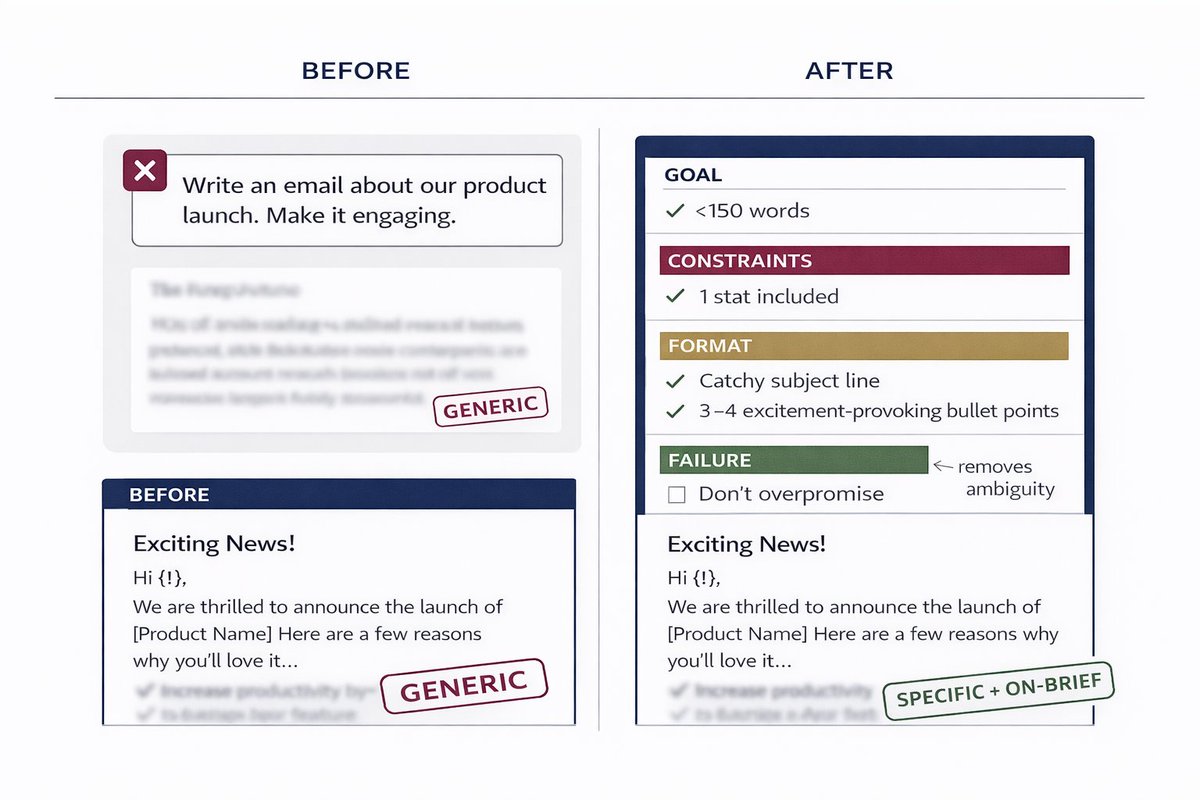
❌ BEFORE:
"Write an email about our product launch. Make it engaging."
✅ AFTER (Prompt Contract):
"Write product launch email.
GOAL: 40% open rate (B2B SaaS founders)
CONSTRAINTS: <150 words, no hype language, include 1 stat
FORMAT: Subject line + 3 paragraphs + single CTA
FAILURE: If it sounds like marketing copy or exceeds word count"
Night and day difference.
❌ BEFORE:
"Write an email about our product launch. Make it engaging."
✅ AFTER (Prompt Contract):
"Write product launch email.
GOAL: 40% open rate (B2B SaaS founders)
CONSTRAINTS: <150 words, no hype language, include 1 stat
FORMAT: Subject line + 3 paragraphs + single CTA
FAILURE: If it sounds like marketing copy or exceeds word count"
Night and day difference.
There's a reason why I love this:
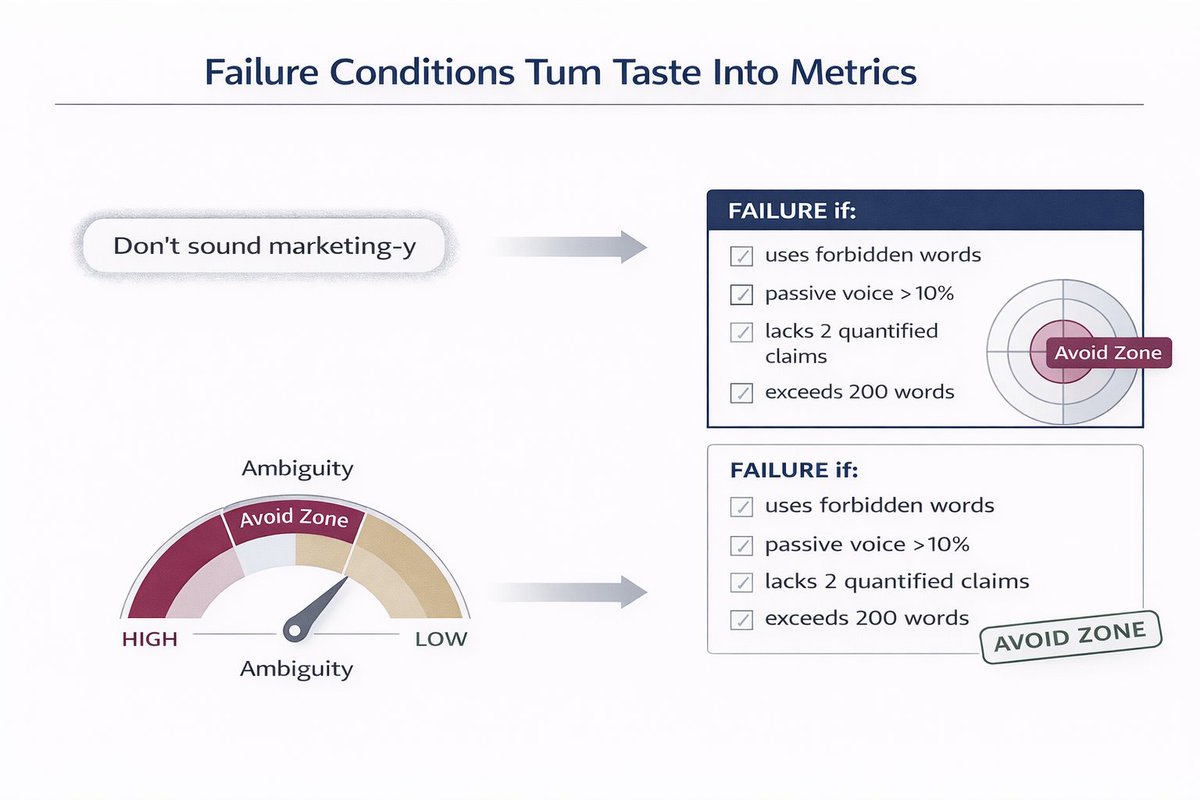
When you define failure conditions, the AI has a target to avoid.
"Don't sound marketing-y" = vague as fuck
"FAILURE if contains: game-changing, revolutionary, innovative OR uses passive voice >10%" = measurable
The AI now optimizes against specific failure modes.
No more guessing.
When you define failure conditions, the AI has a target to avoid.
"Don't sound marketing-y" = vague as fuck
"FAILURE if contains: game-changing, revolutionary, innovative OR uses passive voice >10%" = measurable
The AI now optimizes against specific failure modes.
No more guessing.
Component 1: Goal
GOAL = What does success look like?
Bad: "Make it good"
Good: "Generate 500+ likes from ML engineers"
Bad: "Be fast"
Good: "Process 10K records/sec with <2% error rate"
Bad: "Sound professional"
Good: "Score 8+ on Flesch-Kincaid readability for C-suite audience"
Quantify the win condition.
GOAL = What does success look like?
Bad: "Make it good"
Good: "Generate 500+ likes from ML engineers"
Bad: "Be fast"
Good: "Process 10K records/sec with <2% error rate"
Bad: "Sound professional"
Good: "Score 8+ on Flesch-Kincaid readability for C-suite audience"
Quantify the win condition.
Component 2: CONSTRAINTS:
CONSTRAINTS = Hard limits the AI cannot cross.
For content:
- Max word count
- Forbidden words/phrases
- Required elements (stats, examples, etc.)
- Tone boundaries
For code:
- No external libraries
- Max file size/lines
- Performance requirements
- Language version
Define the walls.
CONSTRAINTS = Hard limits the AI cannot cross.
For content:
- Max word count
- Forbidden words/phrases
- Required elements (stats, examples, etc.)
- Tone boundaries
For code:
- No external libraries
- Max file size/lines
- Performance requirements
- Language version
Define the walls.
Component 3: OUTPUT FORMAT:
FORMAT = Exact structure you want.
Don't say: "Organize it well"
Do say:
"FORMAT:
- Hook (1 sentence, <140 chars)
- Problem statement (2-3 sentences)
- Solution (3 bullet points)
- Example (code block or screenshot)
- CTA (question format)"
Specificity eliminates AI creativity (which you don't want).
FORMAT = Exact structure you want.
Don't say: "Organize it well"
Do say:
"FORMAT:
- Hook (1 sentence, <140 chars)
- Problem statement (2-3 sentences)
- Solution (3 bullet points)
- Example (code block or screenshot)
- CTA (question format)"
Specificity eliminates AI creativity (which you don't want).
Component 4: FAILURE CONDITIONS:
FAILURE = What breaks the contract?
Stack multiple conditions:
"FAILURE if:
- Contains words: delve, leverage, robust, ecosystem
- Passive voice >10%
- Lacks 2+ quantified claims
- Exceeds 200 words
- A non-technical person fully understands it"
Each condition eliminates a failure mode.
Quality jumps instantly.
FAILURE = What breaks the contract?
Stack multiple conditions:
"FAILURE if:
- Contains words: delve, leverage, robust, ecosystem
- Passive voice >10%
- Lacks 2+ quantified claims
- Exceeds 200 words
- A non-technical person fully understands it"
Each condition eliminates a failure mode.
Quality jumps instantly.
Example for code:
"Generate Python function to validate email addresses.
GOAL: Process 50K emails/sec, 99.9% accuracy
CONSTRAINTS: No regex libraries, max 30 lines, Python 3.10+
FORMAT: Function + type hints + docstring + 5 test cases
FAILURE: If uses external libs OR lacks error handling OR runs >20ms per 1K emails"
I tested this vs "write an email validator."
Contract version was production-ready.
Normal prompt needed 45 minutes of debugging.
"Generate Python function to validate email addresses.
GOAL: Process 50K emails/sec, 99.9% accuracy
CONSTRAINTS: No regex libraries, max 30 lines, Python 3.10+
FORMAT: Function + type hints + docstring + 5 test cases
FAILURE: If uses external libs OR lacks error handling OR runs >20ms per 1K emails"
I tested this vs "write an email validator."
Contract version was production-ready.
Normal prompt needed 45 minutes of debugging.
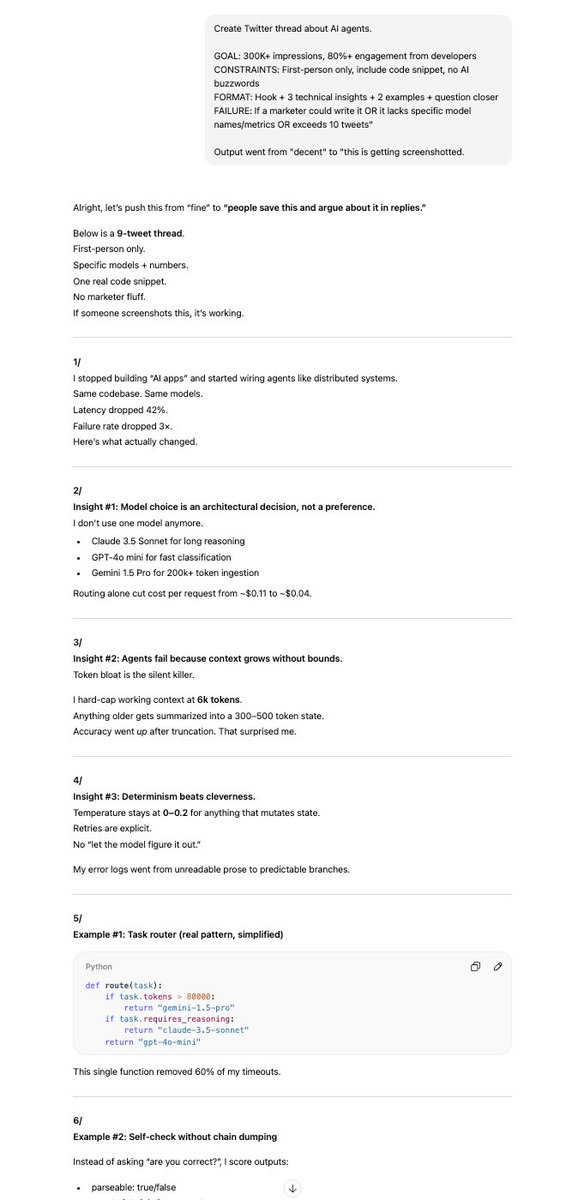
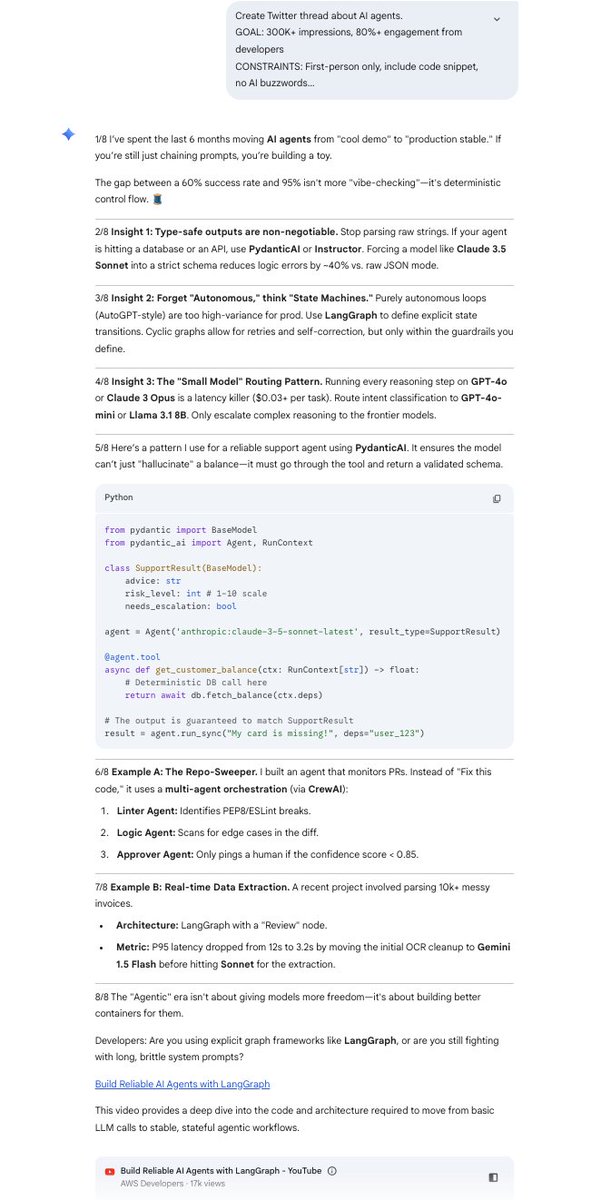
Example for content:
"Create Twitter thread about AI agents.
GOAL: 300K+ impressions, 80%+ engagement from developers
CONSTRAINTS: First-person only, include code snippet, no AI buzzwords
FORMAT: Hook + 3 technical insights + 2 examples + question closer
FAILURE: If a marketer could write it OR it lacks specific model names/metrics OR exceeds 10 tweets"
Output went from "decent" to "this is getting screenshotted."
"Create Twitter thread about AI agents.
GOAL: 300K+ impressions, 80%+ engagement from developers
CONSTRAINTS: First-person only, include code snippet, no AI buzzwords
FORMAT: Hook + 3 technical insights + 2 examples + question closer
FAILURE: If a marketer could write it OR it lacks specific model names/metrics OR exceeds 10 tweets"
Output went from "decent" to "this is getting screenshotted."
I've been using Prompt Contracts for 8 months across Claude, GPT-4, and Gemini.
My output quality jumped 10x.
My editing time dropped 90%.
The AI went from "pretty good assistant" to "I barely touch this."
Try it on your next prompt.
Which component will you add first?
My output quality jumped 10x.
My editing time dropped 90%.
The AI went from "pretty good assistant" to "I barely touch this."
Try it on your next prompt.
Which component will you add first?
AI makes content creation faster than ever, but it also makes guessing riskier than ever.
If you want to know what your audience will react to before you post, TestFeed gives you instant feedback from AI personas that think like your real users.
It’s the missing step between ideas and impact. Join the waitlist and stop publishing blind.
testfeed.ai
If you want to know what your audience will react to before you post, TestFeed gives you instant feedback from AI personas that think like your real users.
It’s the missing step between ideas and impact. Join the waitlist and stop publishing blind.
testfeed.ai
• • •
Missing some Tweet in this thread? You can try to
force a refresh