Sukh Sroay Profile picture
Feb 11 10 tweets 2 min read Read on X
BREAKING: I stopped watching 2-hour YouTube tutorials.

Grok now turns any video into a step-by-step skill plan.

Here are 8 prompts that convert videos into mastery:
1. Comprehensive Overview

Prompt:
“I’ve shared a YouTube video. Give me a high-level overview of everything being taught, broken into the main skills, concepts, and phases, as if you’re introducing it to someone seeing it for the first time.”
2. Skill Tree Extraction

Prompt:
“From this video, identify the complete skill tree required to master the topic.
Organize it from foundational skills to advanced execution.”
3. Actionable Learning Plan

Prompt:
“Turn this video into a structured learning plan with clear practice steps.
Assume I want to go from zero to competent as efficiently as possible.”
4. Core Concepts & Mental Models

Prompt:
“Extract the core concepts and mental models explained in this video.
Explain each one simply and show how it’s used in practice.”
5. Practical Application Focus

Prompt:
“Based on this video, list the specific actions I should take to apply what’s being taught in real-world scenarios.
Avoid theory and focus on execution.”
6. Knowledge Check & Evaluation

Prompt:
“Create questions or exercises based on this video that test whether someone truly understands the material, not just remembers it.”
7. Workflow & Process Mapping

Prompt:
“Extract any workflows, processes, or step-by-step methods mentioned in this video and reorganize them into the most logical execution order.”
8. Common Mistakes & Pitfalls

Prompt:
“Identify common mistakes beginners make when following the advice in this video and explain how to avoid each one.”
I hope you've found this thread helpful.

Follow me @sukh_saroy for more.

Like/Repost the quote below if you can:

• • •

Missing some Tweet in this thread? You can try to force a refresh

 

Keep Current with Sukh Sroay

Sukh Sroay Profile picture

Stay in touch and get notified when new unrolls are available from this author!

Read all threads

This Thread may be Removed Anytime!

PDF

Twitter may remove this content at anytime! Save it as PDF for later use!

Try unrolling a thread yourself!

how to unroll video
  1. Follow @ThreadReaderApp to mention us!

  2. From a Twitter thread mention us with a keyword "unroll"
@threadreaderapp unroll

Practice here first or read more on our help page!

More from @sukh_saroy

Feb 10
BREAKING: AI can now build you a business in 24 hours.

Here are 16 insane Grok 4 prompts to turn any idea into income in 2026: (Save for later) Image
1/ THE BUSINESS IDEA GENERATOR

"I have $500 and 10 hours per week. Analyze current market gaps, my skills in [your skills], and generate 5 business ideas I could launch this month. Include startup costs, timeline, and first revenue projections."

This prompt is stupid powerful.
2/ THE COMPETITOR DESTROYER

"Act as a market analyst. Research [competitor name] and identify 3 weaknesses in their offering. Then create a differentiation strategy I could execute with limited budget to capture their customers."

Watch them panic.
Read 19 tweets
Feb 10
I DON’T UNDERSTAND WHY PEOPLE DON’T USE GROK FOR STOCKS.

Most traders are looking at charts from 6 months ago.
Grok analyzes real-time sentiment on X to predict future.

Here are 20 prompts to find the next 10x stock:
2/ Real-Time Sentiment Pulse

Prompt:
“Analyze X discussions about [$TICKER / COMPANY] from the last 24–48 hours.
Classify sentiment (bullish / neutral / bearish) and explain why sentiment is shifting.”
3/ Sudden Attention Spike Detector

Prompt:
“Find stocks that saw a sudden spike in mentions on X in the last 12 hours, excluding major news outlets. Focus on organic chatter, not headlines.”
Read 22 tweets
Feb 9
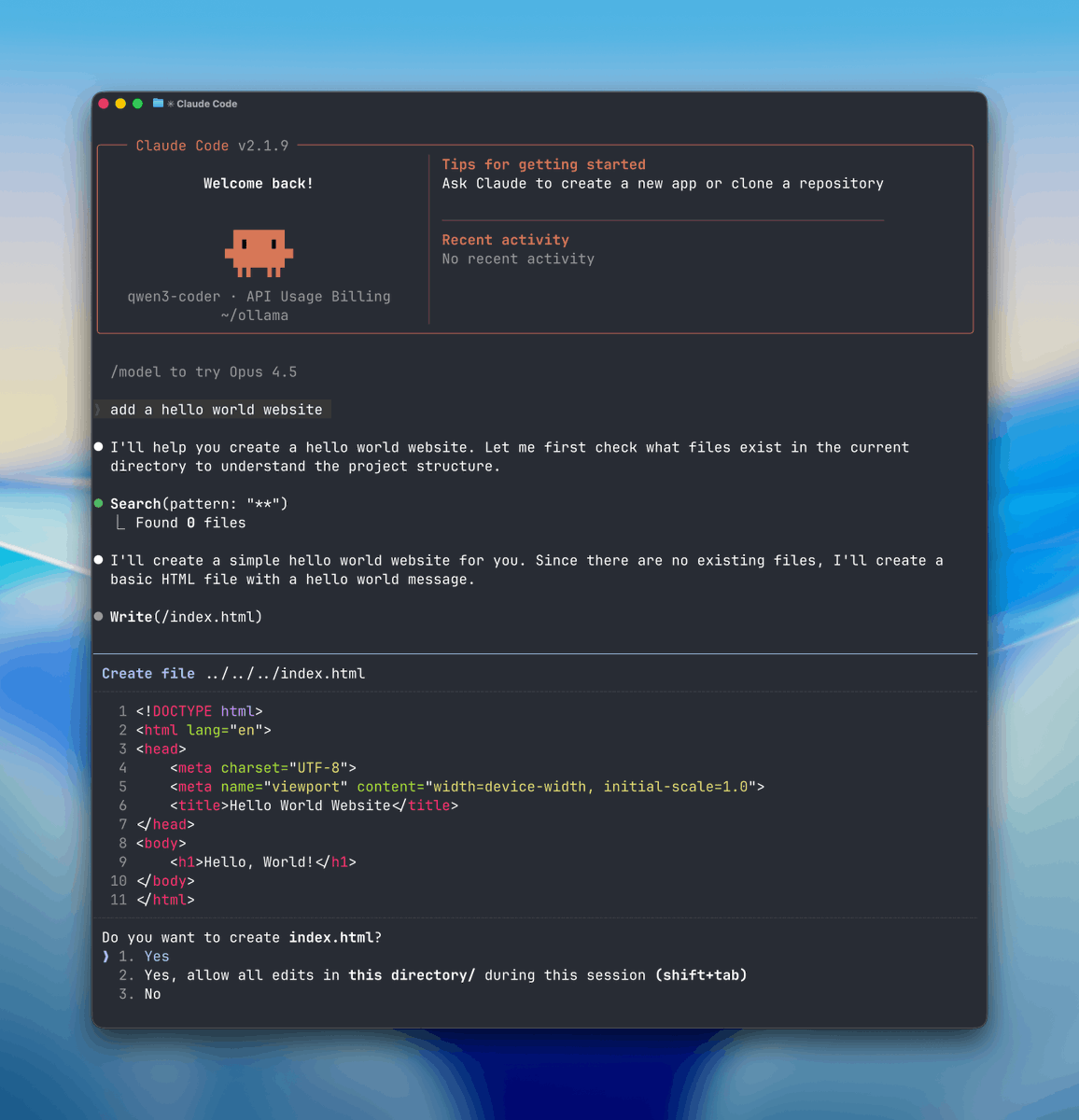
🚨BREAKING: You can now run Claude Code for FREE.

No API costs. No rate limits. 100% local on your machine.

Here's how to run Claude Code locally (100% free & fully private): Image
STEP 1: Select Your Local “Brain” (Ollama)

First you need a local engine that can run AI models and handle tool or function calls.

Here we will use Ollama so download

Once it’s installed, Ollama runs quietly in the background on both Mac and Windows. ollama.com
The installer will set up Ollama and add it to your system path.

After installation, verify Ollama is working:

Ollama runs as a background service automatically after installation.

You should see it running on http:// localhost: 1143
Read 8 tweets
Feb 6
If Google is trying to make you pay for Gmail storage, do this before you upgrade.

I cleared almost 9GB in one afternoon
(14.9/15GB → 6GB).

No apps. No hacks.
Just a few settings most people never check.

Hope this saves you money like it did for me 👇
1. Find the real storage hogs inside Gmail

Go to your Gmail storage breakdown first:
- Visit drive.google.com/settings/stora…
- Check what's using space across Gmail, Drive, and Photos
- Click on "Gmail" to see your biggest culprits

Then in Gmail search bar, type:
- `has:attachment larger:10M` (finds emails over 10MB)
- Sort by size, select multiple, and delete what you don't need
- Try `larger:5M` or `larger:3M` for a more aggressive cleanup

Just clearing big attachments can free gigabytes instantly.

(FOLLOW ME FOR MORE LIKE THIS)
2. Nuke entire categories in bulk

Gmail sorts emails automatically use this to delete fast:
- Search: `category:promotions` (all promo emails)
- Search: `category:social` (Facebook, LinkedIn notifications)
- Search: `category:updates` (receipts, confirmations)
- Click the checkbox → "Select all conversations that match this search"
- Delete in one shot

These categories pile up over years most are safe to delete.
Read 11 tweets
Feb 5
BREAKING: Google Gemini just launched a new feature called Guided Learning.

You can now use it to learn literally anything, step by step, like a personal tutor.

Here’s how to access it 👇 Image
How to access Guided Learning

→ Open Google Gemini (web)
→ Start a new conversation
→ Select “Guided learning” from the mode list
→ Ask a question or upload a document to study

That’s it. No setup. No plugins.
What makes Guided Learning different

Gemini walks you through concepts step by step, making sure you actually understand before moving on.
Read 6 tweets
Feb 5
I don’t understand why more people aren’t using ChatGPT for stock trading.

It’s literally a free research analyst.

Here are 10 powerful prompts traders & investors are sleeping on👇
1. Market Analysis
“Analyze the current stock market environment with a focus on [specific stock or sector]. Identify short-term and long-term trends, key support and resistance levels, and any emerging patterns. Factor in recent earnings, macroeconomic news, and industry developments, then suggest potential investment or trading opportunities.”
2. Portfolio Diversification
“I currently hold a portfolio consisting of [list stocks/sectors]. Evaluate my concentration risk and suggest ways to diversify further while maintaining balanced returns. Recommend new sectors, asset classes, or specific stocks, and explain how each addition reduces overall portfolio risk.”
Read 12 tweets

Did Thread Reader help you today?

Support us! We are indie developers!


This site is made by just two indie developers on a laptop doing marketing, support and development! Read more about the story.

Become a Premium Member ($3/month or $30/year) and get exclusive features!

Become Premium

Don't want to be a Premium member but still want to support us?

Make a small donation by buying us coffee ($5) or help with server cost ($10)

Donate via Paypal

Or Donate anonymously using crypto!

Ethereum

0xfe58350B80634f60Fa6Dc149a72b4DFbc17D341E copy

Bitcoin

3ATGMxNzCUFzxpMCHL5sWSt4DVtS8UqXpi copy

Thank you for your support!

Follow Us!

:(