Wow. I genuinely shouldn't be posting this.
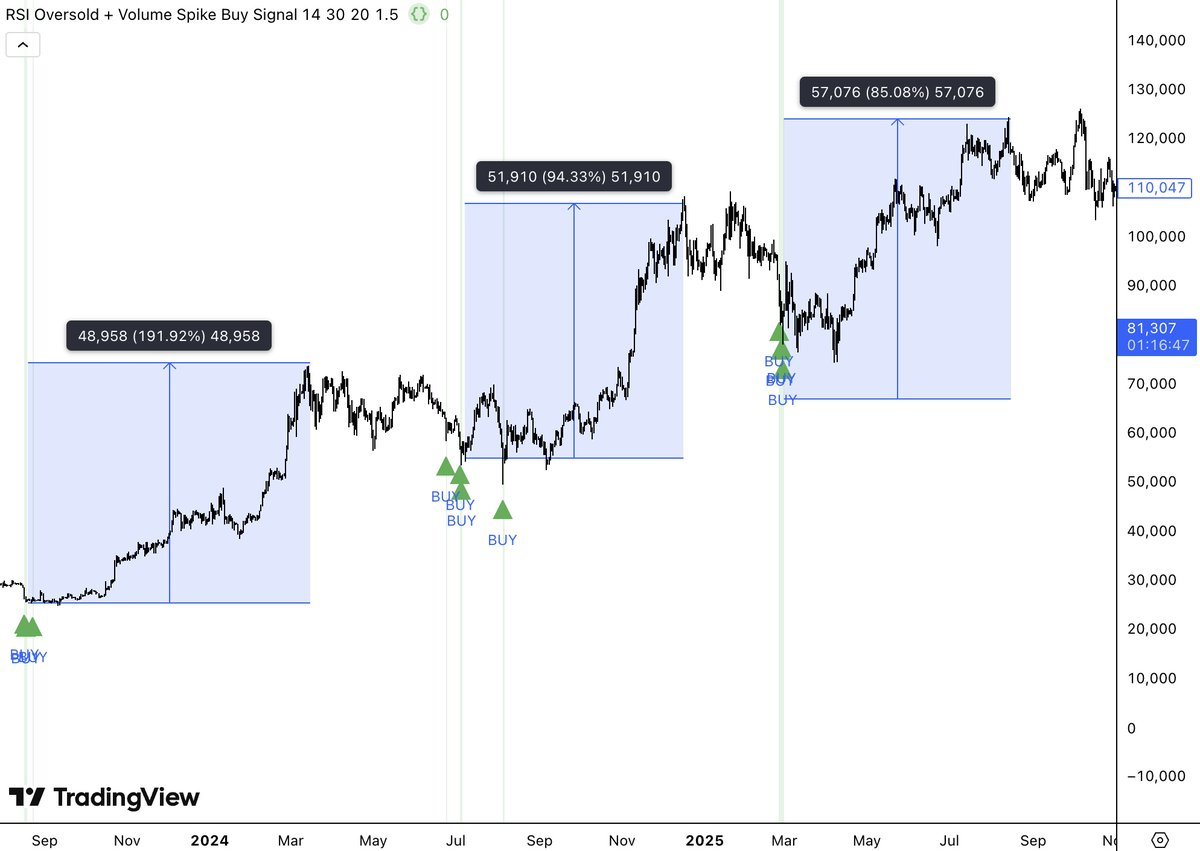
I just vibe-coded a market indicator with Claude Code, which printed buy signals that returned +190%, +95%, and +85%.
Claude Code is literally the most powerful trading quant of all time.
Here's exactly how I built it (copy me to build your own)
Step 1. Make sure you have these requirements:
• Claude Code Desktop App
• Node.js v18+ installed on your computer
• TradingView Desktop App
• The TradingView MCP installed (full guide here on my page under "Articles")
Step 2. Open Claude Code
On your local desktop device, create a new folder titled "Vibe-Coding Indicators" and open it inside a fresh Claude Code chat.
This is your dedicated workspace - every indicator you build will live here.
Step 3. Start building your indicators
You have a few options here:
a) Build indicators based on your own pre-existing market strategy.
b) Source market strategies online.
c) Use Claude to help build a strategy from scratch.
Some things to consider:
• What conditions need to be true for a signal to fire?
• What do you want to see on the chart?
• What timeframe do you want to focus on? (I've found that trying to code indicators for multiple timeframes doesn't work well; just stick to HTF or LTF)
Describe all this the same way you'd explain it to another trader; the more specific you are, the better the output.
Step 4. Use this prompt structure
"I'm building a trading indicator for TradingView. I want you to build it in Pine Script V6 and give me the full script so I can deploy it. I want to build an indicator for [insert conditions]."
Example: "I want a buy signal that only fires when RSI is below 40, price is above the 200 EMA, and the current candle volume is at least 1.5x the 20-period average. Paint a green arrow below the candle when triggered."
Claude will then write your full Pine Script.
Step 5. Deploy it to TradingView
Copy the entire code block Claude generates.
Inside TradingView:
Click "Indicators, metrics, and strategies" in the top menu.
Scroll to "My Scripts" and create a new script.
Paste the entire Pine Script Claude gave to you (make sure to start on line 1).
Finally, click "Add To Chart."
Done. Your indicator is live.
Step 6. Take it to the next level
Once you're comfortable with the basic flow, you can:
• Add alerts: "Set an alert anytime [x] happens on [x] indicator."
• Backtest it: "Turn my indicator into a backtestable strategy."
• Audit it: "Improve this indicator and make it more accurate."
• Steal strategies: Have Claude scrape strategies from elite traders on the web
I can't believe more people aren't talking about this.
My full article guide for this exact setup is live now, and I will handhold you through every step (see my profile).
Save this so you don't forget it!
I just vibe-coded a market indicator with Claude Code, which printed buy signals that returned +190%, +95%, and +85%.
Claude Code is literally the most powerful trading quant of all time.
Here's exactly how I built it (copy me to build your own)
Step 1. Make sure you have these requirements:
• Claude Code Desktop App
• Node.js v18+ installed on your computer
• TradingView Desktop App
• The TradingView MCP installed (full guide here on my page under "Articles")
Step 2. Open Claude Code
On your local desktop device, create a new folder titled "Vibe-Coding Indicators" and open it inside a fresh Claude Code chat.
This is your dedicated workspace - every indicator you build will live here.
Step 3. Start building your indicators
You have a few options here:
a) Build indicators based on your own pre-existing market strategy.
b) Source market strategies online.
c) Use Claude to help build a strategy from scratch.
Some things to consider:
• What conditions need to be true for a signal to fire?
• What do you want to see on the chart?
• What timeframe do you want to focus on? (I've found that trying to code indicators for multiple timeframes doesn't work well; just stick to HTF or LTF)
Describe all this the same way you'd explain it to another trader; the more specific you are, the better the output.
Step 4. Use this prompt structure
"I'm building a trading indicator for TradingView. I want you to build it in Pine Script V6 and give me the full script so I can deploy it. I want to build an indicator for [insert conditions]."
Example: "I want a buy signal that only fires when RSI is below 40, price is above the 200 EMA, and the current candle volume is at least 1.5x the 20-period average. Paint a green arrow below the candle when triggered."
Claude will then write your full Pine Script.
Step 5. Deploy it to TradingView
Copy the entire code block Claude generates.
Inside TradingView:
Click "Indicators, metrics, and strategies" in the top menu.
Scroll to "My Scripts" and create a new script.
Paste the entire Pine Script Claude gave to you (make sure to start on line 1).
Finally, click "Add To Chart."
Done. Your indicator is live.
Step 6. Take it to the next level
Once you're comfortable with the basic flow, you can:
• Add alerts: "Set an alert anytime [x] happens on [x] indicator."
• Backtest it: "Turn my indicator into a backtestable strategy."
• Audit it: "Improve this indicator and make it more accurate."
• Steal strategies: Have Claude scrape strategies from elite traders on the web
I can't believe more people aren't talking about this.
My full article guide for this exact setup is live now, and I will handhold you through every step (see my profile).
Save this so you don't forget it!
• • •
Missing some Tweet in this thread? You can try to
force a refresh