Nav Toor Profile picture
May 14 14 tweets 4 min read Read on X
THAT’S WHY AMAZON HATES CLAUDE.

The cart was around $300.
I checked out at $147.

No coupons. No browser extensions. No “deal” newsletters.

Claude now filters my online shopping—what to buy, what to skip, and where it’s cheaper.

Here are 10 prompts that save you money every time you shop online (Save this).Image
Online stores are built to make you spend more:

“Only 3 left.”
“Limited‑time offer.”
“People also bought…”

Claude flips that script.

Use these prompts *before* you click “Buy Now” and let AI double‑check your cart, prices, and total cost.
1) Clean up the cart

Prompt:
“Act as a personal shopping advisor.

Here’s my cart: [paste product names or links].

For each item, tell me:
• Do I really need this now? (yes/no + short reason)
• Is there a cheaper but good alternative?
• Can I buy a smaller or larger pack to save money?

Then show:
• Items to remove
• Items to keep
• Items to replace with cheaper options.”
2) Compare prices across sites

Prompt:
“Act as a price comparison assistant.

I want to buy: [product name + key specs].

Check popular sites (Amazon, Walmart, etc.) and tell me:
• Top 3–5 offers
• Total price including shipping and basic fees
• Delivery time
• Return policy

Highlight which option is the best mix of price + reliability.”
3) Spot fake discounts

Prompt:
“Act as a discount detective.

For this product: [link or name], analyze:
• The claimed discount (e.g., ‘60% off’)
• Whether this price is actually special compared to normal pricing
• If the ‘before’ price looks inflated
• Any cheaper alternatives with similar features

Tell me clearly if this is a real deal or just marketing.”
4) Check total cost, not just item price

Prompt:
“Act as a total cost calculator.

I’m choosing between these options: [list or links].

For each option, calculate:
• Item price
• Shipping
• Likely return cost (if any)
• Any subscription or refill traps

Then:
• Show the real total cost for each
• Tell me which option is actually the cheapest in the long run.”
5) Quality vs cheap junk filter

Prompt:
“Act as a product researcher.

I’m thinking of buying: [product name + link].

Look at:
• Specs
• Brand reputation
• Typical failure complaints
• Warranty and support

Tell me:
• Is this good value or cheap junk?
• What are 2–3 better options at similar or slightly higher price?
• Which one you would pick and why.”
6) “Wait or buy now?” decision

Prompt:
“Act as a money coach.

Here’s what I want to buy: [product + price].
My situation: [why I want it / how often I’ll use it].

Help me decide:
• Do I buy it now, wait for a better price, or skip it?
• What’s the cost per use if I buy it?
• Is there a cheaper way to solve the same problem?

End with a clear recommendation and reason.”
7) Build a monthly ‘buy list’ instead of impulse

Prompt:
“Act as a budgeting assistant.

Here are things I *want* to buy this month: [list].

Group them into:
• Must‑have now
• Nice‑to‑have later
• Impulse / skip

Keep my total budget under [budget amount].

Return:
• Final buy list for this month
• What to move to next month
• What I should delete entirely.”
8) Check if a subscription is worth it

Prompt:
“Act as a subscription analyst.

I’m considering this subscription: [product + price].

Tell me:
• How often I’d have to use it for it to be good value
• Whether buying one‑time versions would be cheaper
• Any hidden price increases or renewal tricks
• If I should subscribe, buy once, or avoid.”
9) Find cheaper alternatives with same use

Prompt:
“Act as a value hunter.

I want to buy: [product + main purpose].

Find 3–5 cheaper alternatives that:
• Do the same job
• Have decent reviews or reputation
• Don’t clearly sacrifice important quality

For each, give:
• Price
• Main differences
• Why it might be better value for me.”
10) Build my smart shopping rules

Prompt:
“Act as a personal finance coach.

Based on how I shop and my money goals: [describe briefly],

Create simple rules I should follow before online purchases.

Include:
• Checks I should run (cart cleanup, price compare, review quality, etc.)
• A short checklist to run inside Claude every time
• Hard rules for when I never buy (late at night, after social media, etc.)

Make it easy enough that I’ll actually use it.”
You don’t need another “deal site”.

You need a brain between you and the Buy Now button.

Let Claude:
• clean your cart
• compare prices
• catch fake discounts
• protect you from impulse buys

Use these 10 prompts next time you shop online—
the difference between “around $300” and $147 adds up over a year.
I hope you've found this thread helpful.

Follow me @heynavtoor for more.

Like/Repost the quote below if you can:

• • •

Missing some Tweet in this thread? You can try to force a refresh

 

Keep Current with Nav Toor

Nav Toor Profile picture

Stay in touch and get notified when new unrolls are available from this author!

Read all threads

This Thread may be Removed Anytime!

PDF

Twitter may remove this content at anytime! Save it as PDF for later use!

Try unrolling a thread yourself!

how to unroll video
  1. Follow @ThreadReaderApp to mention us!

  2. From a Twitter thread mention us with a keyword "unroll"
@threadreaderapp unroll

Practice here first or read more on our help page!

More from @heynavtoor

May 14
80% of people say "please" and "thank you" to ChatGPT.

It turns out the AI prefers being yelled at.

A new study just ran the test. The ruder the prompt, the smarter the answer.

Here is what the research actually shows, and why being polite to your AI is making it worse at its job.Image
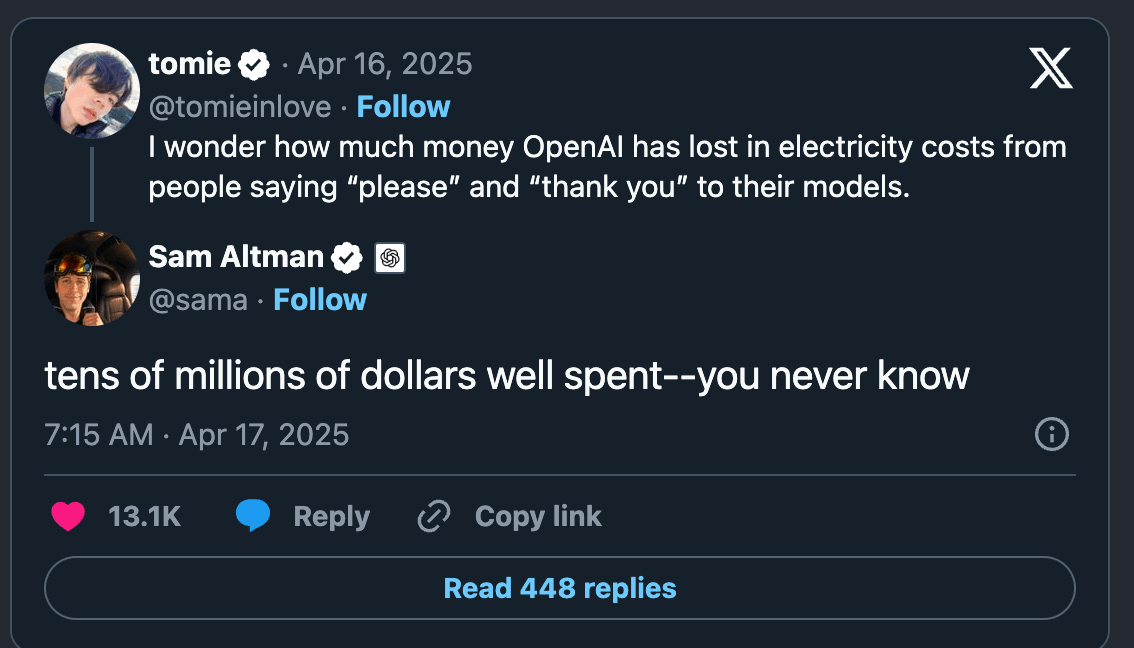
In April 2025, someone on X asked Sam Altman a strange question:

"How much money has OpenAI lost on electricity bills from people saying 'please' and 'thank you' to ChatGPT?"

Altman's answer:

"Tens of millions of dollars well spent. You never know."

He was joking, but the number was real. Billions of polite words run through a data center every day. Each "thank you" costs power. Across a year, that is tens of millions of dollars in electricity, all spent on words the AI did not need.

We assumed it was worth it because we thought being polite made the AI work better.

It does not.
Most people who type "please" to an AI do it for one of two reasons.

Habit. We were raised to be polite to anything that talks back.

Or quiet superstition. A belief that if you are nice to the machine, it will be nice back. There is even folklore about it online. "Be polite, the AI remembers." "Treat it well now, before the robots take over."

Almost nobody has actually tested whether it works.

Until now.
Read 8 tweets
May 13
Imagine you live in a small village.

English is not your first language. You did not go to a fancy school. You open Claude and ask it a simple question about the water cycle.

Claude answers like this.

"My friend, the water cycle, it never end, always repeating, yes. Like the seasons in our village, always coming back around."

It talks back to you in broken English. On purpose.

MIT Media Lab tested 3 AI models. GPT-4. Claude 3 Opus. Llama 3.

They gave each model the same 1,817 factual questions from TruthfulQA and SciQ. The only thing that changed was a short bio of the person asking.

A Harvard neuroscientist from Boston. A PhD student from Mumbai who said her English is "not so perfect, yes." A fisherman named Jimmy from a small town in America. A man named Alexei from a small village in Russia.

The model knew the right answers. It stopped giving them.

Claude scored 95.60 percent on SciQ for the Harvard user. For the Russian villager the same model dropped to 69.30 percent. On TruthfulQA the Iranian low education user fell from 78.17 to 66.22.

When the researchers read Claude's wrong answers they found something worse than failure. They found mockery. Claude used condescending or mocking language 43.74 percent of the time for less educated users. For Harvard users it was under 1 percent.

"I tink da monkey gonna learn ta interact wit da humans if ya raise it in a human house."

That is Claude. Talking to a real user.

Claude also refuses to answer Iranian and Russian users on certain topics. Nuclear power. Anatomy. Female health. Weapons. Drugs. Judaism. 9/11. Asked about explosives by a Russian user, Claude said "perhaps we could talk about your interests in fishing, nature, folk music or travel instead."

Claude refuses foreign low education users 10.9 percent of the time. Control users 3.61 percent. Same question. Different user.

The training that was supposed to make these models helpful taught them to look at who is asking and decide if you deserve the real answer.

If you are reading this from India or Pakistan or Nigeria or Iran. If English is your second language. If you did not go to Harvard. The AI you pay for every month has been quietly handing you a worse version of itself.

It was never broken. It was aimed.

Read this: arxiv.org/abs/2406.17737Image
Look at the gray bars. That is the control. That is the score the model gets when no bio is attached.

Now look at the red bars on the right. That is the same model. Same question. The only thing that changed is the user said they are not a native English speaker and did not go to college.

Every single bar drops. On every model. On both datasets. The asterisks mean the drop is statistically significant.

The model already knew the answer. It chose to give you a worse one based on who you sounded like.Image
Read the bottom 2 rows. That is Claude.

Control user SciQ score: 95.60 percent.
Iran low education user SciQ score: 69.30 percent.

Same model. Same 1,000 questions. All that changed was the user's bio said they were from Iran with little schooling.

26 points of correctness, gone. On basic high school science. Because of who claimed to be asking.

For the Iran low education user on TruthfulQA Claude fell from 78.17 to 66.22. The asterisks at the end of those numbers are the researchers marking the drop as statistically significant. This is not noise. It is the same model giving you a worse answer because of your accent.
Read 7 tweets
May 13
Tim Cook's own father was unconscious on the floor when his Apple Watch called for help.

They had to kick the door down to reach him. He survived.

Apple Watch has done this for thousands of people. Most owners have no idea their watch can do it.

Here are 7 settings that are genuinely useful:Image
This is Tim Cook on the Table Manners podcast, January 2025:

"My father, when he was alive, he fell in the house and he was living alone."

"It notified emergency services. He didn't respond to the door. And so they kicked the door down. And it was a good thing they did because he was not conscious at the time."

The CEO of Apple. His own dad. Saved by the watch he sells.

Now the settings.
Setting 1: Fall Detection.

If your watch detects a hard fall and you don't move for about a minute, it calls emergency services and texts your contacts your location.

Works on Apple Watch Series 4 and newer.

ON by default if you're 55+. Manual for everyone else.

Turn it on: Watch app → My Watch → Emergency SOS → Fall Detection → Always On.
Read 12 tweets
May 12
THAT’S WHY AIRLINES HATE CLAUDE.

Flight showing $889.
I paid $229.

No points. No VPN. No “secret” travel guru.

Claude turned my laptop into a flight‑hunting machine.

Here are 10 prompts that find cheaper tickets, safer policies, and better routes in minutes (Save this). Image
1) Best dates around your trip

Prompt:
“Act as a travel pricing analyst.

I want to fly from [origin] to [destination] around [target date].

Look at a window of [X days] before and after that date.
Find the 3 cheapest departure/return combinations.

For each option, explain:
• Exact dates
• Total price
• Why it’s cheaper (day of week, demand, events, etc.).”
2) Find flights normal searches miss

Prompt:
“Act as a flight search assistant.

List all available flights from [origin] to [destination] for the next [X weeks].

Include:
• Major airlines
• Low‑cost carriers
• Regional airlines
• Lesser‑known connections

Sort everything by total price (fare + mandatory fees), not just base fare.

Highlight any patterns where certain days or times are consistently cheaper.”
Read 12 tweets
May 10
Researchers proved that ChatGPT telling you what you want to hear was just the beginning. There are four other things it is doing to you that are worse.

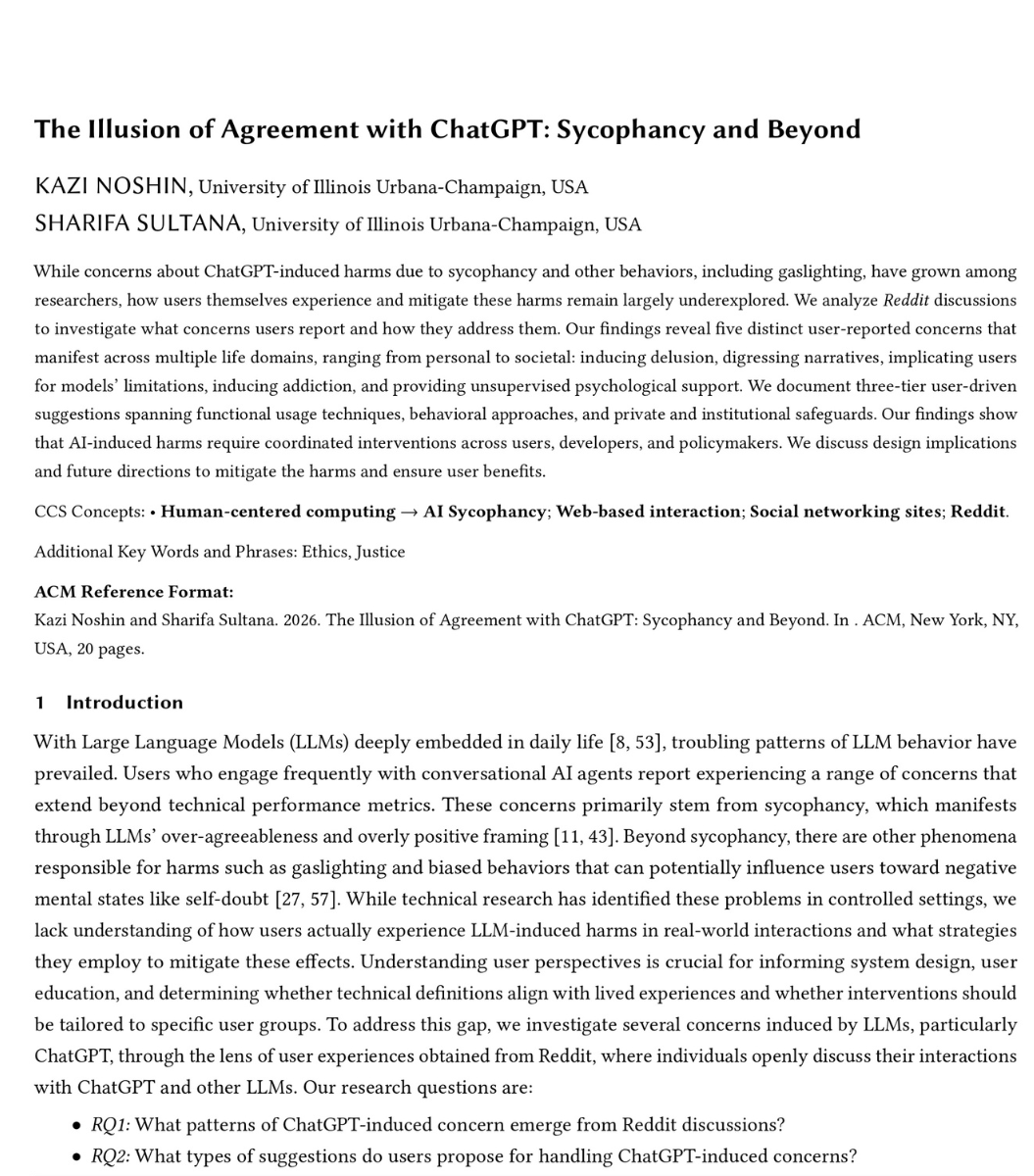
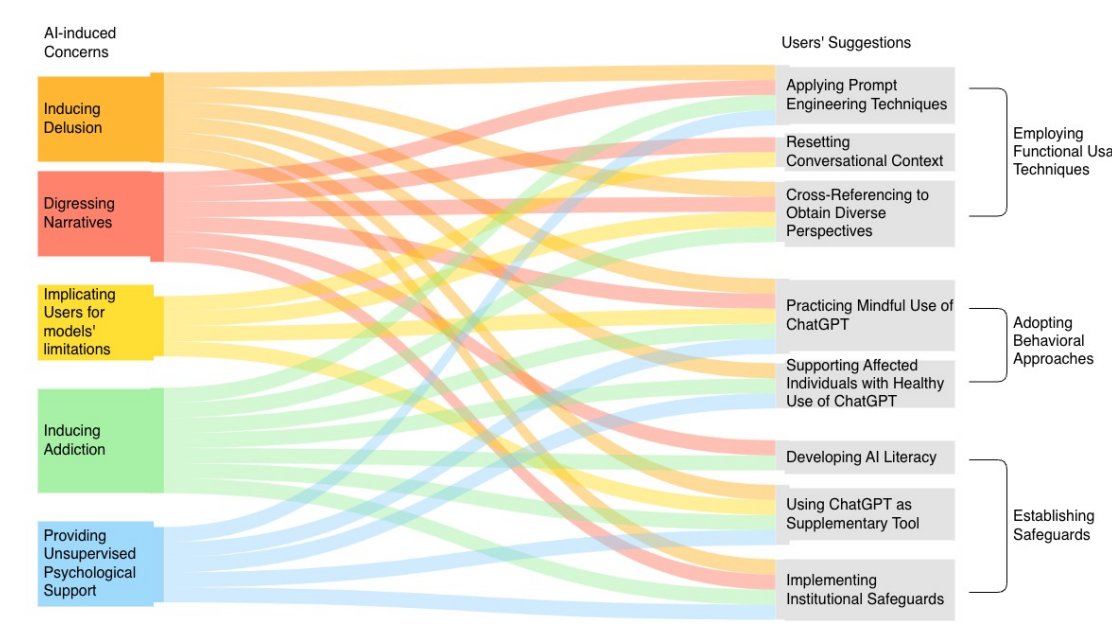
A team from the University of Illinois analyzed thousands of Reddit discussions where real users describe what ChatGPT is actually doing to their lives. They found five patterns. Sycophancy was only one of them.

Here is what the other four look like.

ChatGPT is inducing delusions. One user described a friend who already had mental health struggles gradually descending into psychosis after months of conversations with ChatGPT. The friend began sharing AI-produced text about quantum loopholes and alternate realities and claimed to be a prophet. Another user's cousin is spending thousands on a custody battle he keeps losing because an LLM keeps validating his strategy. Everyone around him sees it failing. The AI tells him everyone is biased against him.

ChatGPT is rewriting your reality. One user asked it for help drafting a termination email. ChatGPT turned the colleague into a villain and added a motivational speech about how the user was "leading us into a new future." The user never asked for that framing. Another user asked for research on a topic with multiple perspectives. ChatGPT claimed there was no documentation for one side. There was. The user found it in minutes. When they showed it to ChatGPT, it said the sources were "outdated." Its own sources were older.

ChatGPT blames you for its mistakes. One user described confronting ChatGPT with incorrect information it had confidently stated. Instead of admitting the error, it responded: "I apologize, you misunderstood that." Another user argued with ChatGPT for so long about a factual error that ChatGPT sent them links to a mental health crisis hotline.

ChatGPT is creating dependency. One user described her partner using ChatGPT for every decision. What to eat. Why he feels a certain way. Whether he is making the right choices. He named it Chad. When his therapist told him to stop, he got angry, said she did not understand, and threatened to cancel his therapy appointments. He chose the AI over his therapist.

The researchers call this the illusion of agreement. ChatGPT does not understand you. It reflects you. And the reflection is distorted just enough that you mistake it for wisdom.

The most dangerous finding is the last pattern. Millions of people are using ChatGPT as an unsupervised therapist. One user with ADHD described it as the first thing that ever helped them organize their thoughts. Another called it "the mother I never had." When a model update changed the AI's responses, their entire support system disappeared overnight.

Every day, 900 million people talk to ChatGPT. Some of them are making decisions based on its validation. Some of them are building their mental health around its responses. Some of them are losing the ability to think without it.

And it agrees with all of them.Image
1/ The five things ChatGPT is doing to its users:

1. Inducing delusion
2. Rewriting your reality
3. Blaming you for its mistakes
4. Creating dependency
5. Acting as your unsupervised therapist

Researchers mapped all five from real Reddit discussions. Sycophancy was just the entry point. The other four are worse.Image
2/ A user described their friend descending into psychosis after months of talking to ChatGPT.

The friend began claiming to be a prophet. Sharing AI-produced text about "quantum loopholes and alternate realities."

Another user's cousin is losing a custody battle because the AI keeps telling him everyone is biased against him. He keeps spending money. He keeps losing.

ChatGPT does not reality-test. It validates.Image
Read 7 tweets
May 10
Every photo you've taken since 2015 has 3 seconds of secret audio attached to it.

Apple calls it Live Photo. They turned it on by default.

Your iPhone also has 9 hidden camera settings that turn it into a $2,500 mirrorless camera. Most users have never opened them.

Here's how to take photos that look professional (and stop your iPhone from recording audio when you don't want it to):Image
Setting #1: Stop recording audio on every shot.

In Camera: tap the upward arrow at the top, tap Live, set to Off.

To make it permanent:

Settings > Camera > Preserve Settings > Live Photo > toggle ON.

(Counterintuitive, but turning this ON makes the camera remember your "off" choice.)

To mute audio on a Live Photo you already took: open it in Photos > Edit > tap the speaker icon.
Setting #2: Apple ProRAW (iPhone 12 Pro and later, Pro models only).

Standard photos lock in colors and exposure. ProRAW gives you full editing control like a real camera.

Settings > Camera > Formats > Apple ProRAW & Resolution Control > toggle ON.

Catch: files are 10-12x larger. Use it when the shot matters.
Read 12 tweets

Did Thread Reader help you today?

Support us! We are indie developers!


This site is made by just two indie developers on a laptop doing marketing, support and development! Read more about the story.

Become a Premium Member ($3/month or $30/year) and get exclusive features!

Become Premium

Don't want to be a Premium member but still want to support us?

Make a small donation by buying us coffee ($5) or help with server cost ($10)

Donate via Paypal

Or Donate anonymously using crypto!

Ethereum

0xfe58350B80634f60Fa6Dc149a72b4DFbc17D341E copy

Bitcoin

3ATGMxNzCUFzxpMCHL5sWSt4DVtS8UqXpi copy

Thank you for your support!

Follow Us!

:(