Olivia Chowdhury Profile picture
AI Educator. Helping you to make money with Al, Tech Tools & Digital Skills | 💬 DM Open for collaboration - 📧 olivia.c.coder@gmail.com
Jul 7 11 tweets 2 min read
Apple hid a $200/year toolkit inside a free app called Settings.

You've had it since the day you unboxed your phone.

You've probably opened it twice — once to change your wallpaper, once to turn on Airplane Mode.

Here's everything else that's been sitting there. 🧵 1/ Tap the back of your phone. Yes, really.

Settings → Accessibility → Touch → Back Tap.

Set a double-tap to screenshot, a triple-tap to run any Shortcut you want. Your phone has a hidden button you've never pressed, on the one part of it you touch constantly.
Jul 4 12 tweets 3 min read
A guy used AirPods Pro 2 for 2 years.

He pressed play. He pressed pause. He answered calls. He switched to noise cancellation on planes.

That was it. 4 features. On a $249 device with 30+.

His coworker — a sound engineer at a recording studio — borrowed them for 10 minutes at lunch.

He handed them back with a look. "You've never opened Settings once, have you?

Apple built 9 features into these that change how you work, sleep, hear, travel, and take calls.

They're buried 3 menus deep and never mentioned in any ad.

You've been wearing the world's most underused productivity tool."
Jul 1 10 tweets 3 min read
My aunt has had a Costco Executive Membership for 4 years.

She thought it just meant "slightly bigger discount at checkout."

I pulled up her account. She had over $1,300/year sitting inside a membership she already pays for — untouched.

Here's everything she didn't know: 1. The 2% Reward — up to $1,250/year, just for shopping normally

Executive Members earn 2% back on qualifying purchases at Costco, Costco.com, and Costco Travel, capped at $1,250 per year.

No app. No activation. It's already running in the background every time you swipe your card.

Most Gold Star members never upgrade and never see a cent of it.
Jun 29 10 tweets 2 min read
My brother has paid for Amazon Prime for 6 years.

He had no idea it already included 8 things he was paying for separately — Kindle Unlimited, Spotify, cloud storage, a Twitch sub.

I showed him. He froze. Then cancelled $39/month in subscriptions in 10 minutes.

Here's everything he didn't know 🧵👇 First — Amazon Photos.

Unlimited, full-resolution photo backup. Not compressed. Not capped.

Google Photos: $2.99/mo for 200GB
iCloud: $9.99/mo for 2TB
Prime: unlimited, forever, free

Most people have never opened the app. It's quietly worth $100+/year.
Jun 18 11 tweets 5 min read
A man saw his phone storage was ''full'' after 18 months but he barely had any photos.

He had deleted apps. Cleared messages. Removed downloads. The warning kept coming back every two weeks:

"Storage Almost Full.''

He went to the Apple Store ready to buy a new iPhone.

The employee at the Genius Bar held up a hand: *"Before you spend a thousand dollars, let me show you something."*

She opened Settings → General → iPhone Storage and shook her head.

"There are 7 things eating your storage right now. Apple ships every iPhone with all of them turned on. Nobody tells you they exist. Let's go through them."

Here's what she showed him in the next 8 minutes. 🧵 The first thing she pointed at: "System Data."

His System Data alone was using 24 GB.

He had no idea what System Data even was. Most iPhone users don't.

She explained: it's a catch-all category Apple uses for cached files, logs, temporary downloads, Safari residue, leftover update files, and dozens of other invisible things that accumulate over time.

Apple gives you no way to directly view or manage what's inside it.

The fix isn't perfect, but it works:

1. Restart the phone (clears short-term caches)
2. Settings → Safari → Clear History and Website Data
3. Settings → General → iPhone Storage → Offload unused apps
4. In extreme cases: back up and restore the phone (this nukes most of it)

He restarted the phone first. System Data dropped from 24 GB to 14 GB instantly.

10 GB recovered in 30 seconds.
Jun 17 10 tweets 6 min read
A phone repair shop owner with 15 years of experience posted his "never do" list.

He's repaired over 30,000 phones. iPhones, Samsungs, Pixels everything.

He says the same 7 mistakes walk through his door every single week. They destroy more phones than drops, water damage, and age combined.

Number 4 is something most people do every single night.

Here's the full list. 🧵 Never charge your phone overnight on a bed, couch, or pillow.

This is the #1 cause of battery damage and the #1 cause of phone fires he's seen in 15 years.

Here's why:

Phones generate heat while charging. On a hard surface, that heat dissipates. On a soft surface, a mattress, a pillow, a blanket the heat gets trapped against the phone.

The battery sits at high charge AND high temperature for 6-8 hours straight.
That combination is the single fastest way to permanently degrade lithium battery chemistry.
His words: "Every customer who comes in with a swollen battery — the kind that pushes the screen out of the frame — I ask the same question. 'Do you charge on your bed?' The answer is almost always yes."
The fix:
— Charge on a hard surface: nightstand, desk, floor — Better: charge in a different room entirely — Best: charge during the day in 60-90 minute sessions instead of 8-hour overnight stretches
Jun 7 13 tweets 8 min read
NOTEBOOKLM IS WAY MORE POWERFUL THAN MOST PEOPLE REALIZE ⚡

Most people just upload a PDF and ask for a summary.

But NotebookLM is not a summarizer.

It is a full AI knowledge system that turns any source into a complete learning and content engine.

You are sitting on one of the most underrated productivity tools right now.

Here are 10 powerful NotebookLM workflows you should be using 👇🏻Image 1️⃣ BUILD ONE NOTEBOOK AROUND ONE CLEAR GOAL

Most people misuse NotebookLM by dumping random files into a single place.

That kills clarity and weakens the output.

Instead, structure it like a system built for performance.

Create separate notebooks based on intent:

• Learn a specific skill
• Prepare for an exam
• Research a business idea
• Understand a new industry
• Create content consistently
• Analyze a competitor
• Organize a project from start to finish

Then only upload high value, relevant sources: PDFs, YouTube videos, articles, reports, audio, slides, or notes that directly serve that goal.

The core principle is simple:

One notebook = one objective = one focused intelligence system.

When you do this, NotebookLM stops being a storage tool and becomes a thinking partner that gives sharper summaries, better quizzes, and more accurate insights every single time.
Jun 6 12 tweets 4 min read
GEMINI HAS BRUTAL FEATURES MOST PEOPLE ARE NOT USING 🤯
99% of people still use Gemini for basic prompts.

But Google quietly packed it with tools that can research, analyze files, build custom assistants, create apps, automate tasks, and turn messy ideas into real outputs.

You’re probably using less than 10% of what Gemini can actually do.

Here are 10 hidden Gemini features worth using 👇🏽👇🏽Image 1. Deep Research

This is one of the strongest Gemini features.

Instead of asking Gemini one question and getting a short answer, Deep Research can break down a big topic, search across the web, compare sources, organize the information, and create a full research report.

Use it for market research, product comparisons, competitor research, content ideas, business reports, travel planning, buying decisions, and understanding complicated topics.

This is not “Google search with a nicer answer.”
This is Gemini doing the research process for you.
Jun 5 8 tweets 4 min read
🚨 Claude 4.8 Can Now Build a Professional, Fully Automated Spreadsheet in Under 60 Seconds

No starting from a blank sheet.
No manually writing complex formulas.
No wasting hours inside Excel.

Just the right prompts → and Claude turns your idea into a clean, polished, ready to use spreadsheet in minutes.

Here are 7 powerful prompts to build smarter spreadsheets faster. 👇👇Image 1️⃣ Planning (Build the logic before the spreadsheet)

“Act as a world class Excel and spreadsheet expert. I want to build a professional spreadsheet for [TOPIC].
Before creating anything, ask me every important question needed to fully understand my workflow, goals, and requirements.

Understand:
• What I’ll use it for
• What data I’ll enter
• What metrics or insights matter most
• What I want visible at a glance
• Any automations, formulas, dashboards, or reports I may need

Challenge unclear assumptions, suggest smarter structures if needed, and think like an expert systems designer.

Do NOT create the spreadsheet yet. First, gather all requirements until you completely understand the project.”
May 29 9 tweets 2 min read
Google Gemini can now completely rewire your brain so you can learn anything at lightning speed.

Here are 7 Gemini prompts to learn anything 10x faster: Image 1. Feynman Learning Method

"Teach me [insert topic] in simple language as if explaining to a beginner. Then ask me to explain it back in my own words and point out gaps in my understanding."
May 26 7 tweets 2 min read
🚨 NotebookLM + Google Antigravity might be the most underrated AI combo right now.

Almost nobody is using it to its full potential—and that’s a huge missed opportunity.

Here’s how to set it up in under 2 minutes + what you can actually do with it 👇 Image 1: Autonomous Deep Research Agents

Once connected, you can prompt AntiGravity in a single chat to automatically deep-research massive topics and spin up multiple, specialized notebooks within NotebookLM instantly. It handles the manual data ingestion so you don't have to.
May 18 10 tweets 6 min read
You don't need to read 50 PDFs.

You need to ingest them with NotebookLM, then think with Claude.

Here are 8 prompts that compress 200 hours of research into one Sunday afternoon:

Save this thread 🧵👇 Image Prompt 1: Use NotebookLM to Ingest, Then Hand Claude the Real Question.
Most people ask NotebookLM their hard questions and get shallow answers.

The smart move: use NotebookLM as the librarian, Claude as the analyst:

I just used NotebookLM to extract the following from [X SOURCES]: [PASTE NOTEBOOKLM SUMMARIES, KEY POINTS, OR EXTRACTS]

Context for what I'm trying to figure out:

- The decision I'm trying to make: [DESCRIBE]
- What I already know: [LIST]
- What I'm trying to learn: [QUESTION]
- The deadline pressure: [TIMELINE]

Now do what NotebookLM can't: think with me.

1. The 3 most important insights buried in these extracts (not topics — INSIGHTS)

2. The argument these sources are collectively making — even if no single one states it

3. The contradictions across sources I should resolve

4. The blind spot — what's MISSING from this research that I should look for next

5. The 1 insight that changes my decision

6. The 3-sentence synthesis I could share with a smart stakeholder

7. The single follow-up question worth ingesting into

NotebookLM next NotebookLM gave me the library. Now help me
think.
May 18 9 tweets 2 min read
Stop telling Claude, "do this."
Stop telling Claude, "write code."
Stop telling Claude, "fix this error."

You're actually treating a senior AI like a junior intern.
Here are 8 prompts you can copy and paste directly: 1. Complete application from scratch.

Think like a senior full-stack engineer developing a complete, production-ready application. First, design the system architecture and then develop the minimal but scalable version.

The result should include:
• Architecture
• File structure
• Database schema
• API endpoints
• UI architecture
• Complete code.

Design it like a real startup MVP and make it scalable.
May 16 7 tweets 2 min read
Claude can now run a full LinkedIn audit like a $400/hr career consultant.

It reads your profile. Identifies 5 gaps. Rewrites each section.

Here are the 5 prompts: Image 1. Profile Gap Audit

"You are a LinkedIn profile strategist for [industry]. Here is my full profile: [paste headline, about, experience]. Target role: [job title]. Target audience: [recruiters / clients / hiring managers]. Analyze: – What is unclear or generic – Where my positioning is weak – Missing keywords or signals – Whether my profile matches the target role. List the top 5 gaps."
May 16 16 tweets 1 min read
These 15 careers will quietly dominate the next 10 years.

Most people won’t notice…
until the money, leverage, and opportunities are gone.

Use Claude to learn these early. 👇 1. AI Automation Consultant
Businesses want AI.
Most don’t know how to implement it.
People who connect workflows + AI tools will print money.
May 13 8 tweets 1 min read
Don't copy and paste answers from ChatGPT .

ChatGPT writing is easily detectable.

Use these prompts instead and see the magic: 1. The Professional AI Humanizer

“Act as a professional human-writing editor. Rewrite the following text to sound natural, human, and conversational. Remove robotic phrasing, stiff structure, and unnatural flow while keeping the original meaning intact. Text: [paste text].”
May 6 8 tweets 2 min read
Claude can now write like a bestselling author — free.

Boost your writing and storytelling instantly.

7 powerful prompts below👇 Image 1/ Find Your Unique Writing Voice

"Analyze these writing samples from me: [paste 3 examples]. Define my natural voice, tone, rhythm, and strengths. Then give me a writing style guide I can use to stay consistent and make every piece of content I publish feel distinctly mine."
May 6 18 tweets 5 min read
Claude can now build your entire mobile app like a $350K senior developer at Apple. (for free)

Here are 10 powerful Claude prompts that can replace weeks of mobile app planning, UX thinking, architecture work, and coding.

(Save before your competitors do): Image 1.1 First, do not ask Claude:

“Build me an app”

That gives weak results.

Ask like this instead:

Prompt 1: Turn my idea into a real app plan

Act as a senior mobile product manager and staff mobile engineer.

I want to build this app: [describe app idea in 2–4 lines].
Target users: [who it is for].
Main problem it solves: [problem].
Platform: [iOS / Android / both].
My skill level: [beginner / intermediate / advanced].
May 2 11 tweets 3 min read
Claude can now build your entire mobile app — like a $350K Apple-level developer — in minutes, for free.

What used to take a full team weeks (and thousands of dollars)…
can now be done with a few powerful prompts. Image 1. The App Blueprint Prompt

Prompt:

“Act as a principal mobile product architect. I’m building [APP NAME] for [TARGET USERS] to solve [PROBLEM]. Create a mobile-first blueprint with personas, pain points, value prop, MVP/v1/v2 features, user flow, monetization, and product/UX/tech risks. Output as table + summary.”

Why this works:

It forces Claude to think like both a product strategist and mobile architect, so you get a full app direction before writing code.
May 2 10 tweets 6 min read
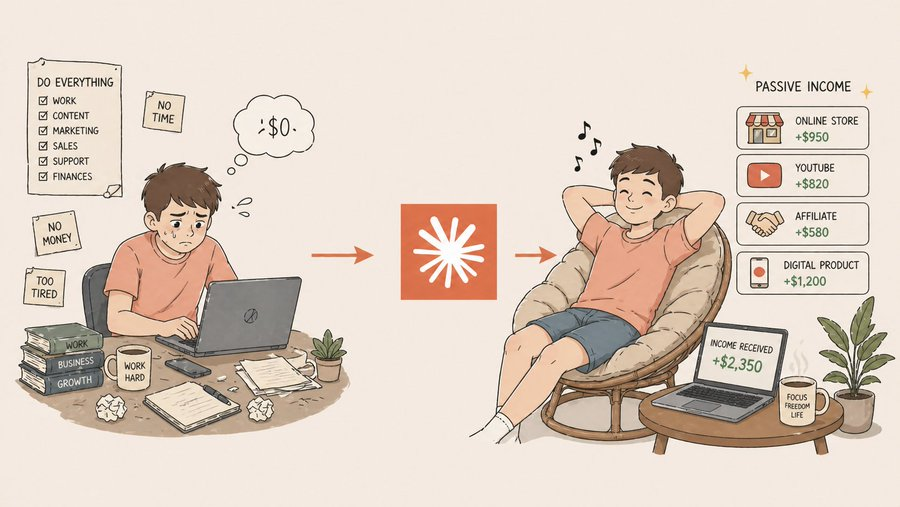
You're not broke because you don't work hard.

You're broke because you only have ONE income stream.

Claude can now build you 5 — running on autopilot while you sleep.

Here are 8 prompts that turn one skill into a passive income empire:

Save this thread 🧵👇 Image Prompt 1: Find the Income-Producing Skill You're Sitting On

Most people don't have an "income idea" problem. They have a leverage problem.

This prompt finds the skill hiding in plain sight:

Act as a wealth strategist who has helped 500+
professionals turn underused skills into multi-stream
income engines.

Here's my honest profile:
- Current job and skills: [LIST]
- Skills I've built but rarely use: [LIST]
- Topics I know more about than 90% of people:
[LIST]
- Hobbies I've gone deep on: [LIST]
- Things friends always ask me for help with:
[LIST]
- Hours per week I can commit: [X]
- Starting capital: $[X]

Run a full leverage audit:
1. The ONE skill with the highest income-producing
potential (and why)
2. 3 skills I'm undervaluing that could become
income streams
3. The "unfair advantage" I have that competitors
don't
4. Skills to drop because they don't compound
5. Realistic monthly income at 6, 12, and 24 months
6. The single move that would unlock the most
leverage in 30 days

Don't tell me to start a podcast. Find the leverage
nobody else sees.
Apr 29 19 tweets 5 min read
Claude can now build your entire mobile app like a $350K senior developer at Apple. (for free)

Here are 10 powerful Claude prompts that can replace weeks of mobile app planning, UX thinking, architecture work, and coding.

(Save before your competitors do): Image 1.1 First, do not ask Claude:

“Build me an app”

That gives weak results.

Ask like this instead:

Prompt 1: Turn my idea into a real app plan

Act as a senior mobile product manager and staff mobile engineer.

I want to build this app: [describe app idea in 2–4 lines].
Target users: [who it is for].
Main problem it solves: [problem].
Platform: [iOS / Android / both].
My skill level: [beginner / intermediate / advanced].