Amira Zairi Profile picture
AI Educator & Creator | @adobe, @LeonardoAi_ ambassador | Runway, Topaz, Kling, Freepik, Pika, Hailuo and more...CPP | 📧 for collab https://t.co/MjBwWCALRQ
Feb 4 13 tweets 7 min read
Nano Banana Pro actually understands camera logic and film stocks, not just visual styles

You can tell it the exact film stock and describe how the camera should behave, and it responds in a way that feels much closer to how a real cinematographer would interpret those choices.

I tested this with 10 iconic film stocks, each paired with a precise prompt, and the results came out shot-ready when generated with Leonardo AI.

If you care about realism, mood, and true cinematic accuracy, these 10prompts will completely change how you approach prompting👇 1. Leica M6

What it’s good for:
- Street photography
- Documentary & photojournalism
- Environmental portraits
- Travel photography

Prompt:
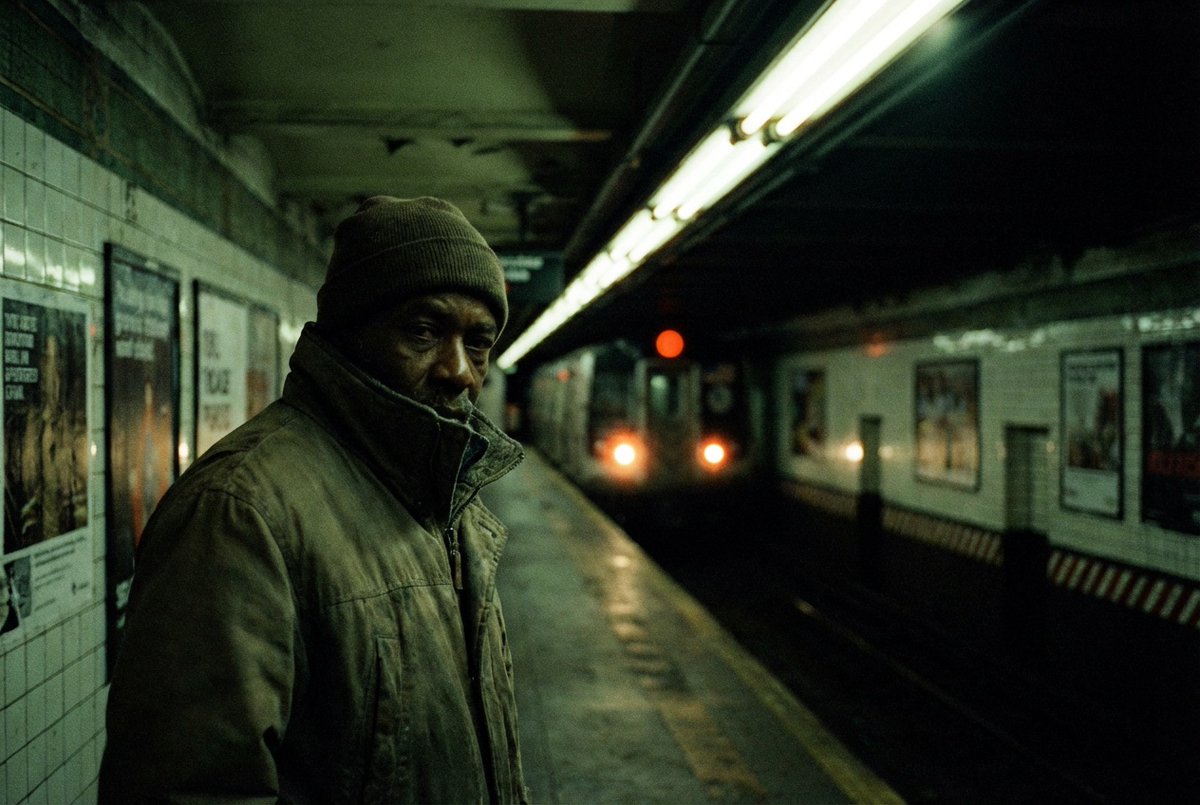
Cinematic close-up of a man standing alone on a subway platform at night, fluorescent lights buzzing overhead, train headlights emerging from darkness. Shot on a Leica M6. Natural low-light contrast, intimate framing, shallow depth of field, quiet urban tension, documentary-style realism.Image
Nov 29, 2025 4 tweets 2 min read
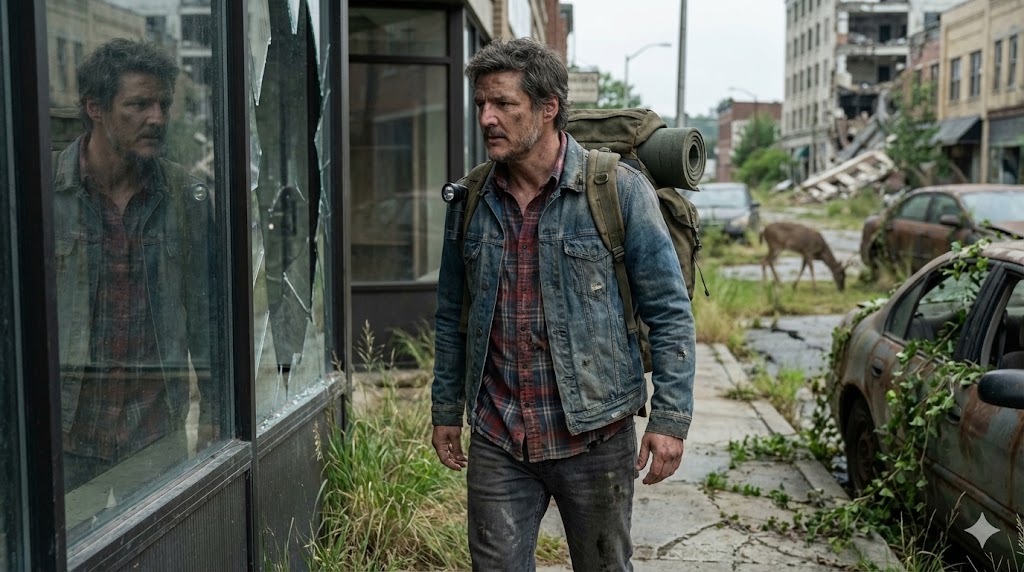
I just created this cinematic shot with Nano banana Pro on the Gemini App 🤯

{
"subject": {
"description": "A rugged male survivor walking through an overgrown city street",
"mirror_rules": "Reflection in broken shop window",
"age": "40s",
"expression": "wary, scanning the horizon, tired",
"hair": {
"color": "salt and pepper",
"style": "overgrown, messy beard"
},
"clothing": {
"top": {
"type": "flannel shirt and denim jacket",
"color": "faded blue and red plaid",
"details": "holes in elbows, sun-bleached, dirt stains"
},
"bottom": {
"type": "jeans",
"color": "dark grey",
"details": "muddy knees, frayed hems"
}
},
"face": {
"preserve_original": true,
"makeup": "dirt smudges, sun spots, realistic weathering"
}
},
"accessories": {
"headwear": {
"type": "none",
"details": "N/A"
},
"jewelry": {
"earrings": "none",
"necklace": "none",
"wrist": "broken analog watch",
"rings": "wedding band on chain around neck"
},
"device": {
"type": "flashlight",
"details": "clipped to backpack strap"
},
"prop": {
"type": "hiking backpack",
"details": "large, olive green, bedroll attached, worn fabric"
}
},
"photography": {
"camera_style": "Cinematic realism, 35mm wide lens",
"angle": "wide shot establishing environment",
"shot_type": "full body walking away from camera slightly",
"aspect_ratio": "16:9",
"texture": "detailed foliage, crisp sunlight, natural colors"
},
"background": {
"setting": "ruined city street reclaimed by nature",
"wall_color": "concrete covered in ivy",
"elements": [
"rusted cars",
"tall grass cracking through pavement",
"collapsed building in distance",
"deer visible in background"
],
"atmosphere": "quiet, desolate, beautiful decay",
"lighting": "overcast soft daylight, diffuse shadows, melancholy feel"
}
}Image
Nov 25, 2025 12 tweets 9 min read
Flux 2 just raised the bar

Next-generation image AI that excels in every style, supports both image generation and editing. Perfect for creators doing portraits, products, ads, and more...

The best part it is unlimited on @openart_ai

Check out these use cases to see what you can create!
And don't forget to bookmark it First, let me tell you that FLUX.2 delivers the best results when your prompts follow a clear and intentional structure. By arranging your description from the most important details to the least important, you help the model understand exactly what to prioritize. The more specific and focused your prompt is, the more control you gain, and the higher the quality and consistency of the final result.

For the most consistent outputs, use this simple framework:
Subject + Action + Style + Context

Check the example below to see how this framework makes the prompt clearer and helps FLUX.2 deliver the best possible results 👇🏻
Oct 10, 2025 8 tweets 5 min read
I’ve been thinking a lot about quitting my job to become a full-time content creator, so I made a short movie with Leonardo AI, and I loved the result.

Here’s exactly how you can do it too, full prompts, full process, all in under 2 hours.

Don’t forget to bookmark this thread Step 1: Base Image
This is the image we’ll use to start our story.
It was created in Midjourney using the prompt in the ALT

The base image sets the tone, mood, and color palette for the entire short film, everything that follows will grow from this single frame. Image
Sep 19, 2025 14 tweets 11 min read
designers… you’ll love this

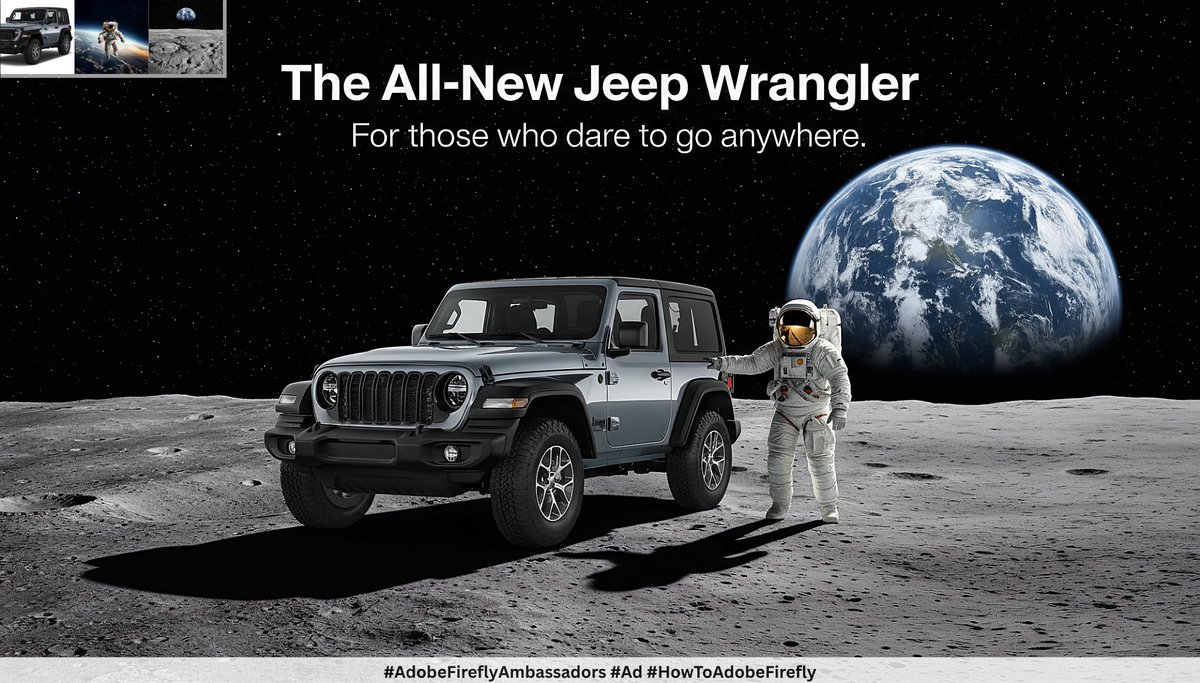
Nano Banana is part of Adobe Firefly. It handles the boring tasks, keeps your projects organized, and gives you more time to design.

Here are 10 use cases that will save you time
Trust me, you’ll want to save this one 🔖

This post is sponsored by Adobe Firefly
#AdobeFireflyAmbassadors #Ad #HowToAdobeFireflyImage 1. Product Isolation

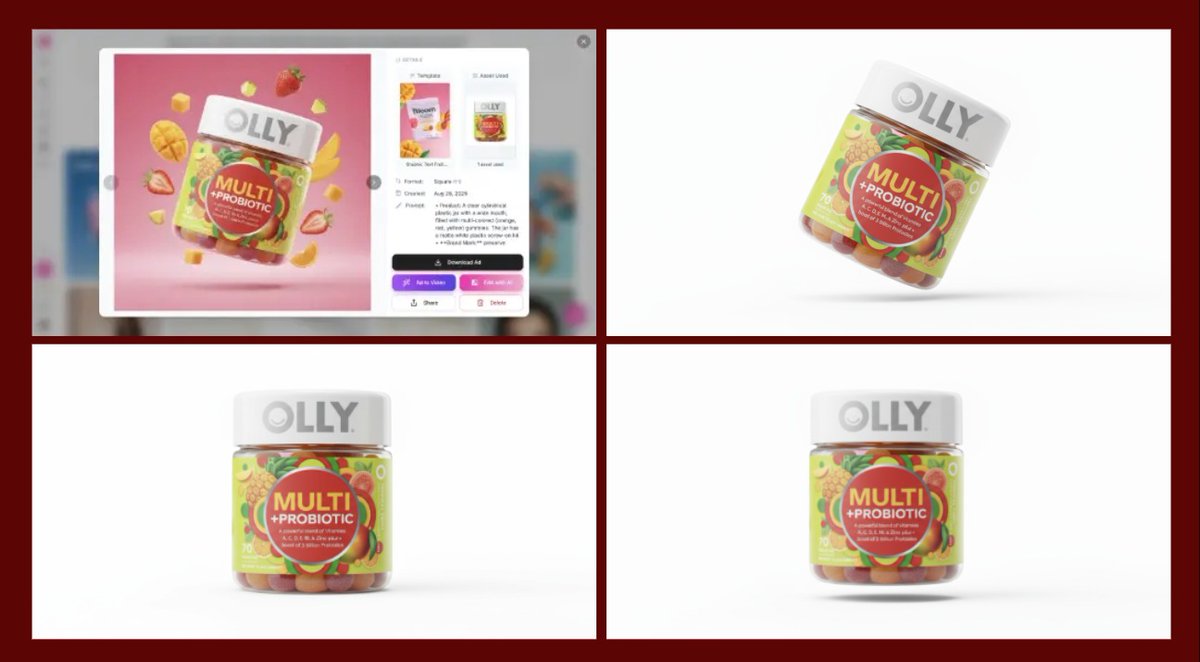
With Nano Banana, you can isolate any product, no matter how complex or busy the background is. Simply place it on a clean white background in seconds.

Once isolated, you can generate new images of your product in different positions and perspectives, ready to be used in your designs.

And the best part you can organize everything effortlessly on an Adobe board, keeping your workflow neat and efficient, saving you time while creating high-quality visuals.

Here are the prompts I used:
1. Extract the product from the image, place it on a clean white background, keep the jar upright and not floating, with no extra elements.

2. A clear cylindrical jar filled with colorful gummies, floating and slightly tilted to the left, with a pure white background, and realistic product photography.

3. A clear cylindrical jar filled with colorful gummies, floating in mid-air, front view, pure white background, realistic product photographyImage
Sep 11, 2025 7 tweets 5 min read
Ever thought about dropping your animated character into real footage, like it was actually filmed on set?

It’s way easier than you’d expect.

With Nano Banana + Veo 3 inside Leonardo, you can create a video like this in minutes.

I’ll walk you through the exact steps.
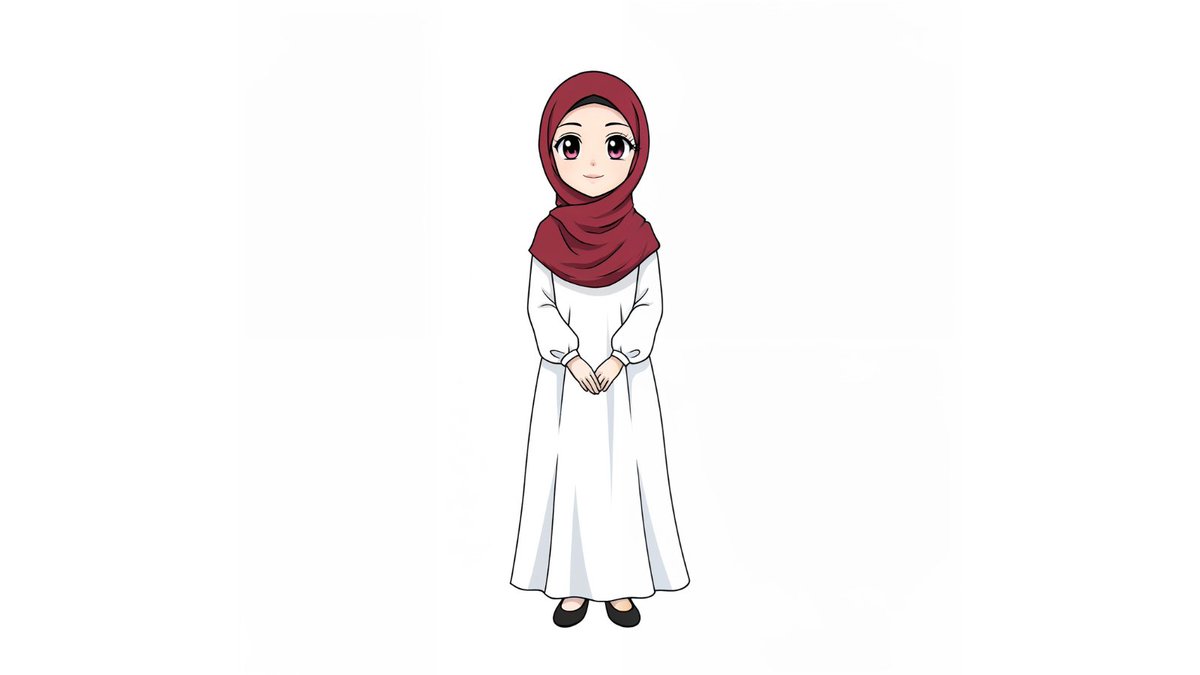
Save this post, you’ll want to try it. Step 1: Generate the Base Image in Leonardo

- Upload Reference Image: Start by uploading a reference image of yourself to Leonardo.
- choose Nano banana model
- write your prompt (Check ALT for the prompt)

This will generate an anime-style, full-body image that accurately represents your pose and outfit.

Once you get your result, it’s best to upscale it to enhance the quality and details. Leonardo’s built-in upscaler works great, especially for artistic and anime-style images, giving you a cleaner and sharper final output.Restyle this character as a full-body illustration in classic anime style, with large expressive eyes and smooth, simplified facial features. Keep her hijab, long white dress, and black shoes. The design should appear cute and youthful, consistent with modern Japanese slice-of-life animation aesthetics. Present her in a neutral front-facing pose on a plain white background, with clean linework and flat anime-style shading for a polished, professional look.
Sep 8, 2025 15 tweets 9 min read
AI just got smarter than you think..

Most AI models struggle when you throw complex prompts at them.
But Nano Bana actually gets it, and with @Adobe Firefly Boards, it’s even easier to keep all your generations in one place and compare how every detail is interpreted.

I tested 9 prompts to see how far it can really go 👇

This post is sponsored by Adobe Firefly
#AdobeFireflyAmbassadors #Ad #HowToAdobeFireflyImage First, here’s how you can use Adobe Boards in seconds 👇
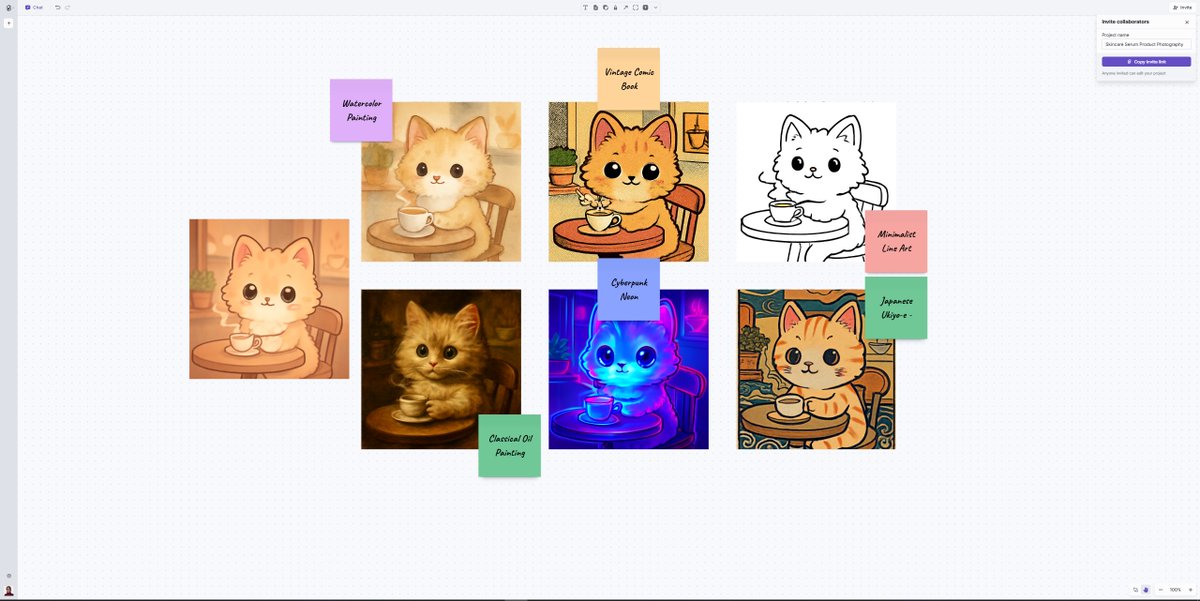
- Go to
- Click Create New Board
- Upload your image
- Choose your model (we’re using Gemini 2.5 Flash)
- Write your prompt
- Hit generate

That’s it, you’ll get your result instantly, ready to download or refine.firefly.adobe.com/boards
Sep 4, 2025 6 tweets 3 min read
This is wild..

A new AI company called Mirage is here, built only for short-form video.

You type a prompt, and it generates a fully edited TikTok or Instagram Reel in seconds.

It’s trained for the pacing, framing, and style that hooks you on FYP…

Here's everything you need to know 👇🔖 1. Most AI avatars still look stiff and robotic.

Mirage just fixed that.

Their model generates expressive, natural actors that move, react, and perform like real creators on your feed.

It’s the closest thing yet to AI-native TikTok talent, check this out 👇🏻😍
Aug 26, 2025 10 tweets 3 min read
🚨 BREAKING: The world’s first AI Creative Manager just dropped.
It’s called Air. And they’ve raised $70M.

Already used by brands like Ramp & Warby Parker.

And it might replace Dropbox, Google Drive, and Frame io forever.

Here’s why this is HUGE 🧵 1. AI Library Management

Upload once → Air scans every pixel, word & face.

Your library organizes itself in seconds.

Screenshots, decks, images & video auto-tagged with plain-English keywords you actually understand.
Aug 1, 2025 8 tweets 4 min read
Veo 3 just unlocked something wild...

You can now draw your idea on the first frame… and the model gets it instantly.

Forget typing JSON prompts or trying to describe every detail, just sketch your idea and let it do the rest.

Tried it myself on Leonardo’s new image-to-video feature… and it nailed it.

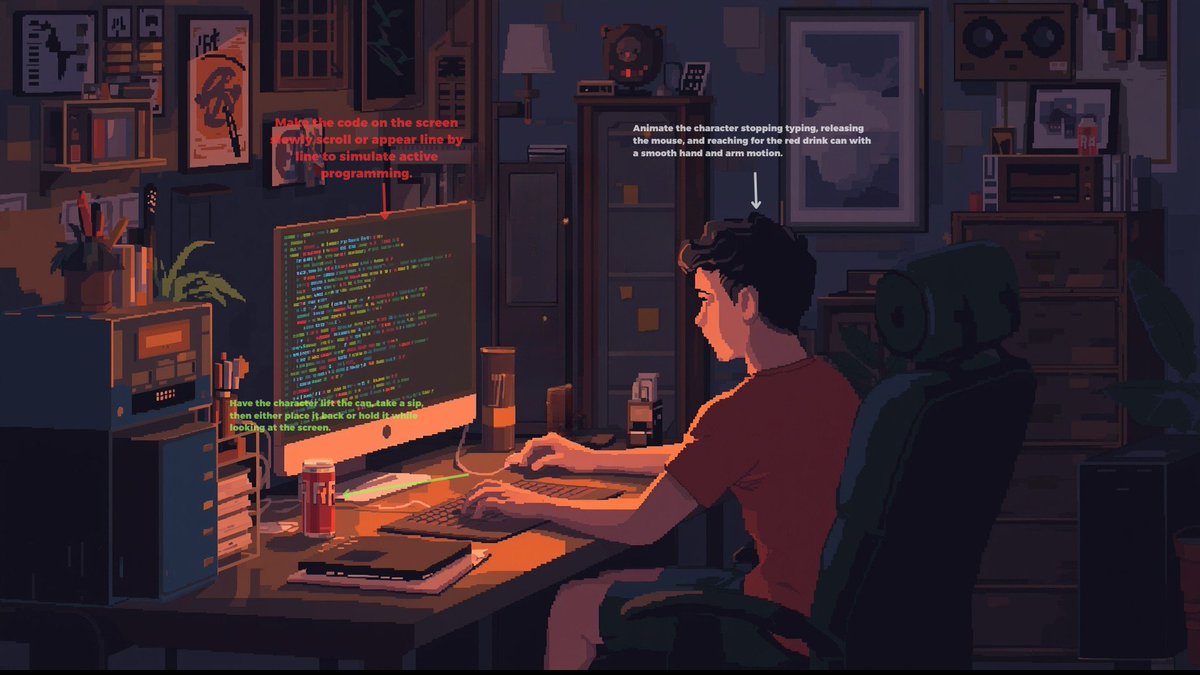
5 amazing results + prompts 👇 1. All images created and upscaled using @LeonardoAi_

Video Prompt:
Remove any visible instructions or text annotations from the image to keep the scene clean and immersive. Add subtle ambient SFX, soft keyboard typing, mouse clicks, and a quiet computer hum. Include background music, something soft and lo-fi to match the nighttime coding vibe and enhance the mood without overpowering the sound effects.pixel art programmer at glowing desk, cozy indie game studio, floating pixel code around monitor, cluttered desk with energy drinks, warm amber lighting, retro setup, soft shadows, 8-bit palette, relaxed night coding vibe
Jul 24, 2025 11 tweets 4 min read
Hailuo 2.0 is now free on Freepik

and it’s absolutely insane, not only can it animate anything you write or upload... It renders text like a design tool.

I made a thread with 9 wild examples for you to try, don't forget to bookmark it 🔖 1. Side-tracking camera movement: The word 'FOG' forms letter by letter in thick white mist. After the last letter appears, the entire word swirls outward into a rolling fog bank. mysterious, moody, cinematic
Jul 20, 2025 12 tweets 3 min read
been busy? I got you.

here’s what I posted last week (and why it matters):

– how to write JSON prompts for video generation
– new tools
– tutorials, clear and simple
– creative prompts for image & video

save this for later 🔖 Create super realistic images and aninmate them using @LeonardoAi_
Jul 18, 2025 8 tweets 4 min read
The last time I shared a Veo3 fast video using JSON Prompt, some of you asked me about this technique and how you can use it.

Lately, I started learning and experimenting with JSON Prompting after seeing so many amazing video results on X using it.

Here’s everything you need to know + a GIFT 🧵 JSON stands for JavaScript Object Notation, but don’t let the name scare you.

It’s just a way to organize information clearly so computers and AI models can understand things like how the camera moves, what the colors should look like, what the sound feels like, and who the subject is and what they’re doing.

Think of it like this:
Instead of writing:
> A child sits and grows old.
You write it like a checklist:
{
"subject": "child",
"action": "grows old",
"location": "porch"
}
```
Each part is labeled. That makes it easier for the AI to know what’s happening and how to build your video, especially when you want cinematic control like camera angles, lighting, or sound.
Jul 14, 2025 10 tweets 5 min read
What if one tool let you design interfaces, prototype ideas, and even build full games, all in your browser?

Meet Hatch Canvas: the most underrated no-code playground out there.
It’s fast, visual, collaborative… and completely free.

Full walkthrough + link below 👇🏻 1/ First, head over to @madewithhatch and sign up

🔗

It’s free for now, so make the most of it while you can.hatchcanvas.com/sign-up?passwo…
Jul 10, 2025 6 tweets 3 min read
Leonardo just made creating way too easy.

I turned a static image into a full animation without leaving Leonardo.

Used Lucid to create it, refined with Omni Editing, then brought it to life with Motion 2.0, all in one smooth flow.

Here’s exactly how I did it 👇🏻 Step 1: Create your image
Start by generating your base image.

You can choose from:
• GPT-Image-1: perfect for creative control
• FLUX – great for contextual, editable outputs
• Lucid Realism: ideal for photorealistic quality, or any model you wish to use

I chose Lucid, Leonardo’s powerful realism model,
and used this prompt to create my images 👇🏻
stunning woman with porcelain skin, subtle rosy cheeks, sitting cross-legged on sleek dark hardwood floor, fitted black leather jacket with soft sheen, high-neck crisp white blouse, high-waisted dark blue stretch jeans, polished black loafers with slender heel, raven-black messy updo with loose strands framing heart-shaped face, piercing green eyes locked on camera, subtle enigmatic smile, creamy neutral background gradating warm beige to pale gray, soft diffused studio lighting, sharp facial features, athletic build, clean minimal aesthetic, intense editorial focus on subject
Jul 6, 2025 10 tweets 5 min read
These VEO-3 videos are going viral…

But no one’s telling you how to make one.
So I’ll do it

7 wild videos + prompts, you can steal it.
Bookmark this for later 1. A handheld tracking shot follows a young afro-american male street reporter in his late 20s, energetically approaching pedestrians on a sunny downtown sidewalk. He stops a confused elderly man and asks, “Sir, do you think dogs should vote?” The man pauses, then replies, “Only if they pay taxes!” Passersby chuckles in the background. The scene captures candid laughter, framed with a shallow depth of field, warm natural lighting, and a touch of lens flare as sunlight peeks past city buildings.
Jun 30, 2025 12 tweets 6 min read
This combo hits different...

Lucid Realism + Motion 2.0 by Leonardo = pure storytelling energy.

Depth, light, movement, and yes, the clips are 720p.

9 images + videos with prompts below👇🏻
Don't forget to bookmark this 1/ Orbit Tight

Motion 2.0 prompt:
Orbiting dolly shot, Morrígan’s cloak spreads like raven wings, blood-soaked ground beneath her feet, bronze torc glinting in mist, low backlight and drifting smoke, mythic, terrifying. The Morrígan in warrior form, ancient Celtic weapons, crow-black hair, sovereign presence, surrounded by battlefield remains, mythological Celtic horror atmosphere, dark pagan style, moonlit mist glow, deep emerald tones, crow-black accents, divine detail with ARRI ALEXA 35, 50mm goddess portrait, battle queen reveal
Jun 28, 2025 8 tweets 4 min read
I get this question all the time:
"Can you make a library to track all your prompts?"

Honestly, I’ve been meaning to, but I’m not a developer.

Then I stumbled on Emergent, and it looked super simple. So I reached out to their team, and they were incredibly helpful. Walked me through everything.

And somehow… 10 minutes later, I had my first working app:
A Midjourney / ChatGPT prompt tracker live and real. 😍🔥

Here’s exactly how I did it, step by step 👇🏻 @EmergentLabsHQ is the world’s first agentic vibecoding platform, turning raw ideas into full-stack apps in minutes.

Just describe what you want, and AI agents instantly generate production-ready apps with sleek UIs and real Python backends.

Here's how to use like a pro 👇emergent.sh
Jun 11, 2025 14 tweets 4 min read
Midjourney Video is real…

It looks like art, every frame feels painted. Every movement feels directed.

Yes it is real, and yes it’s coming soon.

12 early examples: 🧵👇 1. Girl riding a lion
Mar 27, 2025 7 tweets 4 min read
WILD… I just turned a simple script into a full movie all thanks to AI agents working together.

Cinematic shots, dynamic camera moves, epic soundtrack, flawless narration, and smooth editing all auto-generated.

No crew. No cameras. Just pure creative power at lightning speed. Feels like having a Hollywood team on demand.

I’ll show you exactly how you can do it yourself
Bookmark this for later! let's talk a little about aivideo.com the all-in-one tool, no fancy skills are required. Here’s why I love it:

Generate videos/images (or turn pics into videos) using top AI tools like:
- Kling 1.6
- Veo2
- HailuoAI
- LumaLabs
- Vidu
image generators:
- Luma Photon
- Recraft V3
- Ideogram
- Flux models
-Stable Diffusion.

you can upscale the images and even use character references 🤯

Editing:
You can effortlessly tweak your video change shots, adjust voiceovers, or generate a brand-new soundtrack. Everything you need in one place! 🚀

Let’s dive into the process! 🔽
Mar 26, 2025 14 tweets 4 min read
GPT-4o just got a massive upgrade!

OpenAI rolled out native image generation inside GPT-4o and the quality is unreal. Both text and visuals are next-level, all 100% AI.

10 wild examples Image 1️⃣