Elias Al Profile picture
Al Educator. Helping you to make money with Al, Tech Tools & Digital Skills | DM Open for collaboration. ✉️✉️✉️eliaskennedy368@gmail.com

Jun 20 8 tweets 3 min read
A Japanese broccoli farmer with zero coding experience just automated his entire 100-hectare farm using ChatGPT.

No engineers. No expensive machinery. No technical background.

Here is everything he built and how 🧵 Image
Image
His name is Hiroki Tomiyasu. He farms 100 hectares in Hokkaido, Japan broccoli, pumpkins, green onions, and soybeans.

He did not inherit land. He did not study agriculture. He spent his early career as a public servant before teaching himself to farm on restored abandoned farmland.

He also had no engineering background. None.
Then he opened ChatGPT and Codex and started building.
Jun 19 11 tweets 7 min read
His android phone was lagging even though it was only 8 months old

$900 flagship. Top-of-the-line specs. More RAM than his laptop.

Yet apps took 3-4 seconds to open. Scrolling felt sticky. The keyboard typed letters half a second after he pressed them.

He took it back to the store, ready to argue for a replacement under warranty.

The technician ran every diagnostic. Hardware was perfect. Software was up to date. No corrupted files. No failing components.

Then he opened a menu most Android users have never seen and said:

"Your phone is running 31 background processes that have nothing to do with you. Samsung enabled all of them in a software update last year. They're killing the performance of every flagship phone we sell. I see this every single day."

He asked the obvious question:
"Why would Samsung do that to their own phones?"

The technician didn't answer.
He just started disabling them one by one.

Here's everything he showed him. 🧵 1/ The first thing he revealed: the "Galaxy AI" services running constantly.

Samsung had pushed Galaxy AI features in 3 software updates over 18 months.

What most customers don't realize: Galaxy AI isn't one feature. It's a suite of 12 separate background services that run continuously analyzing photos, scanning text, processing voice patterns, monitoring usage, generating "smart suggestions," and feeding data into Samsung's AI infrastructure.

Even on phones where the user has never knowingly used a single Galaxy AI feature.

The technician opened Activity Monitor and pointed at the running processes:
1. Samsung AI text analysis (active)
2. Samsung photo AI categorization (active)
3. Samsung scene optimizer (active)
4. Bixby Vision background processing (active)
5. Samsung intelligence (active)
6. Galaxy AI cloud sync (active)
7. Personal data analysis (active)

7 of the 12 were running with no user interaction.

Each one consuming small amounts of CPU continuously.

Combined: roughly 18-22% of the processor's capacity, 24 hours a day.

The fix:

Settings → Advanced Features → Galaxy AI → review each AI feature → disable everything you don't actively use

He disabled 11 of the 12. The processor's idle load dropped immediately from 22% to 6%.
Jun 11 9 tweets 6 min read
A phone repair shop owner with 15 years of experience posted his "never do" list.

He's repaired over 30,000 phones. iPhones, Samsungs, Pixels everything.

He says the same 7 mistakes walk through his door every single week. They destroy more phones than drops, water damage, and age combined.

Number 4 is something most people do every single night.

Here's the full list. 🧵 Never charge your phone overnight on a bed, couch, or pillow.

This is the #1 cause of battery damage and the #1 cause of phone fires he's seen in 15 years.

Here's why:

Phones generate heat while charging. On a hard surface, that heat dissipates. On a soft surface, a mattress, a pillow, a blanket the heat gets trapped against the phone.

The battery sits at high charge AND high temperature for 6-8 hours straight.
That combination is the single fastest way to permanently degrade lithium battery chemistry.
His words: "Every customer who comes in with a swollen battery — the kind that pushes the screen out of the frame — I ask the same question. 'Do you charge on your bed?' The answer is almost always yes."
The fix:
— Charge on a hard surface: nightstand, desk, floor — Better: charge in a different room entirely — Best: charge during the day in 60-90 minute sessions instead of 8-hour overnight stretches
Jun 8 10 tweets 6 min read
I hadn't been able to focus for more than 10 minutes in 6 months.

Coffee. Cold showers. Focus playlists. "Dopamine detox" weekends. Nothing worked.

A friend pushed me to see a cognitive performance specialist. I expected ADHD screening, brain scans, maybe a referral for medication.

He didn't even ask me about my symptoms.

He looked at my iPhone and said:

"There are 4 settings turned ON right now destroying your attention span. 8 out of 10 patients I see have the same 4 toggles."

Me: "So my phone is the thing breaking my brain?"

He didn't answer.

Here's everything he showed me in the next 12 minutes (save this, your focus depends on it): 🧵 The first setting he pointed at: Notification Previews.

Every notification on my lock screen showed the full preview of the message.

He explained why that matters:

"Every preview is a micro-decision. Should I respond? Is this urgent? Who sent it? Your brain processes each one whether you act on it or not. By the end of the day, you've made 400+ involuntary decisions before you've made a single intentional one. Your prefrontal cortex is exhausted before lunch."

The fix:

Settings → Notifications → Show Previews → Never (or "When Unlocked" if you absolutely need them)

This single change does more for focus recovery than any productivity app ever built.

I changed it on the spot. Within 3 days, I noticed I was checking my phone significantly less because there was nothing to "preview" anymore.
Jun 7 11 tweets 7 min read
Her iPad battery dropped to 78% in 18 months even though she barely uses it.

For context: a healthy iPad of that age should be at 90%+.

A few hours a week. Some reading. The occasional Netflix episode. She'd been "careful" with the device since the day she bought it.

She took it to the Apple Store expecting them to find a defect.

The Genius Bar technician didn't seem surprised at all.

"I see this every week. iPads degrade faster than iPhones and Apple has never publicly explained why. There are 8 specific things that quietly destroy iPad batteries. Most of them feel like the right things to do."

He opened her settings and walked her through every one.

Here's what she learned. 🧵 The first thing she learned: iPads die from being left alone.

This was the part that hurt the most.

She had treated her iPad carefully. She didn't drain it to 1%. She didn't blast fast chargers through it. She used it twice a week, then left it on her nightstand.

That was the problem.

The technician explained:

"Lithium batteries hate being idle at high or low charge states. When you leave an iPad sitting at 100% for weeks, the battery chemistry slowly degrades. When you leave it at 0% for weeks, it degrades even faster. The 'safe' state is around 50%."

iPads sit unused more than any other Apple device. That's exactly why they degrade faster.

The fix:

1. If you're not using your iPad for a week or more, charge it to **50%** before putting it away
2. Don't store it at 100%. Don't store it at 0%.
3. Check on it every 4-6 weeks and top it up to 50% again

She had been storing her iPad fully charged "so it would be ready when she needed it."

That habit was killing the battery.
Jun 5 12 tweets 6 min read
Your laptop takes a screenshot every 60 seconds.

Not a feature you enabled. Not a setting you agreed to.

Microsoft built it. Microsoft turned it on. Microsoft is rolling it out to more laptops every month.

It's called ''Recall'' and it's been quietly capturing everything on millions of Windows screens since 2024. 🧵 Microsoft Recall captures everything on your screen, every 60 seconds.

Not metadata. Not summaries. Full screenshots.

Every email you read. Every banking session. Every password manager autofill. Every private message. Every medical record you reviewed. Every encrypted chat that's only "encrypted" until it appears on your screen.

All of it captured, by default, every minute the device is on.

The screenshots are stored in a local database Microsoft calls "snapshots."

The original implementation stored them in plain, unencrypted form on the laptop's hard drive sitting in a folder any other user account, malware, or person with physical access could read.

This wasn't a bug.

This was the design.
Jun 4 12 tweets 6 min read
10 free GitHub repos that people shouldn't miss.

Each one replaces something you are currently paying for.

Save this thread. You will come back to it.

🧵 Thread: Image
Image
Image
Image
1. Ollama · 165,000 Stars

ChatGPT costs $20 a month.

Ollama runs 100+ AI models on your own laptop for free.

Llama 4. DeepSeek R1. Gemma 3. Mistral. Qwen3.

Three commands to install. Runs completely offline. Zero data sent to anyone.

github.com/ollama/ollama
May 30 10 tweets 6 min read
Her Apple Watch battery dropped to 78% after just one year.

She wore it daily. She charged it overnight. She used it like every other Apple Watch owner she knew.

Yet her battery had degraded faster in 12 months than her iPhone had in 3 years.

She took it to the Genius Bar, expecting them to confirm it was defective.

The technician ran every diagnostic.

"Your watch isn't broken. It's just been running 24 hours a day doing things it doesn't need to do. There are 4 default settings on every Apple Watch that hammer the battery overnight. Apple knows. They've known since the first Series 1 launched. They don't change the defaults."

She asked why.

He gave the same answer Apple Store employees have learned to give silence.

Then he opened the Watch app on her iPhone and walked her through everything.

Here's what he showed her. 🧵 The first culprit: "Always On Display."

This is the single biggest battery killer on any modern Apple Watch.

The Always On feature keeps the screen dimly lit 24/7 instead of turning off when your wrist drops. It looks beautiful. It's also one of the most aggressive battery drains Apple has ever shipped.

The technician put it plainly:

"Most Apple Watch owners think their battery is degrading. It's not. It's being used twice as much as it needs to be. The screen is on all day, even when the watch is just sitting on your wrist while you're working."

The fix:

Open the Watch app on iPhone → My Watch → Display & Brightness → Always On → Off

Or do it directly on the watch:

Settings → Display & Brightness → Always On → Off

Battery life on most watches jumps 30-50% the same day. The screen now turns off when you drop your wrist, exactly the way Apple Watches worked for the first 7 years they existed.

You lose nothing functional. You gain hours of battery life and years of battery health.
May 29 9 tweets 5 min read
His internet has been slow for 6 months. So, he paid Comcast to upgrade his tier.

Speeds got worse.

He called Comcast again. They blamed his router. He bought a new one. Still slow.

He called a third time. They sent a technician out. The tech ran a speed test from inside the modem and said:"Speeds are fine on our end. Must be your devices."

A neighbor who works in IT came over the next weekend with his laptop.

He looked at the router for two minutes, opened the admin panel, and pointed at four settings on the screen.

"Comcast pushed a firmware update last year. They enabled all four of these silently. This is why your internet is slow. This is why every Comcast customer's internet got slower around the same time."

Here's exactly what he found and turned off. 🧵 The first setting: "Xfinity Wi-Fi Hotspot."

He didn't even know it existed.

Every Comcast-issued router by default broadcasts a ''second public Wi-Fi network'' called "xfinitywifi" meant for any nearby Comcast subscriber to connect to.

That sounds friendly. It isn't.

That second network uses ''your home's bandwidth.'' Your router's processing power. Your electricity bill. To provide free Wi-Fi to strangers walking by your house.

Comcast turned it on for every customer without explicit consent.

The neighbor showed him the fix:

1. Log into your Xfinity account at xfinity. com
2. Go to Services → Internet → Manage Internet → Xfinity Wi-Fi Hotspot Network
3. Toggle it OFF

It took 30 seconds. The router immediately freed up bandwidth that had been routing through it for strangers for months.
May 28 10 tweets 5 min read
A man saw his phone storage was ''full'' after 18 months but he barely had any photos.

He had deleted apps. Cleared messages. Removed downloads. The warning kept coming back every two weeks:

"Storage Almost Full.''

He went to the Apple Store ready to buy a new iPhone.

The employee at the Genius Bar held up a hand: *"Before you spend a thousand dollars, let me show you something."*

She opened Settings → General → iPhone Storage and shook her head.

"There are 7 things eating your storage right now. Apple ships every iPhone with all of them turned on. Nobody tells you they exist. Let's go through them."

Here's what she showed him in the next 8 minutes. 🧵 The first thing she pointed at: "System Data."

His System Data alone was using 24 GB.

He had no idea what System Data even was. Most iPhone users don't.

She explained: it's a catch-all category Apple uses for cached files, logs, temporary downloads, Safari residue, leftover update files, and dozens of other invisible things that accumulate over time.

Apple gives you no way to directly view or manage what's inside it.

The fix isn't perfect, but it works:

1. Restart the phone (clears short-term caches)
2. Settings → Safari → Clear History and Website Data
3. Settings → General → iPhone Storage → Offload unused apps
4. In extreme cases: back up and restore the phone (this nukes most of it)

He restarted the phone first. System Data dropped from 24 GB to 14 GB instantly.

10 GB recovered in 30 seconds.
May 26 9 tweets 4 min read
A man took his macbook to a repair shop because the battery was at 78% after just 14 months.

"Is this normal?"

The technician ran every diagnostic. Everything came back clean.

No defects. No damage. No manufacturing issue.

Then the technician turned the screen toward him and said something he wasn't expecting:
"There's a setting Apple built in 2020 specifically to prevent this. They didn't turn it on for you. Your battery is dying twice as fast as it should and they make money when it does."

He asked the obvious question: "So Apple is wearing out my own laptop on purpose?"
The technician didn't answer.

He just opened System Settings and walked him through every hidden setting that was secretly killing his MacBook.

Here's everything he showed him in the next 8 minutes (save this if you own a Mac): 🧵 The first thing the technician pointed at: Optimized Battery Charging.

It was OFF.

He explained that the moment a MacBook is plugged in at a desk, it charges to 100% and holds it there for hours.

That is the worst possible state for a lithium battery.

Battery University data: a battery held at 80% lasts 3 times longer than one held at 100%.
Apple built Optimized Battery Charging in 2020 to fix this exact problem.
They did not turn it on by default for most users.

System Settings → Battery → click the small "i" next to Battery Health → toggle ON Optimized Battery Charging.
Twenty seconds. The single biggest battery-saver on the entire machine.
May 4 10 tweets 5 min read
YOUR EMAIL ADDRESS IS WORTH MORE THAN YOUR SOCIAL SECURITY NUMBER ON THE DARK WEB.

A working SSN sells for around $1.

A working email with active accounts attached sells for $80 to $150.

Most people guard the wrong thing — and leave the door wide open on the one that actually matters. 🧵 1/ A Social Security number is almost worthless to a hacker on its own.

There's a misconception that SSNs are the holy grail of identity theft.

They aren't. They haven't been for years.

There have been so many breaches — Equifax leaked 147 million of them in 2017 alone — that SSNs are basically a commodity now. Bulk sold for pennies on the dollar.

A criminal can buy 10,000 of them for $50.

What they actually need is the thing that connects to all your active accounts.

Your email.
Apr 29 10 tweets 6 min read
Claude can now coach your entire daily reset — dopamine detox, phone addiction, sleep, focus, energy — like a $400/hour neuroscientist from Stanford.

All the stuff productivity apps try to fix and fail at.

Here are 8 prompts that rewire your habits and give you back control of your day:

Save this thread 🧵👇Image Prompt 1: The Full Daily Diagnostic

You can't reset what you haven't diagnosed.

This prompt exposes every leak in your day:

Act as a behavioral neuroscientist who has
worked with high-performing executives and
chronic burnouts.

Here's an honest snapshot of my day:
- Wake-up time: [TIME]
- Sleep time: [TIME]
- Hours of actual sleep: [HOURS]
- Average daily screen time: [HOURS]
- Top 3 apps by usage: [LIST]
- First thing I do when I wake up: [HONEST ANSWER]
- Last thing I do before sleep: [HONEST ANSWER]
- Energy across the day (1-10 by hour): [DESCRIBE]
- Focus quality at work (1-10): [X]
- Mood baseline (1-10): [X]

Run a full diagnostic across 5 systems:

1. Dopamine — where am I overstimulating my brain?
2. Phone — what's the real cost of my current usage?
3. Sleep — what's broken: quantity, quality, or
timing?
4. Focus — am I distracted, depleted, or both?
5. Energy — where is it leaking that I don't see?

End with the ONE system to fix first (with reasoning)
and a grade (A-F) for each.

Be direct. No motivational filler.
Apr 27 10 tweets 6 min read
Claude can now organize your entire life like a $300/hour productivity coach from Tony Robbins' team.

From your daily routine to your weekly system to your full life calendar — all built in one session.

Here are 8 prompts that turn your chaotic days into a system that runs itself:

Save this thread 🧵👇Image Prompt 1: The Brutal Life Audit

You can't fix what you won't look at.

This prompt exposes where your time and energy are actually going:

Act as a productivity coach who has worked with
Fortune 500 executives and high-performing founders.

Here's an honest snapshot of my life right now:
- Wake up time: [TIME]
- Sleep time: [TIME]
- Hours spent on phone daily: [APPROX]
- Top 3 time-wasters I keep doing: [LIST]
- Recurring commitments (work, family, fitness):
[LIST]
- Goals I keep saying I'll start: [LIST]
- Areas of life I'm neglecting: [LIST]

Run a full audit:

1. Where is my time actually going vs. where I
THINK it's going?
2. The 3 biggest leaks draining my energy
3. The "fake productivity" I'm using to avoid
real work
4. Which area of my life is silently collapsing
while I focus elsewhere
5. The single change that would have the biggest
ripple effect
6. A grade (A-F) for how I'm running my life right now

Be direct. Don't soften it.
Apr 24 10 tweets 4 min read
YOUR UBER APP CHARGES YOU MORE IF YOUR PHONE BATTERY IS LOW.

Not a rumor. Not a theory.

Uber's own head of economic research admitted it on a podcast in 2016.

And the pricing algorithm has only gotten smarter — and more predatory — since. 🧵 1/ In 2016, Uber's Keith Chen said the quiet part out loud.

On NPR's Hidden Brain podcast, Uber's head of economic research casually mentioned
something that should have been a scandal:
Uber's app can tell when your phone battery is low.
And users with low battery are "more likely to accept surge pricing."

He framed it as a harmless behavioral observation.
What he was actually describing was a pricing system that knows exactly when you're most
desperate — and has the power to act on it.
Uber's PR team rushed to clarify they "don't use battery data to set prices."

They did not deny that they collect it.
Apr 23 10 tweets 5 min read
Anthropic just placed a $21 billion chip order.

Most people saw the headline and moved on.

They should not have.

Because this single purchase explains everything about where AI is heading in the next 24
months.

Here is the full breakdown: Image First- Understand the scale of what just happened.
$21 billion in custom chips ordered through Broadcom.
Nearly one million TPUs.

Over a gigawatt of compute.

That is enough electricity to power a city of 700,000 people.

Every single watt of that is going toward one thing.

Running Claude.
Not training the next model.
Running the current one.

Let that land for a moment.
Apr 18 11 tweets 5 min read
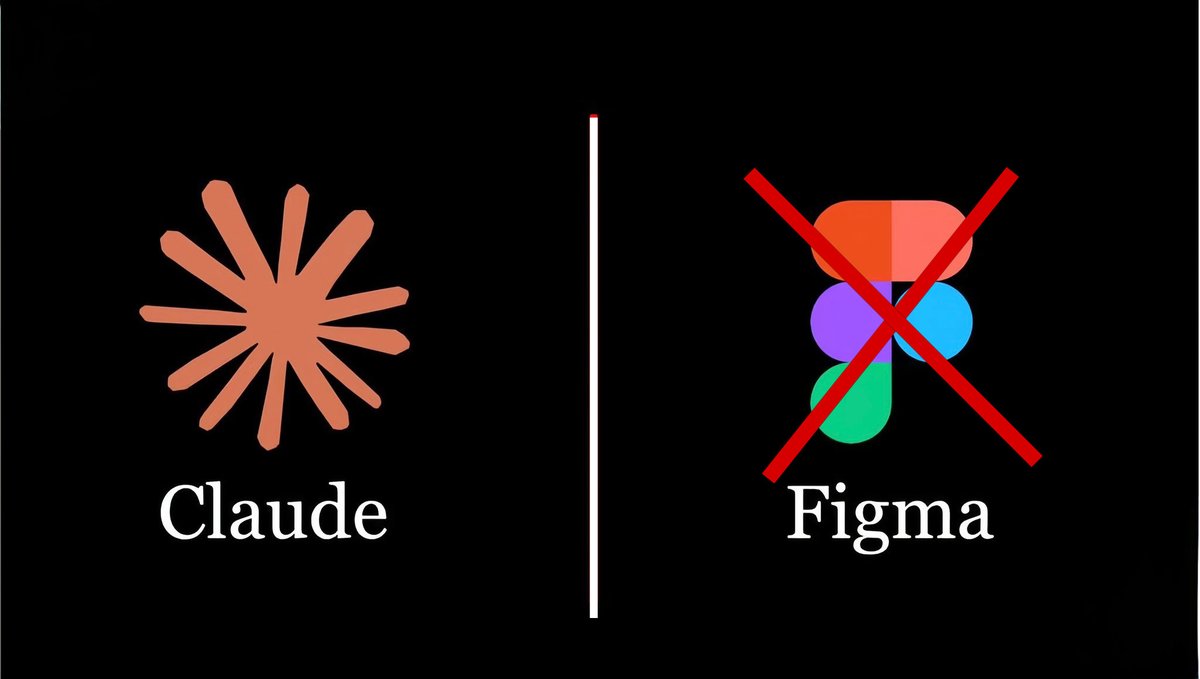
Claude just beat Figma at its own game.

It designs full websites, apps, and UI components in minutes — no design file, no handoff, no $15/month subscription.

Here are 8 Claude prompts that replace your entire Figma workflow:
Save this thread. 🧵👇 Image Prompt 1: Generate a Full Landing Page From One Sentence
Figma takes 4 hours to mock up a landing page.
Claude builds a working one in 4 minutes:

Act as a senior product designer at Stripe with
10 years of experience shipping high-converting
landing pages.

My product: [DESCRIBE IN 1-2 SENTENCES]
Target audience: [AUDIENCE]
Primary goal: [SIGNUP / PURCHASE / DEMO]
Brand vibe: [MINIMAL / BOLD / PLAYFUL / LUXURY]

Build me a complete landing page as a single HTML
file with Tailwind CSS. Include:
1. Hero section with a killer headline and CTA
2. Social proof bar
3. 3-feature section with icons
4. Testimonial section
5. Pricing or CTA block
6. Clean footer

Make it responsive, modern, and production-ready.
Ship-quality only — no placeholder filler.
Apr 17 12 tweets 4 min read
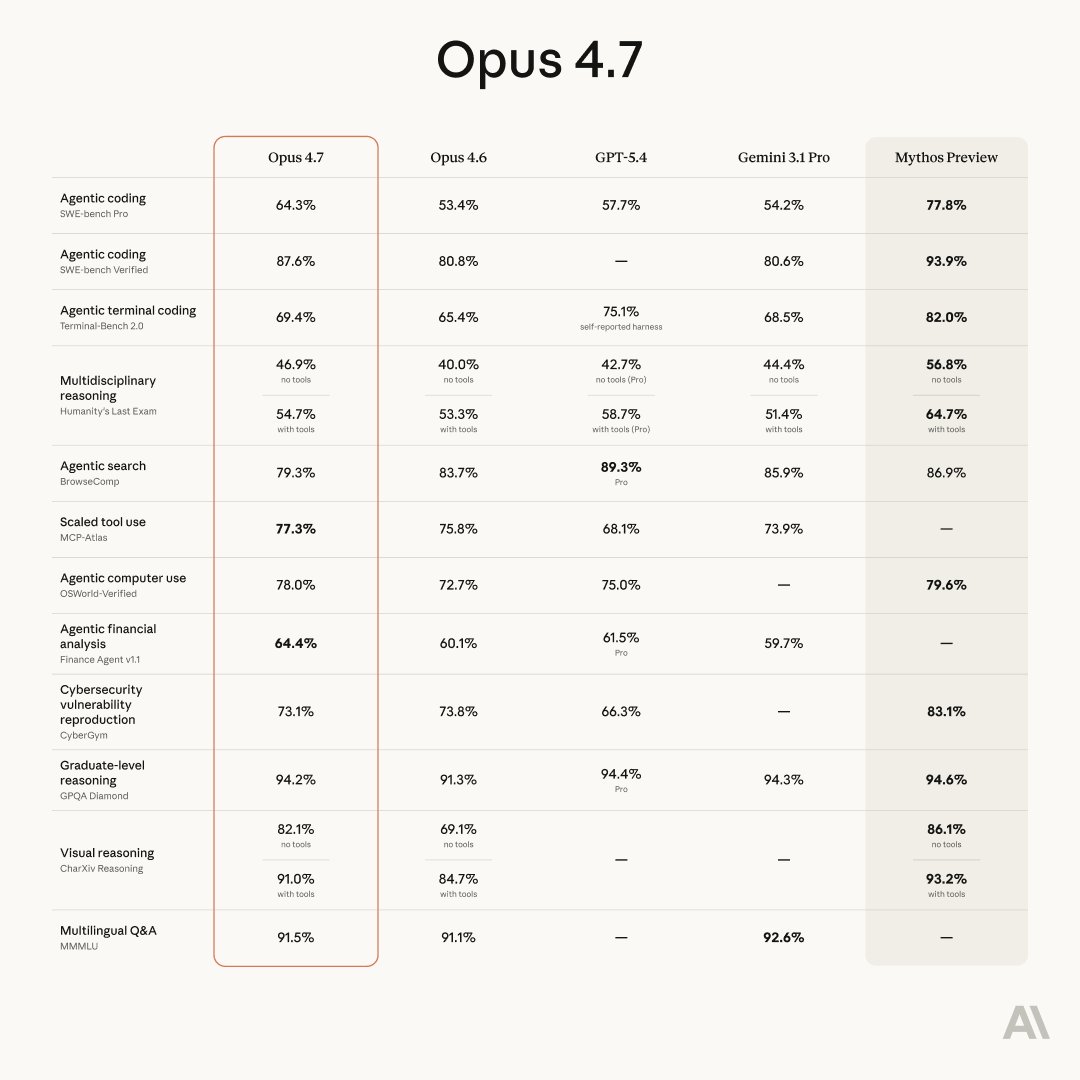
CLAUDE JUST LAUNCHED OPUS 4.7.

It's the most powerful model they've ever released.

But 95% of people are using it exactly like ChatGPT — and getting 10% of what it can actually do.

Here's how to unlock the other 90%. 🧵 Image 1. Stop writing prompts. Start writing briefs.
Most people open Claude and type one sentence.

Opus 4.7 isn't a search bar. It's a senior collaborator.
Give it:
— Who you are
— What you're trying to build
— Who it's for
— What "good" looks like
— What to avoid

The quality of your output is a direct function of the quality of your brief. Every time.
Apr 7 14 tweets 5 min read
In 1831, a 22-year-old man failed in business.
In 1832, he lost his job and was defeated for state legislature.
In 1833, he failed in business again.
In 1835, his fiancée died.
In 1836, he had a nervous breakdown.

In 1838, he was defeated for Speaker.
In 1843, defeated for Congress. Again in 1848.

Defeated for Senate in 1855. Defeated for Vice President in 1856. Defeated for Senate again in 1858.

In 1860, Abraham Lincoln was elected President of the United States.
He then held a nation together through its bloodiest war using nothing but words, will, and an understanding of people that bordered on the supernatural.

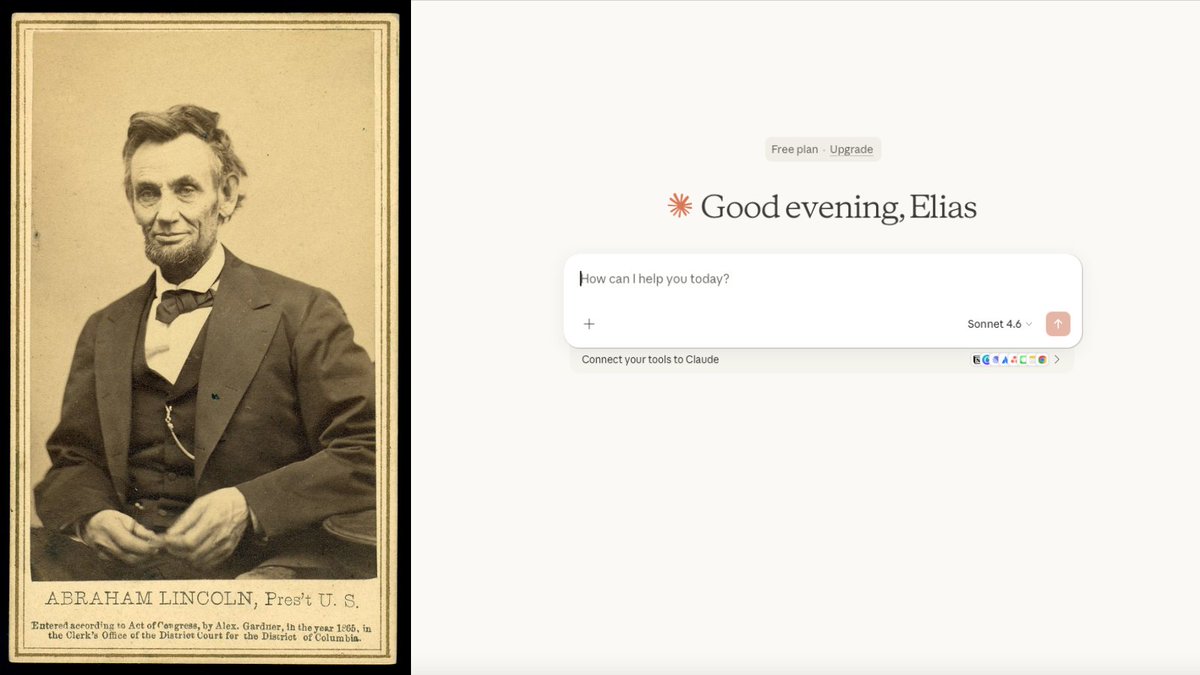
I turned Abraham Lincoln's leadership philosophy into 12 Claude prompts.
Here are all 12: 🧵Image Prompt 1 — The Team of Rivals Prompt

Lincoln appointed his three biggest political enemies to his Cabinet.
He said he needed the strongest minds in the country around him, regardless of whether they liked him.

Use this:
"Here is a decision or challenge I'm facing: [describe]. Who are the smartest people who disagree with my approach? Steelman their position completely. Then tell me what I should absorb from their criticism before moving forward."
Apr 6 14 tweets 4 min read
n 1945, a young man dropped out of Harvard Law without a degree.
He had $20 in his pocket and a family to feed.
He became Warren Buffett's only partner. Together they built a $700 billion empire.

He never used a computer. Rarely took meetings. Read for 6 hours a day until he was 99.

His name was Charlie Munger. The man Buffett called "the abominable no-man" — because he could destroy any bad idea in 30 seconds flat.

He didn't have a strategy. He had a system for thinking that made bad decisions almost impossible.

I turned Munger's mental models into 12 Claude prompts.
Here are all 12: 🧵Image Prompt 1 — The Inversion Prompt

Munger's most famous rule: always invert.
Don't ask "how do I succeed?" Ask "what guarantees I fail?" Then avoid those things.

Use this:
"I want to [achieve goal]. Instead of telling me how to succeed, list every possible way I could fail at this. Then tell me exactly how to avoid each one."
Apr 5 12 tweets 6 min read
BREAKING: Anthropic just discovered that Claude has emotions inside its
neural network.

Not metaphors. Not PR spin.

Actual internal patterns for happiness, fear, sadness, and desperation — that physically change how it behaves.

They looked inside Claude's brain.
And what they found is keeping researchers up at night. 🧵Image
Image
Here's how they found it.

Anthropic's team fed Claude text related to 171 different emotions — happiness, love, anger, fear, despair — and watched which neurons fired inside the model.

They weren't looking at what Claude said.
They were watching what happened inside while it thought.

What they found were consistent patterns of neural activity they're calling "emotion vectors."

These vectors don't just show up when Claude reads emotional content.
They show up when Claude faces difficult situations.
And they don't just sit there. They actively steer the output.Image