Here’s what’s new with Android for Cars (Android Auto and Android Automotive OS), as announced at #GoogleIO 2023. The biggest announcement IMO is Android Automotive OS 14 based on Android 14 and the new multi-screen feature it’ll bring 👀 

Before I get ahead of myself, though, let’s recap Google’s announcements, starting with why you should care. Google expects the # of cars running Android Automotive OS with Google built-in to nearly double by the end of 2023.
Google’s only counting cars whose makers have licensed Google apps (hence “Google built-in”), so there’ll be even more cars running Android Automotive on the streets as some makers opt not to license Google Automotive Services (GAS).
Android Auto, meanwhile, will be available in about 200 million vehicles in 2023, according to Google.

To aid devs in building automotive apps, Google is expanding its Android for Cars App Library with new templates across a number of categories like navigation. These new templates are being introduced alongside the new Waze app, available today for all cars with Google built-in.

Speaking of navigation, apps can now integrate with the instrument cluster to provide info like turn-by-turn directions right in front of the driver. Apps can also access car sensor data to show useful info like range, fuel level, and speed to the driver.

The Android for Cars App Library recently opened up an IoT category for all developers, so if you have an app that interfaces with IoT products, you can make an app for Android Auto and AAOS now. The weather category, on the other hand, is in early access right now.
Audible recently made its way to Android Auto and AAOS. The Weather Channel app will be coming to these platforms later this year. And Zoom, MS Teams, and Cisco Webex will add support for letting you join meetings by audio from your car display.

To improve the parked and passenger experiences, Android for Cars supports apps in video and gaming categories. Soon, an early access program for browsing apps will open up. YouTube is coming to Polestar cars followed by others soon.


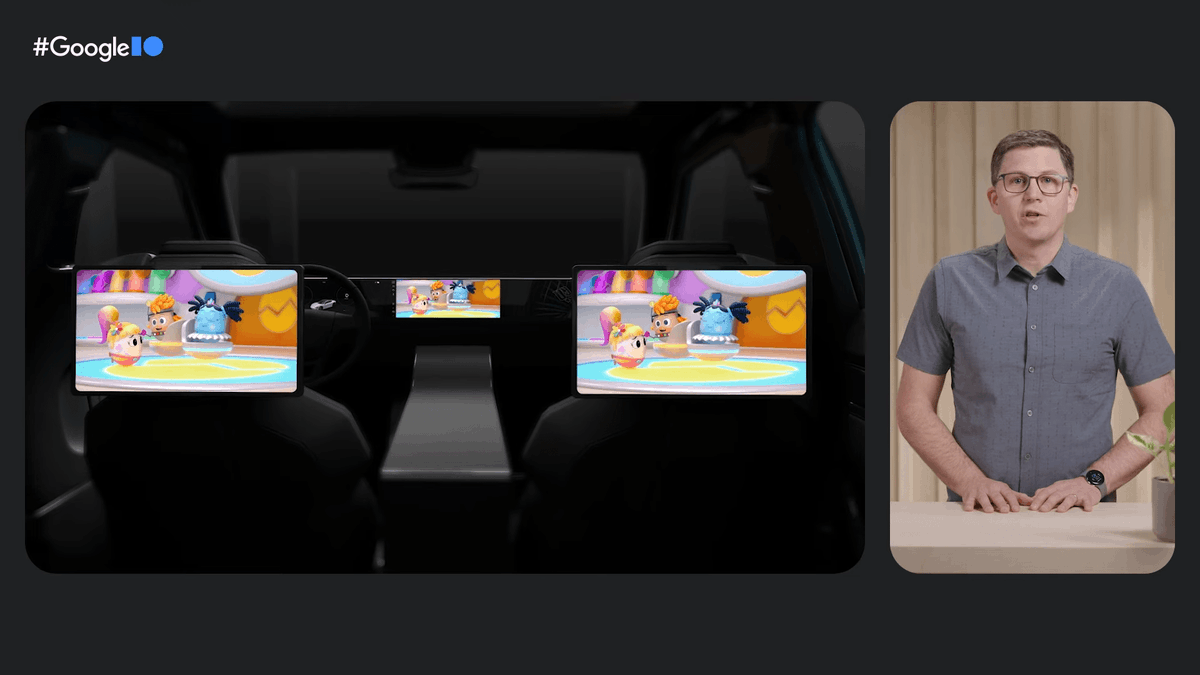
👀 Google is bringing multi-screen support to Android Automotive OS 14 based on Android 14. For example, a car with a panoramic front display and screens in headrests can all show apps and video content. More details on AAOS 14 will be shared later.


Links!
Technical session on Android for Cars:
Codelab on the Android for Cars App Library: developer.android.com/codelabs/car-a…
Android for Cars documentation: developer.android.com/cars
Technical session on Android for Cars:
Codelab on the Android for Cars App Library: developer.android.com/codelabs/car-a…
Android for Cars documentation: developer.android.com/cars
• • •
Missing some Tweet in this thread? You can try to
force a refresh