If you are drowning in PDFs for your literature review, you don't have a strategy.
Be a detective and build a dashboard to see the whole picture.
A simple yet flexible paradigm:
👇
Be a detective and build a dashboard to see the whole picture.
A simple yet flexible paradigm:
👇
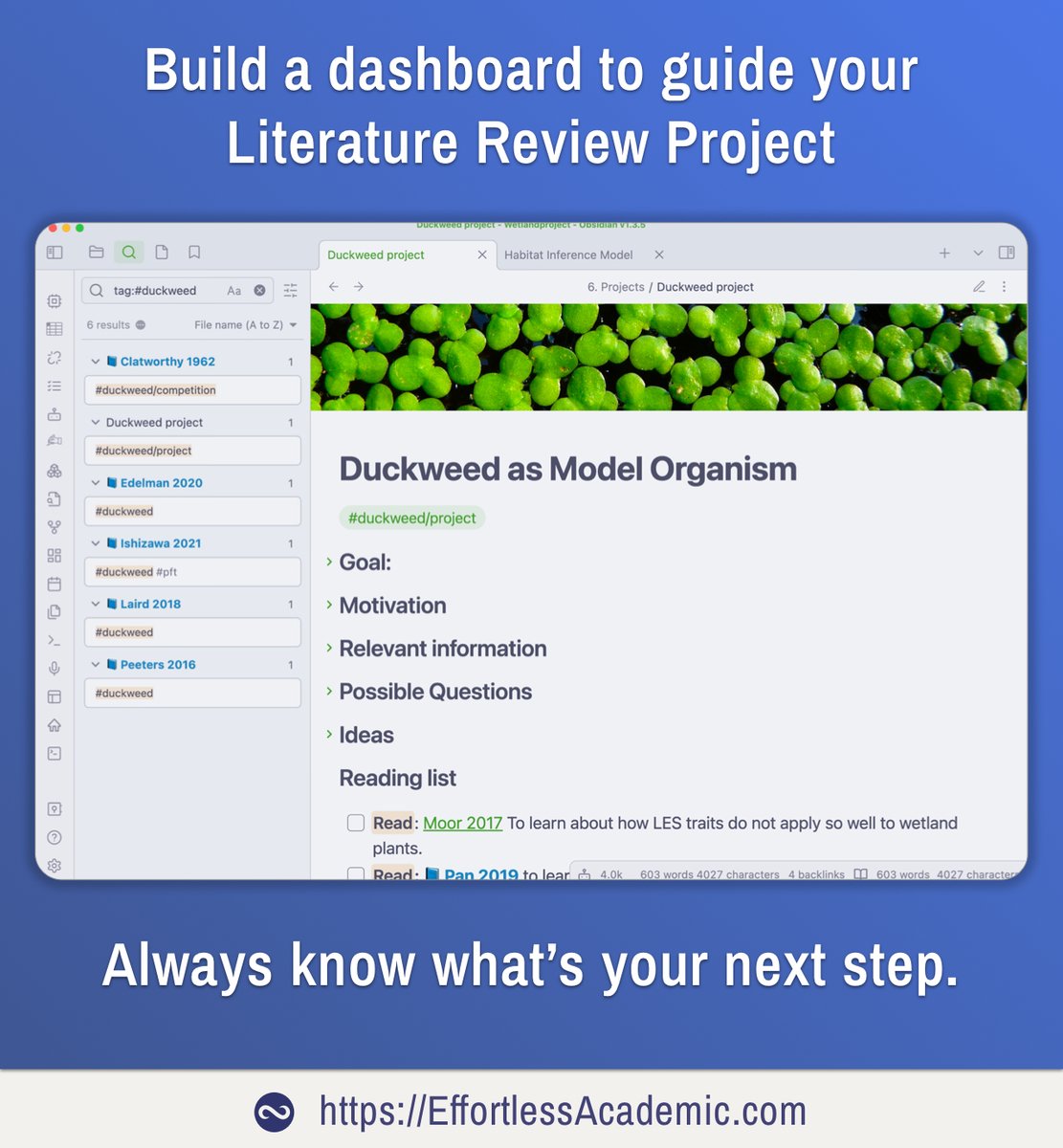
1. Project note
Start your project by creating a single "PROJECT" note.
It can be a question, a topic, a chapter or anything "bigger" than an afternoon of reading.
Use it as a control center to quickly remember what you are working on and where you left off.
Set a GOAL.
Start your project by creating a single "PROJECT" note.
It can be a question, a topic, a chapter or anything "bigger" than an afternoon of reading.
Use it as a control center to quickly remember what you are working on and where you left off.
Set a GOAL.

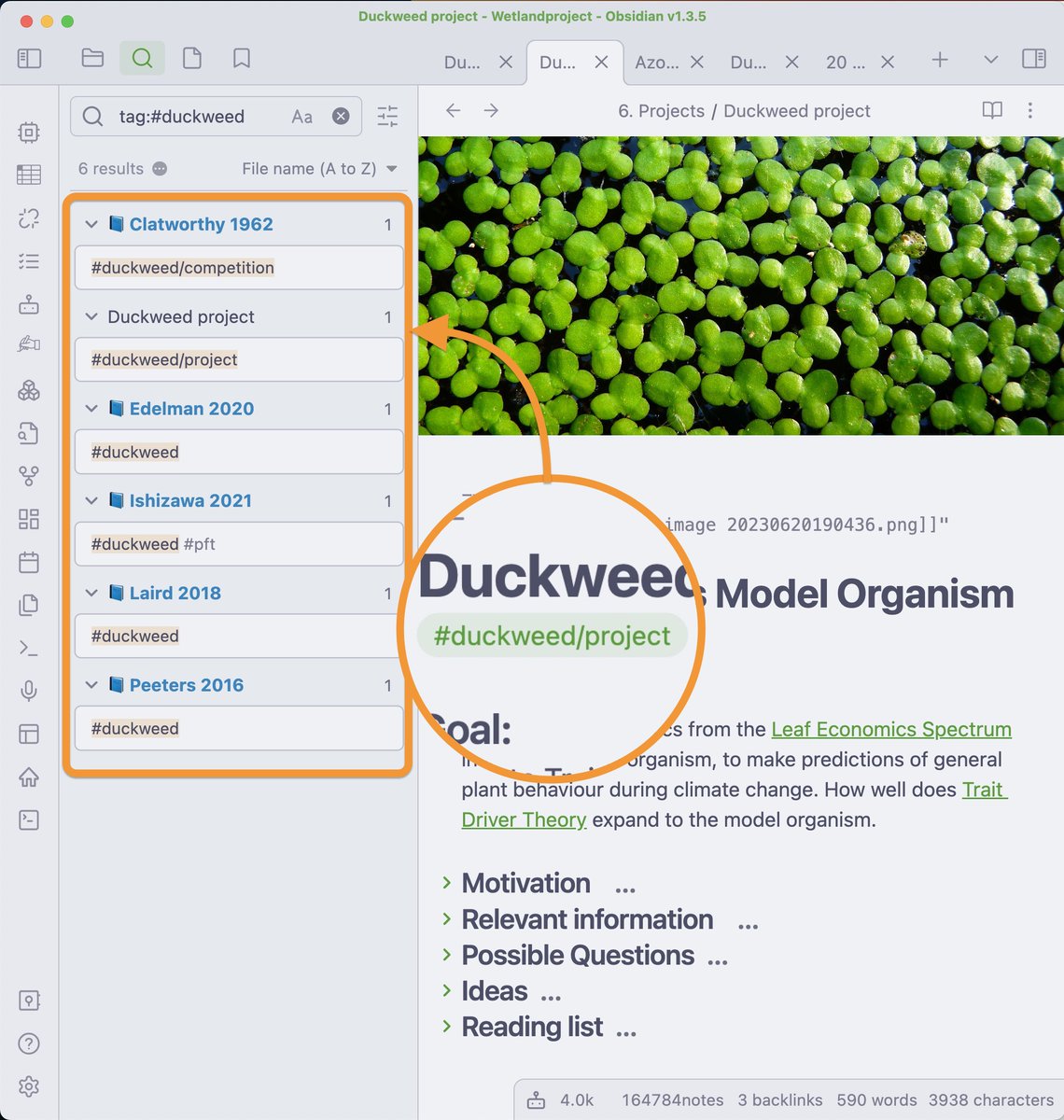
2. Assign a tag to your project
Every paper that you read gets a single note, named like so: "Smith 2020"
Add the tag of your project to this note.
✅ Find all PAPERS on this subject with one click.
@obsdmd opens a search for this tag if you click on it.
Every paper that you read gets a single note, named like so: "Smith 2020"
Add the tag of your project to this note.
✅ Find all PAPERS on this subject with one click.
@obsdmd opens a search for this tag if you click on it.
@obsdmd I asked 281 of you what I should talk about in my next webinar.
The majority wants: Organization and Structure.
The dashboard is just one such approach.
Pre-register for the webinar:
The majority wants: Organization and Structure.
The dashboard is just one such approach.
Pre-register for the webinar:
https://twitter.com/Artifexx/status/1670022490725433345
@obsdmd 3. Reading List
Collecting 50 papers first thing is a bad idea.
Instead: Be selective!
Write down the papers you WANT to read and WHY.
You are a detective carefully investigating a mystery.
✅ Always know what's the next step in your research.
Collecting 50 papers first thing is a bad idea.
Instead: Be selective!
Write down the papers you WANT to read and WHY.
You are a detective carefully investigating a mystery.
✅ Always know what's the next step in your research.

@obsdmd 4. Questions
This is my favourite section.
When reading ideas come: "Can I do X? Has anyone tried Y?".
Write them down, link the relevant notes and papers, where you got the idea from.
✅ More critical thinking and creativity, plus if you are stuck, look at your ideas!
This is my favourite section.
When reading ideas come: "Can I do X? Has anyone tried Y?".
Write them down, link the relevant notes and papers, where you got the idea from.
✅ More critical thinking and creativity, plus if you are stuck, look at your ideas!

@obsdmd 5. Rabbit holes or Ideas
Sometimes you get bigger ideas for the project.
But researching them often takes days.
So park them - for now.
✅ Keep track of your rabbit holes, choose which ones to explore - wisely.
Sometimes you get bigger ideas for the project.
But researching them often takes days.
So park them - for now.
✅ Keep track of your rabbit holes, choose which ones to explore - wisely.

@obsdmd 6. Link RELATED notes to this project
When creating a note that mostly relates to this project, add a link in the header.
It takes close to no time.
Using BACKLINKS you can now discover all the notes that link TO your project.
When creating a note that mostly relates to this project, add a link in the header.
It takes close to no time.
Using BACKLINKS you can now discover all the notes that link TO your project.
https://twitter.com/Artifexx/status/1669300153654624258

@obsdmd The structure of your project dashboard is not set in stone: Experiment and Evolve!
Approach the Lit Review as a project with actionable steps and clues.
See yourself as a DETECTIVE and the dashboard as your OFFICE.
Approach the Lit Review as a project with actionable steps and clues.
See yourself as a DETECTIVE and the dashboard as your OFFICE.
https://twitter.com/Artifexx/status/1657240428704301058
• • •
Missing some Tweet in this thread? You can try to
force a refresh