
Here's a quick interface tour where we highlight key features, plus tips on making the most out of your social trading experience on Aluna.
Find out what you can do with an Aluna account 🤓👇
blog.aluna.social/aluna-platform… #crypto #trading #ethereum
Find out what you can do with an Aluna account 🤓👇
blog.aluna.social/aluna-platform… #crypto #trading #ethereum
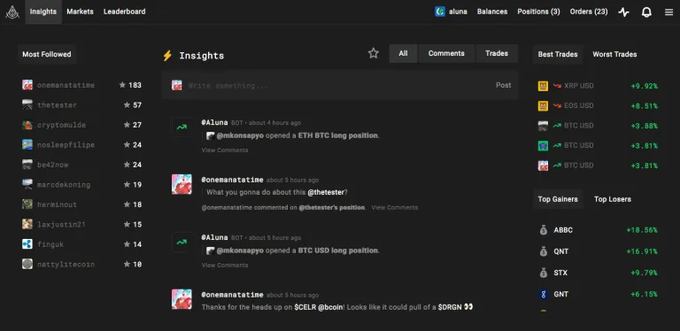
1. Homepage (Insights)
The first thing you see on aluna.social is our micro-blogging feature (like Twitter) where traders can share their thoughts on the crypto market.
Every time someone opens a new trade, it appears on this global Insights feed as well.
The first thing you see on aluna.social is our micro-blogging feature (like Twitter) where traders can share their thoughts on the crypto market.
Every time someone opens a new trade, it appears on this global Insights feed as well.
2. Navigation
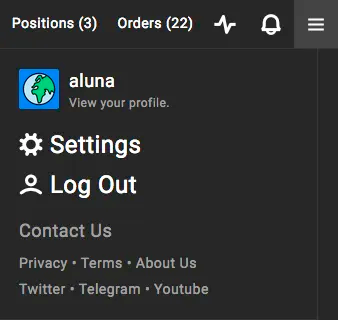
The navigation bar is located at the top of your screen.
On the left you can access Insights, Markets, and the Leaderboard.
On the right you can access your Profile, your connected exchange data (balances, orders, positions), notifications, and the Menu/Settings.
The navigation bar is located at the top of your screen.
On the left you can access Insights, Markets, and the Leaderboard.
On the right you can access your Profile, your connected exchange data (balances, orders, positions), notifications, and the Menu/Settings.


3. Markets
On the Aluna Markets page you'll find a list of all cryptocurrencies that are trading on exchanges which are integrated with Aluna.
Clicking on any of the cryptocurrencies will bring you to its specific Coin page.
📈 aluna.social/markets
On the Aluna Markets page you'll find a list of all cryptocurrencies that are trading on exchanges which are integrated with Aluna.
Clicking on any of the cryptocurrencies will bring you to its specific Coin page.
📈 aluna.social/markets
4. Coin pages (e.g. #Ethereum )
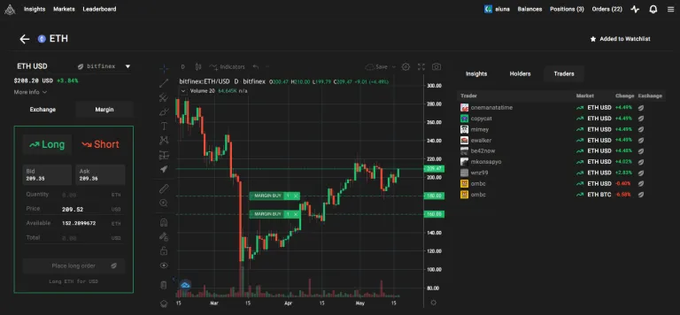
On the Coin page is a custom TradingView chart with drawing tools, indicators, and also shows your open orders, entries & exits.
On the left is an Order Form for executing trades, and on the right is a list of Insights, Holders, and Traders.
On the Coin page is a custom TradingView chart with drawing tools, indicators, and also shows your open orders, entries & exits.
On the left is an Order Form for executing trades, and on the right is a list of Insights, Holders, and Traders.
5. Positions
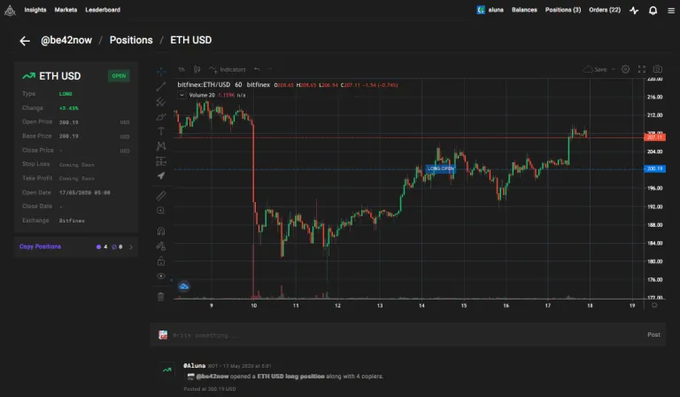
Every margin/futures trade is public and has its own Position page, while private information such as position size are kept hidden from public.
(Pictured below: aluna.social/be42now/positi…)
Every margin/futures trade is public and has its own Position page, while private information such as position size are kept hidden from public.
(Pictured below: aluna.social/be42now/positi…)
6. Leaderboard
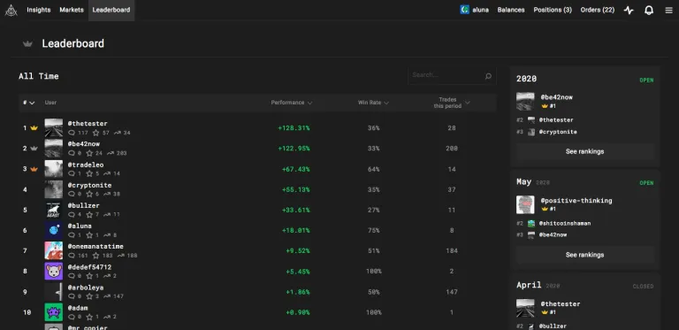
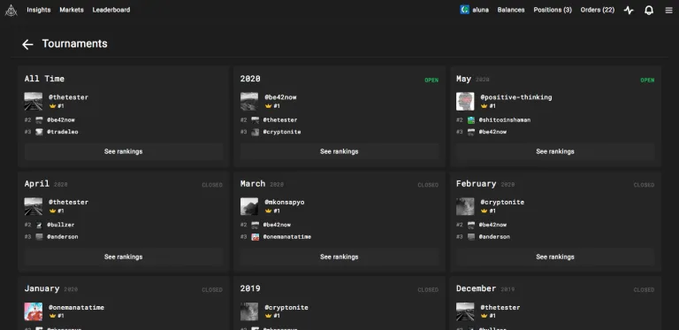
The Aluna Leaderboard features a list of all traders on Aluna and their overall trading performance across multiple exchanges.
This gives you an easy way to find and sort traders based on their performance, risk, and consistency.
🏆💯 aluna.social/leaderboard
The Aluna Leaderboard features a list of all traders on Aluna and their overall trading performance across multiple exchanges.
This gives you an easy way to find and sort traders based on their performance, risk, and consistency.
🏆💯 aluna.social/leaderboard
7. Connect your exchange API key
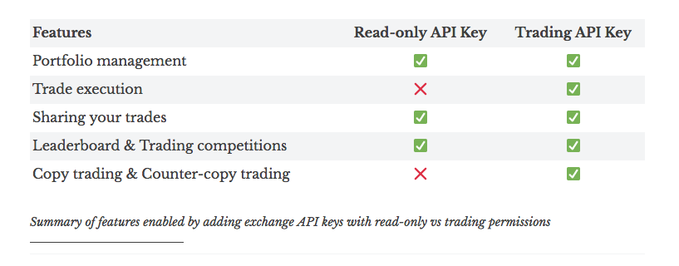
Connect an exchange API key to get the most out of your Aluna account, including unlocking features, and earning benefits and rewards.
Read this blog post for more: blog.aluna.social/aluna-platform…
Connect an exchange API key to get the most out of your Aluna account, including unlocking features, and earning benefits and rewards.
Read this blog post for more: blog.aluna.social/aluna-platform…
8. User Profiles
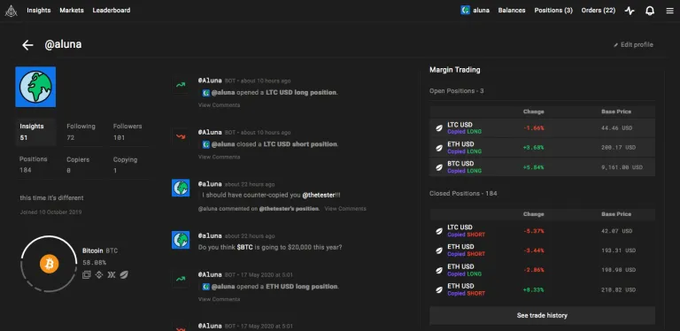
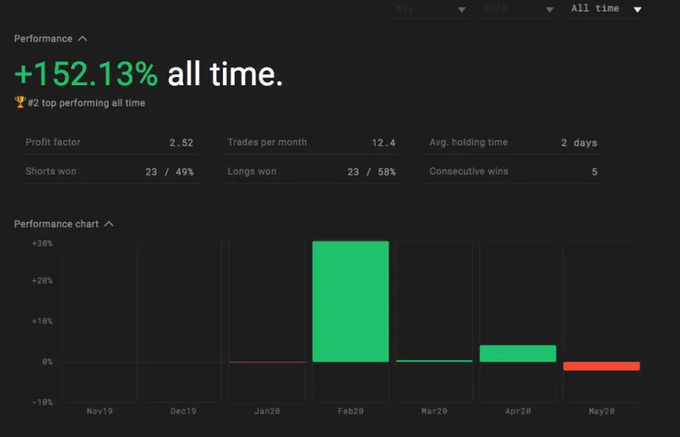
Every trader on Aluna.Social has a public Profile, showing a pie chart of the trader’s portfolio distribution, his Insights, open margin/futures trades and trading history.
Trading performance cannot be forged and serve as a "Proof-of-Performance".
Every trader on Aluna.Social has a public Profile, showing a pie chart of the trader’s portfolio distribution, his Insights, open margin/futures trades and trading history.
Trading performance cannot be forged and serve as a "Proof-of-Performance".
9. Portfolio Management
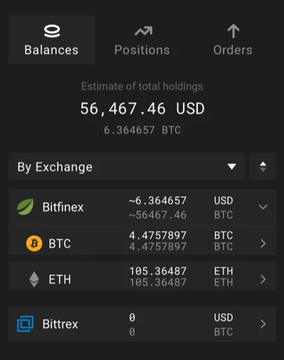
After connecting your exchange account, you can check your balances, along with your open orders, positions, and trading history.
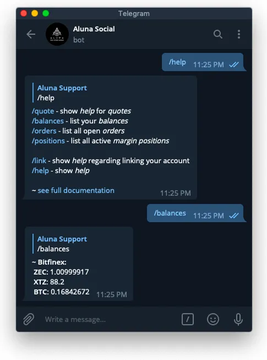
You can also connect your Aluna account with our Telegram Bot (t.me/aluna_social_b…) to manage your portfolio on-the-go.
After connecting your exchange account, you can check your balances, along with your open orders, positions, and trading history.
You can also connect your Aluna account with our Telegram Bot (t.me/aluna_social_b…) to manage your portfolio on-the-go.
10. Copy Trading (and Counter-copy Trading)
Aluna makes it easy for you to automatically copy other traders across multiple exchanges such as @bitfinex @binance @BitMEXdotcom and more!
Come try it out today for free:
👏💯 aluna.social
Aluna makes it easy for you to automatically copy other traders across multiple exchanges such as @bitfinex @binance @BitMEXdotcom and more!
Come try it out today for free:
👏💯 aluna.social