Here is another thread of the most important clauses to boost your SQL queries to the next level!
Advance SQL, A beginner-friendly version! (#DataScience)
Thread 🧵
Advance SQL, A beginner-friendly version! (#DataScience)
Thread 🧵
Let me explain what the table looks like.
The table name is customer_list, where the columns are ID, name, address, zip code, phone, city, country, notes & SID.
See the image for reference
The table name is customer_list, where the columns are ID, name, address, zip code, phone, city, country, notes & SID.
See the image for reference

☑️ GROUP BY
This clause is used to group rows that have the same values together. It summarises data from the database.
Note: The group by clause returns one row for each group.
👉 Query: select col_name from table_name GROUP BY column_name;
This clause is used to group rows that have the same values together. It summarises data from the database.
Note: The group by clause returns one row for each group.
👉 Query: select col_name from table_name GROUP BY column_name;
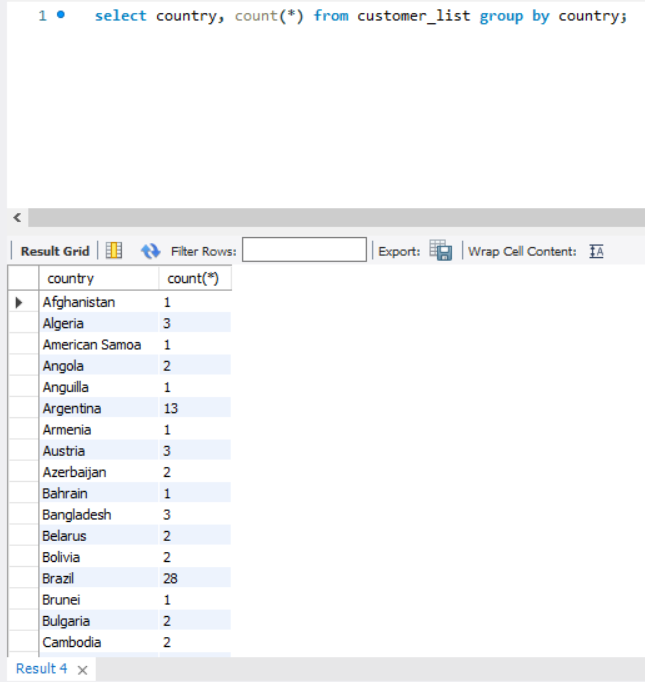
Example: Group the customers by country.
-> select country, count(*) from customer_list group by country;
Here we get the number of customers in each country. For ex: Argentina has 13 customers, Austria 3 and so on.
-> select country, count(*) from customer_list group by country;
Here we get the number of customers in each country. For ex: Argentina has 13 customers, Austria 3 and so on.
Let's implement another query with the same clause.
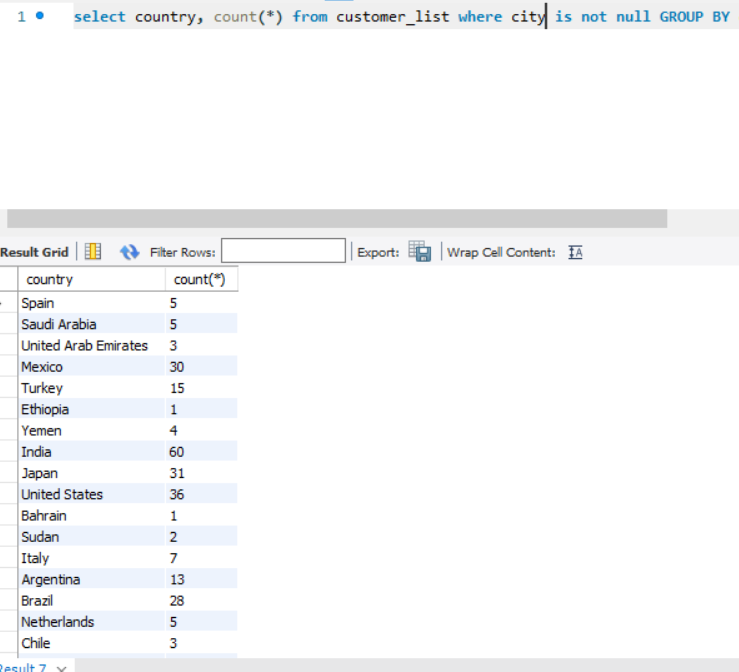
Query: Find the number of customers in each country where the state is not null.
Simplifying the query: Our aim is to find the number of customers where the state is NOT NULL grouped by country.
Query: Find the number of customers in each country where the state is not null.
Simplifying the query: Our aim is to find the number of customers where the state is NOT NULL grouped by country.
-> select country, count(*) from customers_list where city is not null GROUP BY country;
See the image for the output.
See the image for the output.
*Important*
How to group the results based on two columns? 🤔
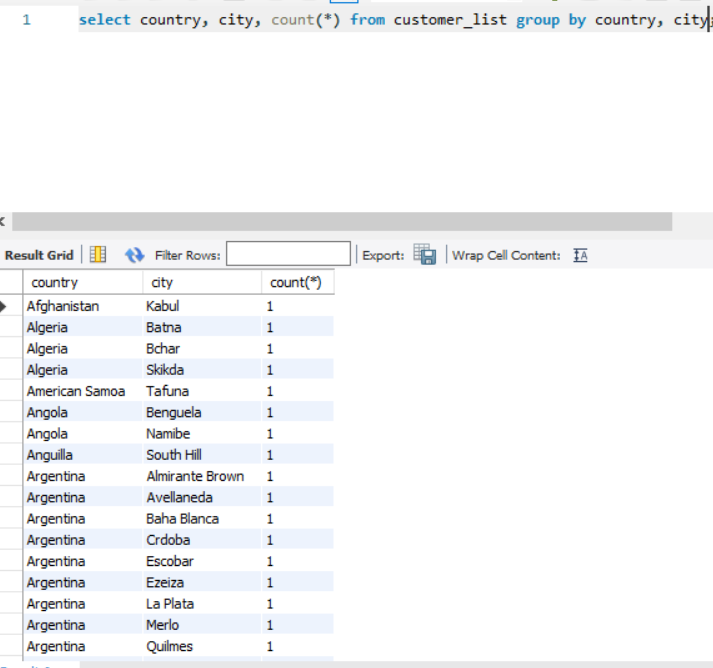
Query: Count the no. of customers first based on country, then based on city.
SQL query: select country, city, count(*) from customer_list group by country, city;
See the image for output
How to group the results based on two columns? 🤔
Query: Count the no. of customers first based on country, then based on city.
SQL query: select country, city, count(*) from customer_list group by country, city;
See the image for output
Let me simplify this:-
The above query will be executed in two parts.
First, we will get the count of customers based on countries based on country
Then, corresponding to each country we will get each city in the country & the no. of customers in that city.
The above query will be executed in two parts.
First, we will get the count of customers based on countries based on country
Then, corresponding to each country we will get each city in the country & the no. of customers in that city.

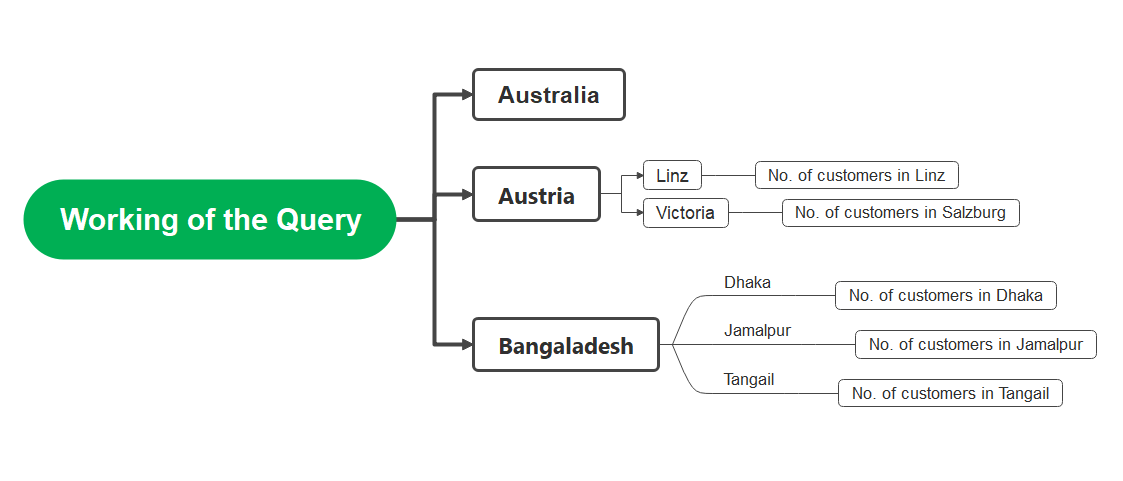
Observe the output of the above query.
Country Austria has two cities Linz and Salzburg. Linz has 1 customer, and Salzburg has 1 Customer.
See the flowchart for a better understanding.
Country Austria has two cities Linz and Salzburg. Linz has 1 customer, and Salzburg has 1 Customer.
See the flowchart for a better understanding.
☑️ HAVING
The clause WHERE cannot be used to filter the "grouped" results obtained using the GROUP BY clause.
We use the HAVING clause for that.
Note: If the group by clause is not present the HAVING clause behaves like a WHERE clause.
The clause WHERE cannot be used to filter the "grouped" results obtained using the GROUP BY clause.
We use the HAVING clause for that.
Note: If the group by clause is not present the HAVING clause behaves like a WHERE clause.
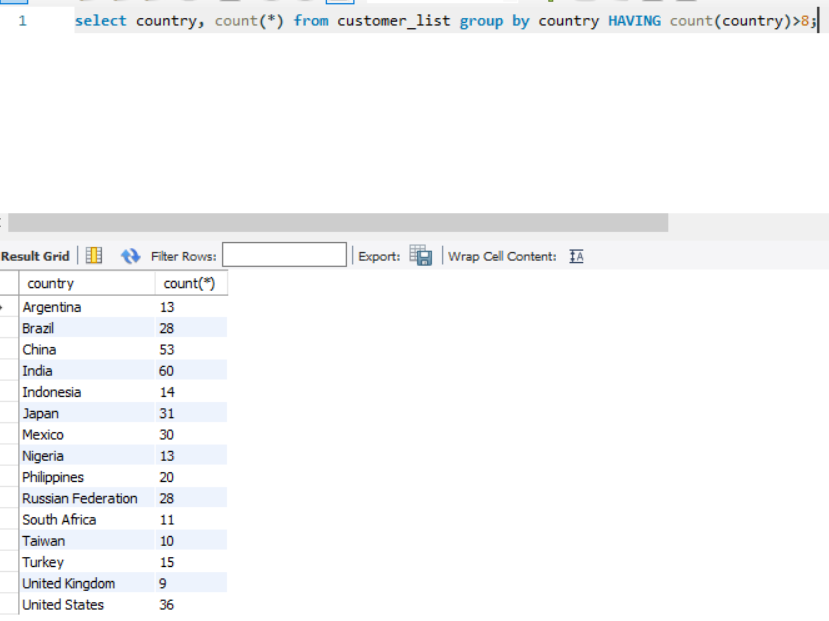
Query: Count the number of customers with respect to countries where the no. of customers is greater than 8.
SQL query: select country, count(*) from customer_list group by country HAVING count(country)>8;
SQL query: select country, count(*) from customer_list group by country HAVING count(country)>8;
☑️ ORDER BY
The clause is used to sort the results in ascending or descending order.
It sorts the result in ascending order by default. To sort the result in descending order, use the keyword DESC.
The clause is used to sort the results in ascending or descending order.
It sorts the result in ascending order by default. To sort the result in descending order, use the keyword DESC.
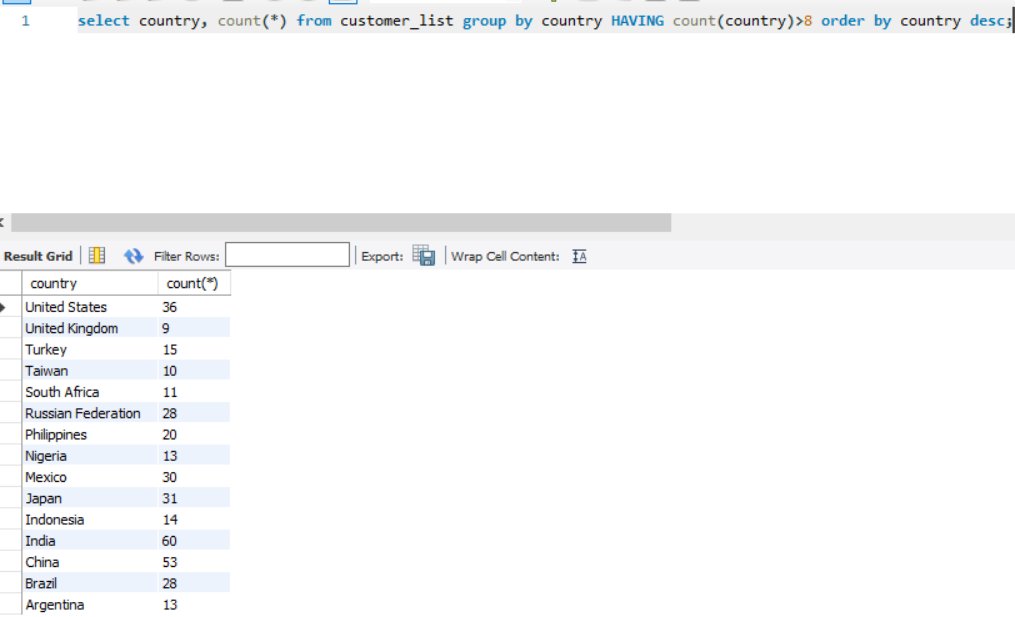
Query: Count the number of customers with respect to countries where the no. of customers is greater than 8 and sort the countries in descending order.
SQL query: select country, count(*) from customer_list group by country HAVING count(country)>8 order by country desc;
SQL query: select country, count(*) from customer_list group by country HAVING count(country)>8 order by country desc;
• • •
Missing some Tweet in this thread? You can try to
force a refresh