Ready for one of my favorite typography hacks?

Knowing when to customize letter spacing can make a HUGE difference in your UI.

Here are the 3 rules I live by πŸ‘‡ Image
Headings = decrease letter spacing

Labels = increase letter spacing

Paragraphs = leave as the default

It can really take a simple piece of UI to the next level πŸ’ͺ Image
Does it work for EVERY type system?

No, definitely not (especially if you're using some whacky fonts). But it's a heck of a starting point!

P.s. the spacing in the example above helps too πŸ˜‰
πŸ‘† A little excerpt taken from the "Typography Systems" lesson in @figmaacademy

Beta access opens in a week so make sure you're on the list! Image
If you like to geek on type here’s the first tweet to share with others πŸ‘‡

β€’ β€’ β€’

Missing some Tweet in this thread? You can try to force a refresh

γ€€

Keep Current with Ridd

Ridd Profile picture

Stay in touch and get notified when new unrolls are available from this author!

Read all threads

This Thread may be Removed Anytime!

PDF

Twitter may remove this content at anytime! Save it as PDF for later use!

Try unrolling a thread yourself!

how to unroll video
  1. Follow @ThreadReaderApp to mention us!

  2. From a Twitter thread mention us with a keyword "unroll"
@threadreaderapp unroll

Practice here first or read more on our help page!

More from @Ridderingand

7 Sep
"Slot" components are one of the best ways to save time as a product designer

They can be tricky at first, but once you wrap your head around the right way to use them...

They become one of the most powerful tactics in @figmadesignπŸ‘‡
What are "Slots"?

They're placeholder components that are part of larger organisms or templates.

They are intentionally empty so that they can be replaced with a local component.
Why use "Slots"?

1. They minimize sources of truth

2. They allow you to integrate local UI into your design system components

3. They eliminate a ton of manual work
Read 10 tweets
26 Aug
I’ll never build a form in @figmadesign the same way again…


It took me countless tries, but I think I’ve finally created a system that is flexible and doesn't result in variant overload πŸ’ͺ

Here's a 5 step walkthrough πŸ‘‡
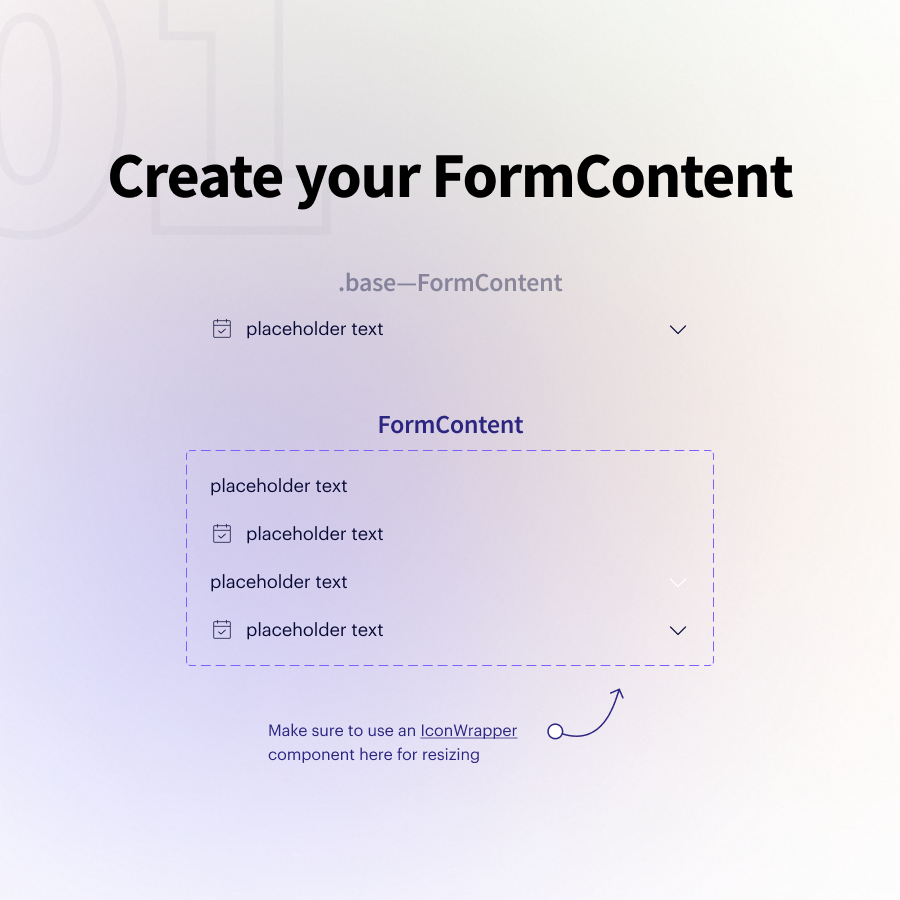
01 β€” Create a "FormContent" component

This most likely combines text + icons

I'll create a handful of variants that give me flexibility around where/how my icons are displayed

Pro tip: Use an `IconWrapper` component so you can resize icons using variants
02 β€” Create a "FormChild" component

This is simply an auto-layout wrapper around my FormContent that dictates the base size + padding.

We'll use these to create many types of subcomponents!
Read 12 tweets
15 Aug
Ready for a @figmadesign pro tip?

Use an `IconWrapper` to nest icons in your components.

That way you can always resize your icons without having to detach components, hide layers, or add additional variants.

Here's how it works πŸ‘‡
This is how I build my .baseβ€”Button component:

Two hidden icons on the left and right of my text that I can unhide as I need them.

The problem is...

If I need different icon sizes across my components, I have to hide multiple icon sizes in my .base 😠
The solution...

Introducing the `IconWrapper` πŸ’ͺ

I simply insert an icon from my icon library and duplicate it once for each of the sizes I need (ex: 16px - 20px - 24px).

I then turn these into new main components and combine as variants naming it `IconWrapper`.
Read 7 tweets
8 Aug
Ready for a behind-the-scenes look at one of my favorite systems I've ever built in @figmadesign ?

Of course you are (it'll be fun) πŸ‘‡
First, the context...

We're currently redesigning the landing pages that Maven provides instructors to promote their courses.

Goals:
β€’ Create a starting template of sections
β€’ Allow each section to be customized
β€’ Prepare for a million future changes

πŸ‘‡
Once we finalized the outline of our starter template, I set to work creating a series of components for each individual "section" that we could combine to create our templates.

Each section has a column within a giant auto layout ✨
Read 14 tweets
24 Jun
Building complex nested components is one of my favorite parts of working in @figmadesign

I love seeing how people think about the building blocks!

So this is me peeling back the curtain and showing you exactly how I built this menu component below πŸ‘‡
First, let's visualize where we are going.

There's a lot happening here... 😳 Specifically, there are many different levels that future changes can be made within this component.

So let's start building with our smallest possible legos πŸ‘‡ Image
01 // `IconType` component

We know that we'll have an icon for each question type and we know that we'll be wrapping them into an `IconType`to display in our rows.

So let's start here.

Pro tip: use the same layer names inside to preserve overrides when switching color πŸ’ͺ Image
Read 8 tweets
20 Jun
There's a right way and a wrong way to use variants in @figmadesign.

When used correctly, they can be the most powerful part of your entire workflow.

These are the 5 steps I do for every single component I create πŸ‘‡
01 β€” Create a "base" component

This will function as the single source of truth for all of your variants. So include everything you think you'll need.

I like to follow this naming format πŸ‘‡

".baseβ€”[ComponentName]"

(using a . in front of the name hides it from your libraries) Image
02 β€” Duplicate your .base component 2x

Careful... don't duplicate it once, and then duplicate that new instance the 2nd time.

Both instances must come directly from the .base component to preserve all of your overrides when you switch between variants in the future. Image
Read 10 tweets

Did Thread Reader help you today?

Support us! We are indie developers!


This site is made by just two indie developers on a laptop doing marketing, support and development! Read more about the story.

Become a Premium Member ($3/month or $30/year) and get exclusive features!

Become Premium

Too expensive? Make a small donation by buying us coffee ($5) or help with server cost ($10)

Donate via Paypal Become our Patreon

Thank you for your support!

Follow Us on Twitter!

:(