You can use animated textures and some material tricks to create believable swarms of creatures out of simple sprites, a more detailed breakdown is on the way! #ue4 #gamedev #indiedev #screenshotsaturday
I use a diffuse + normal animated texture to mimic 3D and add vertex animation to break up the motion. Each particle has randomized speed, period and frequency. Vertex offset is camera aligned so it looks interesting from any angle. #ue4 #screenshotsaturday #gamedev #indiedev
Another example, green space squid invasion! #ue4 #gamedev #indiedev
Thanks for all the love, glad you liked this one!

• • •

Missing some Tweet in this thread? You can try to force a refresh

 

Keep Current with Klemen

Klemen Profile picture

Stay in touch and get notified when new unrolls are available from this author!

Read all threads

This Thread may be Removed Anytime!

PDF

Twitter may remove this content at anytime! Save it as PDF for later use!

Try unrolling a thread yourself!

how to unroll video
  1. Follow @ThreadReaderApp to mention us!

  2. From a Twitter thread mention us with a keyword "unroll"
@threadreaderapp unroll

Practice here first or read more on our help page!

More from @klemen_lozar

21 Sep 19
Been a while since I promised a breakdown for this shot (no sims, all done with vertex offset). I finally got around to it, I'll be updating this thread shortly! #screenshotsaturday #gamedev #UE4
We'll need our mesh to have positions of it's individual fragments saved somehow. I do this by baking pivot data into UVs. I bake XY pos to UV1 and Z to UV2. This data is easily accessible in the shader, see below.

Here's a sample mesh for anyone to use:
klemenlozar.com/@klemen_lozar_… Image
We've now essentially created a new coordinate expression, what I would call "fragment position", we can use this to pass unique values to separate fragments instead of distorting the vertices of the entire mesh as a whole.
Read 7 tweets
25 Aug 18
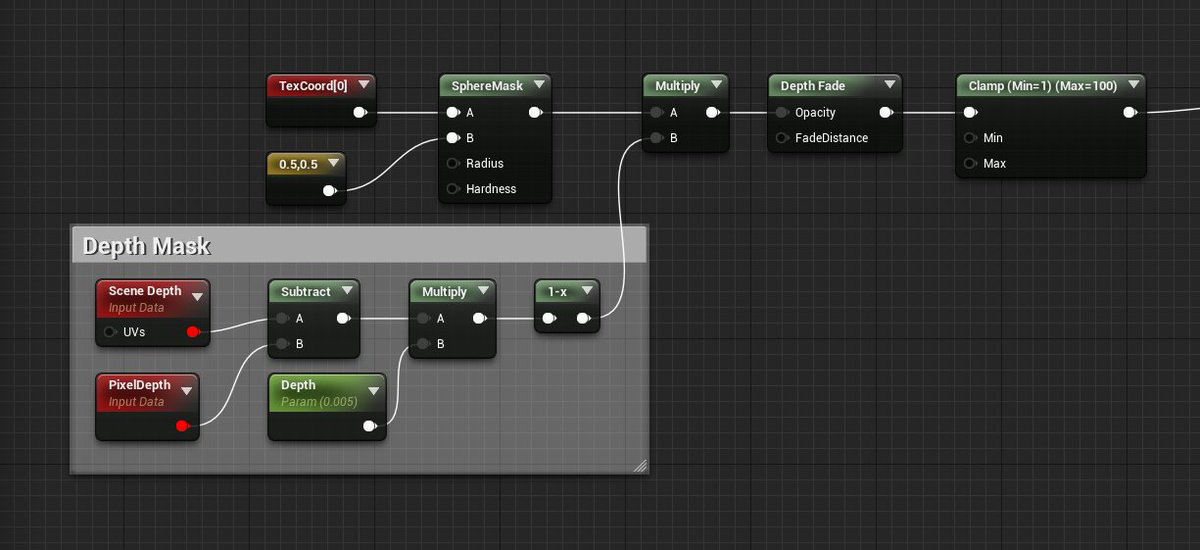
Dynamic lights are expensive, using sprites with a modulate blend material you can multiply screen colors behind the sprite and use depth masking to fake a light radius, cheap and can work surprisingly well. #screenshotsaturday #UE4 #gamedev #indiedev
Using modulate blending, make sure you clamp the result in a range above 1 for this to work right. Modulate blending without depth testing is also great for various glow effects. #screenshotsaturday #UE4 #gamedev #indiedev
Here's a more practical example, core of the sprite is not being masked by depth so it's always visible, depth masked glows around geometry look pretty convincing as impressions of lighting. #screenshotsaturday #UE4 #gamedev #indiedev
Read 4 tweets
31 May 18
Next breakdown will focus on this little scene I made. Almost has a simulated quality to it but you might be surprised to learn how simple it is. #UE4 #gamedev #indiedev
First component, the stream, is a torus I deform and rotate. I use a world space radial gradient to gradually increase deformation away from the nozzle. Large part of the torus is just hidden behind geo, you could also collapse those verts to a point to remove them. #ue4 #gamedev
At the heart of the the second element is a procedural pulsating texture which drives displacement and is also used to derive normals. Not mentioned in the gif but I'm also mixing in some random noise to break things up. #UE4 #gamedev
Read 4 tweets
17 Jan 18
Raindrop shader. Three layers, two dynamic, one static. Packed tiling textures with normals and opacity mask. More detailed breakdown on the way, look for replies to this thread! #UE4 #gamedev #indiedev
Streaks on top, a tiling tex, distortion is animated so you can see the influence of the distortion tex on the left. Drops on the bottom, I use a very small but uncompressed tex that holds different UV values per pixel, this is used to distribute another tex around. #UE4 #gamedev
If you're fine with some quality loss you can strip out the blue channel of the normal and pack in another grayscale texture instead. Make sure compression is default and multiply the normal by 2 and subtract 1 to move it back to the right range. #UE4 #gamedev
Read 5 tweets
6 Jan 18
Calcifer shader! Single noise texture used, everything is procedural including the eyes and mouth. I'll follow up to this thread with a breakdown for this type of procedural fire. #screenshotsaturday #gamedev #UE4
First part of the setup I like to use. On the left it's a UV distortion texture, I add this to the UVs of the noise texture on the right. For efficiency you could pack the noise texture into the blue channel of the dist texture, save a texture call. #UE4 #gamedev #indiedev Image
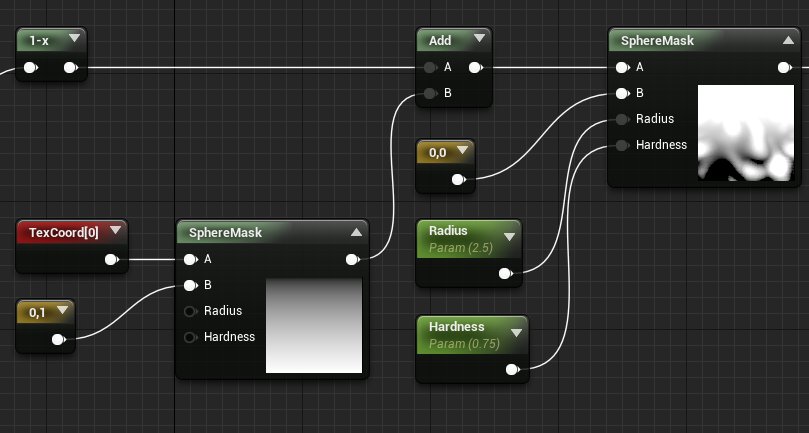
2nd part, I use a linear gradient for the fire transition and a 2nd sphere mask to control the length/hardness of the flames. Optional 1-x on the left, depends on your noise texture, it will change the look. You should invert the end result and color it. #UE4 #gamedev #indiedev Image
Read 4 tweets

Did Thread Reader help you today?

Support us! We are indie developers!


This site is made by just two indie developers on a laptop doing marketing, support and development! Read more about the story.

Become a Premium Member ($3/month or $30/year) and get exclusive features!

Become Premium

Too expensive? Make a small donation by buying us coffee ($5) or help with server cost ($10)

Donate via Paypal

Thank you for your support!

Follow Us on Twitter!

:(