Keep Current with Sukriti Macker

Sukriti Macker Profile picture

Stay in touch and get notified when new unrolls are available from this author!

Read all threads

This Thread may be Removed Anytime!

PDF

Twitter may remove this content at anytime! Save it as PDF for later use!

Try unrolling a thread yourself!

how to unroll video
  1. Follow @ThreadReaderApp to mention us!

  2. From a Twitter thread mention us with a keyword "unroll"
@threadreaderapp unroll

Practice here first or read more on our help page!

More from @Sukriti_Macker

28 Jun
What else can I say about SQL to prove that it is crucial to know how to work around databases?

Having said that, SQL could be the one thing that you could begin your programming journey with. 🤩

A Beginner-friendly version of SQL (UPDATE and DELETE)
🧵👇
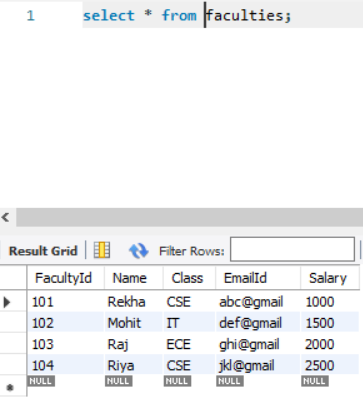
🌟 Let's look at the table first!
The name of the table is -> faculties
We have columns as FacultyId, Name, Class, EmailId and Salary. "Faculties" Table.
☑️ UPDATE
This clause is used to change values in a specified column.
You may or may not provide a condition along with the change you want to make.

👉 Update without condition:-
UPDATE table_name SET column_name = column_value;
Read 9 tweets
25 Jun
I hope you are practising SQL whilst you are learning it. This technique makes it easier to understand concepts.

Alrighty, here is another thread for SQL. 🤩

SQL - A Beginner-friendly version! 📚
(Clauses: IN, BETWEEN and LIKE)

Thread 🧵
🌟Which table are we working on today?
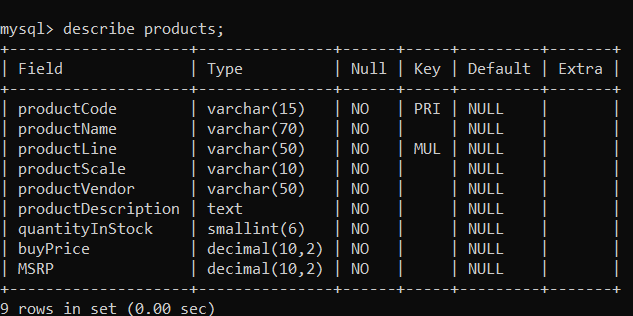
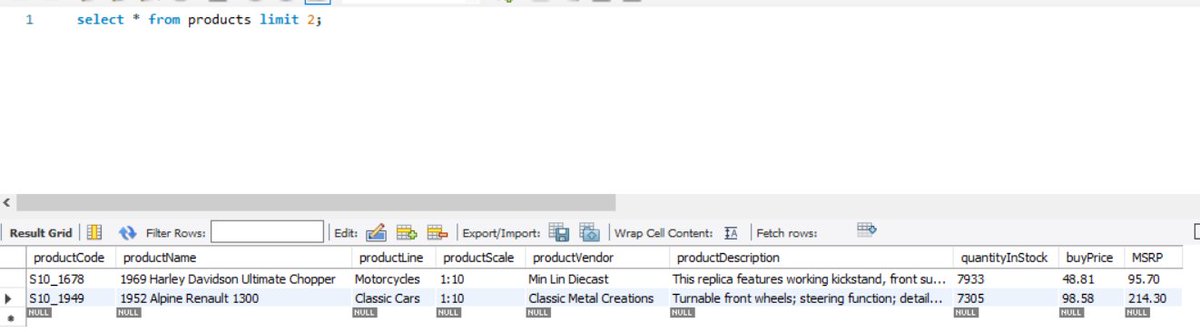
The name of the table is "products". So the columns that we have are productCode, productName, productDescription, among others.

Take a look 👇 Column namesOverview of the information in the columns
☑️ IN
This clause would reduce the efforts to write multiple OR conditions. It helps you find a specific match for a value.

👉 select column1, column2 from table_name where EXPRESSION IN ('value1', 'value2')
Read 15 tweets
24 Jun
Here is another thread of the most important clauses to boost your SQL queries to the next level!

Advance SQL, A beginner-friendly version! (#DataScience)

Thread 🧵
Let me explain what the table looks like.
The table name is customer_list, where the columns are ID, name, address, zip code, phone, city, country, notes & SID.

See the image for reference The table and column names in that table.
☑️ GROUP BY
This clause is used to group rows that have the same values together. It summarises data from the database.

Note: The group by clause returns one row for each group.

👉 Query: select col_name from table_name GROUP BY column_name;
Read 13 tweets
16 Jun
Some SQL Aggregate Functions that would come in handy! ➕ ➖ ➗ ✖️

Let's dive right into them. 🤩

Thread 🧵
☑️ Aggregate Functions
The motive of these functions is to perform a calculation on a set of values and return a single value as a result.

Different functions:-
1. COUNT
2. AVERAGE (AVG)
3. MAXIMUM (MAX)
4. MINIMUM (MIN)
5. SUM
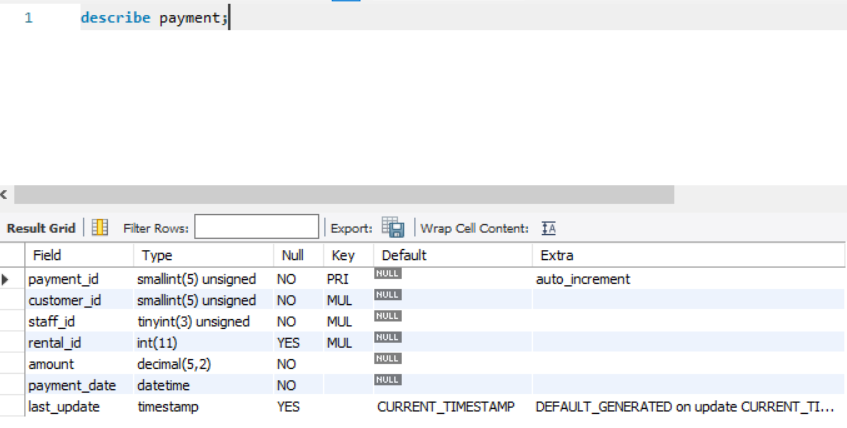
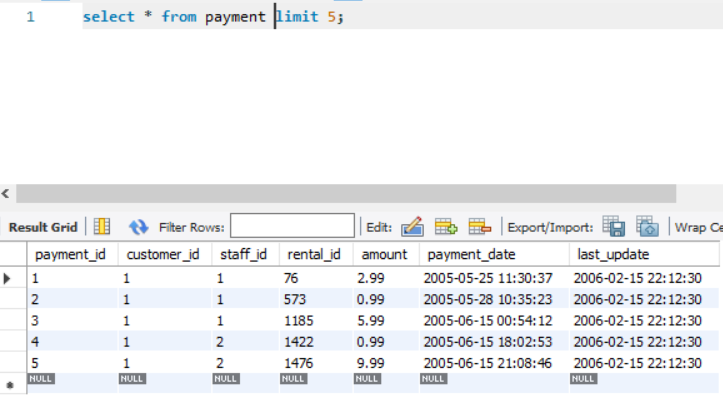
To understand most of the Advance SQL clauses, we will use the table named "payment". It consists of columns like payment_id, amount, staff_id, customer_id, etc. (See the image).

The first 5 rows of the table are also described for reference. All columns in Payment Table.The data values in the Paym...
Read 12 tweets
14 Jun
Hey, folks! Some time back, I was scrolling through LinkedIn and found some essential SQL topics to revisit before an Interview.

Have a look 🧵👇
1. WHERE, AND, OR, NOT, IN
2. ORDER BY, ASC, DESC
3. IS NULL
4. LIMIT
5. MIN, MAX, COUNT, AVG, SUM
6. LIKE, WILDCARDS
7. IN BETWEEN
8. INNER JOIN
9. LEFT JOIN
10. UNION ALL
11. GROUP BY
12. HAVING
13. LEFT, RIGHT, MID, CONCAT
14. PARTITION BY, OVER
15. LEAD, LAG
16. Subqueries
17. RANK, DENSE_RANK, PERCENT_RANK
18. ROW_NUMBER, CUME_DIST
19. FIRST_VALUE, LAST_VALUE
20. AS
Read 5 tweets
10 Jun
Let's dive further into SQL to help you through the most demanding skill required in the Data Science Industry.

A Beginner's Guide to Filter Results in MySQL - Part 5!!

Thread 🧵
☑️ LIMIT Clause
To restrict the number of rows in the final result, we use the LIMIT clause.
That means if you have 10,000 rows in the data, you can fetch only 10 rows using this clause in your query.
👉 Query: select * table_name LIMIT limit_no;

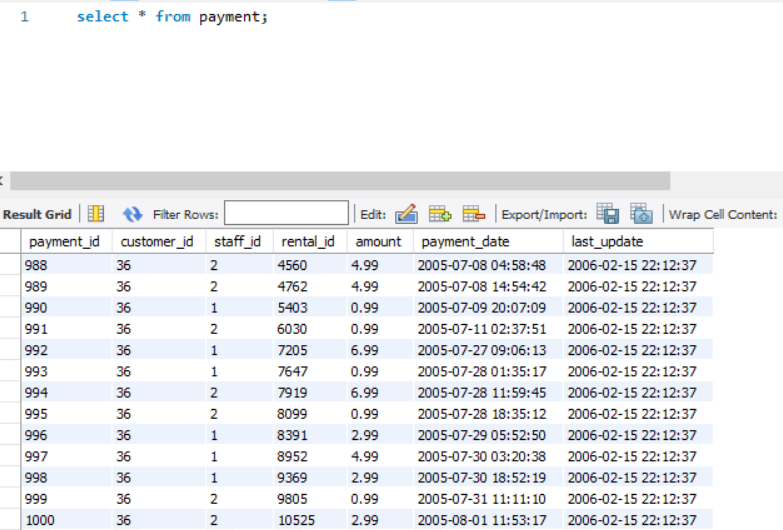
For e.g., Consider a table PAYMENTS. It has more than 1000 rows. [See the image] Table PAYMENTS with 1000 rows.
Read 8 tweets

Did Thread Reader help you today?

Support us! We are indie developers!


This site is made by just two indie developers on a laptop doing marketing, support and development! Read more about the story.

Become a Premium Member ($3/month or $30/year) and get exclusive features!

Become Premium

Too expensive? Make a small donation by buying us coffee ($5) or help with server cost ($10)

Donate via Paypal Become our Patreon

Thank you for your support!

Follow Us on Twitter!

:(