A promised thread for adtech nerds. Since we announced an important product change last week that applies to all ads (not just a subset), for ‘Custom Audiences from a list’. I wanted to give some more details. These changes start to roll out later this month (1/17)
Back last July, we added more transparency into which advertisers and third-parties were uploading or using lists with your information on it … back then I’d said in an interview with Buzzfeed: (2/17)
“We heard that even though we’d made some improvements over the last year, the tools are [still] somewhat difficult to navigate and not as comprehensive as [people would] like.” buzzfeednews.com/article/katien… (3/17)
Those improvements to “Why am I seeing this ad” were an “update that Facebook rolled out today [that] makes it clear which brands have actually advertised to you and which brokers have uploaded a list with your info.” (4/17)
We said we’d explore further how to show relationships between agencies, marketing partners & advertisers. Many small and medium businesses do their own marketing, whereas some big companies have their own marketing affiliates and multiple agencies. (5/17)
Businesses agree to Custom Audiences terms and specify their relationships with advertisers (typically a Facebook Page). So a "business account" (Business Manager in FB lingo) could point to 1 or more Pages. (6/17)
So… here’s a mock of what the new control screen for a Business will look like, using a made-up corporate entity (Jasper’s) (7/17) 
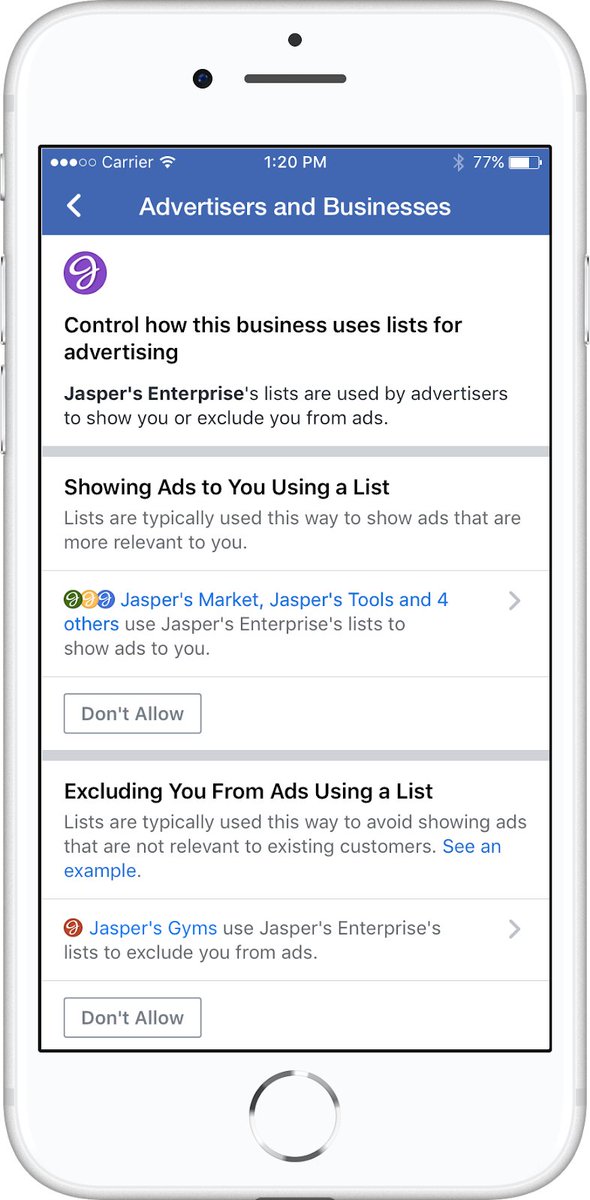
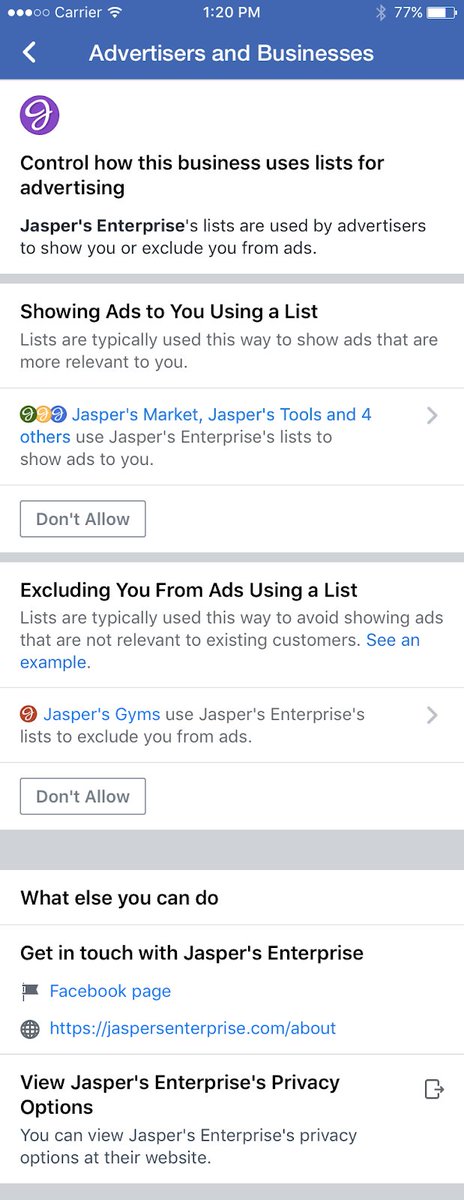
You can control the use of lists at a business level. You could disallow the use of lists by multiple advertisers at one time, if they are using lists uploaded by the same business account (8/17)
You can choose whether an advertiser can include or exclude you from their target audience at a business account level. That means any advertiser using *any* list from that business will also not be able to include, or exclude, you in an audience (9/17)
OR you could make yourself eligible for seeing the ad, if they are using a list to exclude you. In this example, a gym might exclude you from ads to sign up because you’re already a member (10/17)
The include/exclude split makes it more difficult to explain but it’s important: advertisers use it for testing, and some to just simply not annoy existing customers. eg. your streaming service won’t show you sign up ads, but will show you ads for specific new shows (11/17)
So - you will soon have the ability to see either/both and the choice to disallow one or both for all lists that business is using (12/17)
Caveats: You’ll still have to contact the business if you’re not sure why they have you on a list. We don’t have visibility into the makeup of the list. All the information is hashed before it is sent to Facebook (13/17)
This feature will live under “Advertisers & Businesses” in Ads Preferences, and is diff from how you might be retargeted based on web surfing behavior, to control that use “ads based on data from partners” section in ad settings, detailed here (14/17) facebook.com/help/568137493…
Many advertisers use Custom Audiences to avoid annoying existing customers (and to increase their ROI). Direct mail has dealt with this issue for decades to avoid unhappy existing customers, so it makes sense - but it’s not simple to explain on a settings screen (15/17)
As I’ve been testing the tool I’ve made myself eligible for ads from a few advertisers where I used to be a customer a few years ago but I might sign up again! (16/17)
I’m excited about the new transparency people will get about how marketers are trying to reach them, and the granular ability to make changes to that picture. Once it rolls out later this month, would love feedback on how we continue to improve it! (17/17)